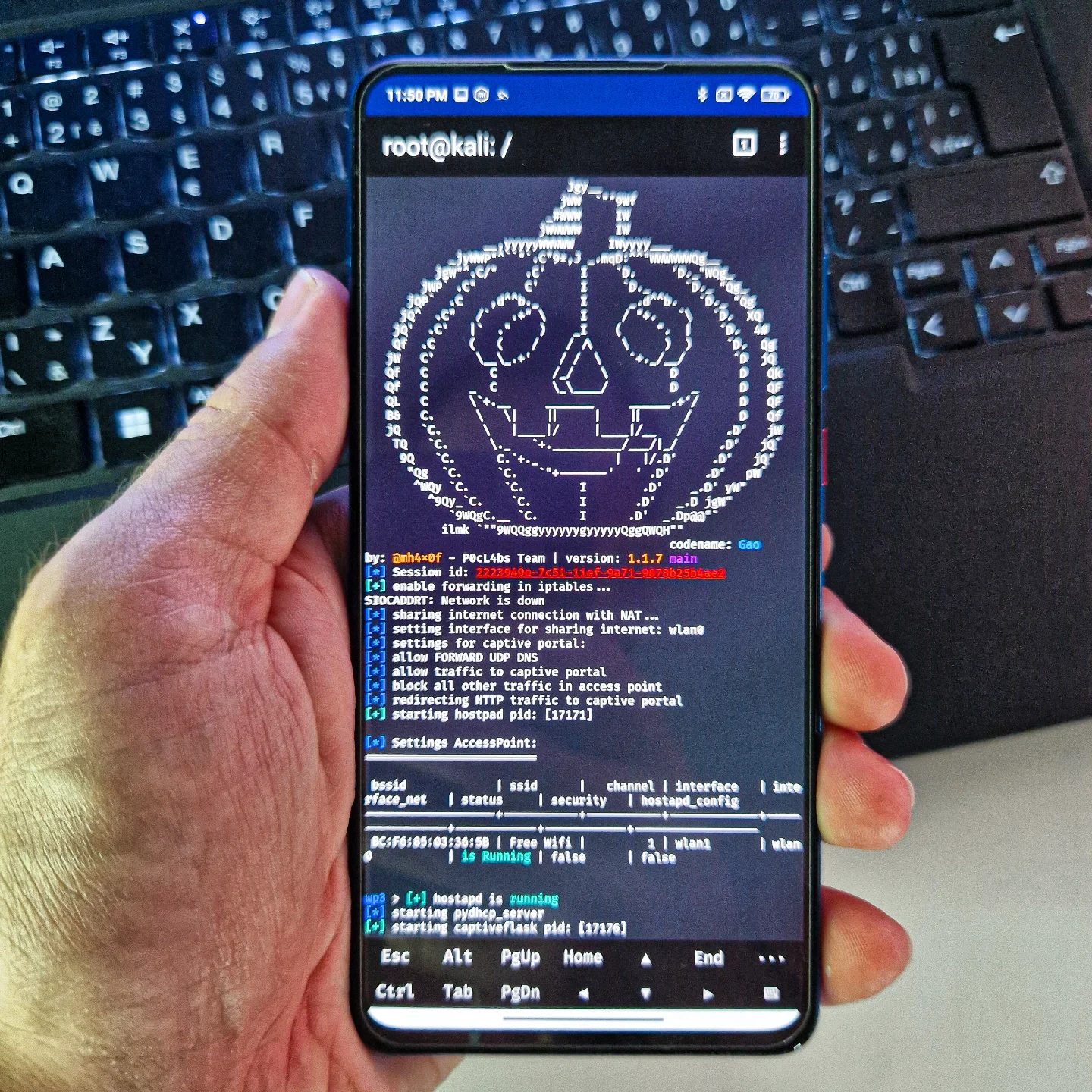
WiFiPumpkin3 is a powerful tool for network security testing, especially for those interested in wireless network hacking and penetration testing. The recent integration of WiFiPumpkin3 into the NetHunter arsenal has made it more portable and accessible, allowing users to run it directly from an Android smartphone. This development is significant for security professionals and enthusiasts who need a mobile solution for their network configuration and testing tasks.
Context: Why This Matters
The rise of mobile hacking tools like WiFiPumpkin3 is crucial in today's interconnected world. With the increasing reliance on wireless networks, the need for robust security measures is more important than ever. WiFiPumpkin3, with its ability to run on smartphones, offers a new level of portability and flexibility for security testing, making it easier to identify and mitigate vulnerabilities in network configurations.
Main Discussion
Integration with NetHunter
WiFiPumpkin3's integration into the NetHunter arsenal has made it a go-to tool for mobile hacking. NetHunter is a popular penetration testing platform for Android devices, and WiFiPumpkin3 enhances its capabilities by providing a user-friendly interface for network configuration and traffic redirection. This integration allows users to perform complex network operations directly from their smartphones, making the tool more accessible and convenient.
Replacing the MANA Toolkit
WiFiPumpkin3 has effectively replaced the MANA Toolkit, which was known for its difficulties in setup and maintenance. The MANA Toolkit, though powerful, was often cumbersome to use and lacked regular updates, leading to frustrations among users. WiFiPumpkin3 addresses these issues by offering a more user-friendly interface and regular maintenance, making it a more reliable tool for network security testing.
Key Features
WiFiPumpkin3 includes several key features that make it a powerful tool for network security testing. Some of these features include:
- Captive Portal Configuration: WiFiPumpkin3 allows for the setup of a captive portal, which can be used to redirect HTTP traffic and capture network data. This is particularly useful for testing the security of public Wi-Fi networks.
- HTTP Traffic Redirection: The tool enables the redirection of HTTP traffic, making it easier to intercept and analyze data packets. This is crucial for identifying vulnerabilities in network communication.
- Hostapd Configuration: WiFiPumpkin3 includes support for hostapd, which is a user-space daemon for access point and authentication servers. This allows for more advanced network configurations and better control over wireless access points.
- SSID and Channel Management: The tool provides detailed control over SSID (Service Set Identifier) and channel settings, allowing users to configure their network interfaces precisely.
Terminal Interface and Commands
The terminal interface in WiFiPumpkin3 is a powerful feature that allows for direct interaction with the network. Users can execute various commands to configure their network settings, manage traffic, and perform security tests. Some of the commands and settings visible in the interface include:
- Root Access: The interface typically requires root access to perform advanced network operations, ensuring that users have the necessary permissions to make changes.
- Network Interface Details: Users can view and configure network interfaces, including SSID, channel, and other settings.
- Hostapd Process: The interface displays the hostapd process, which is essential for managing access points and authentication servers.
- Traffic Redirection: Commands for redirecting HTTP traffic and allowing traffic to a captive portal are also visible, making it easier to intercept and analyze network data.
Practical Tips
Setting Up WiFiPumpkin3 on an Android Smartphone
To get started with WiFiPumpkin3 on an Android smartphone, follow these steps:
- Install NetHunter: Ensure that your Android device is compatible with NetHunter. You can download and install the NetHunter ROM from the official website.
- Install WiFiPumpkin3: Once NetHunter is set up, you can install WiFiPumpkin3 from the NetHunter app store.
- Configure Network Settings: Open the WiFiPumpkin3 app and configure your network settings, including SSID, channel, and interface details.
- Execute Commands: Use the terminal interface to execute commands for network configuration and traffic redirection.
Tips for Effective Network Testing
- Regular Updates: Keep WiFiPumpkin3 and NetHunter updated to ensure you have the latest features and security patches.
- Root Access: Ensure you have root access on your Android device to perform advanced network operations.
- Test in Controlled Environments: Always test in a controlled environment to avoid any unintended disruptions to live networks.
- Monitor Traffic: Use the traffic redirection features to monitor and analyze network data, identifying potential vulnerabilities.
Important Takeaways
WiFiPumpkin3's integration into the NetHunter arsenal has made mobile hacking more accessible and efficient. The tool's user-friendly interface, combined with its powerful features for network configuration and traffic redirection, makes it a valuable asset for security professionals and enthusiasts. With the ability to run directly from an Android smartphone, WiFiPumpkin3 offers a high level of portability, making it easier to perform network security tests on the go.
Conclusion
WiFiPumpkin3 represents a significant advancement in mobile hacking and network security testing. Its integration with NetHunter, along with its robust features and user-friendly interface, makes it a powerful tool for anyone interested in wireless network security. Whether you're a professional penetration tester or an enthusiast looking to enhance your skills, WiFiPumpkin3 provides the tools you need to stay ahead in the ever-evolving world of network security.
Questions readers ask
Can WiFiPumpkin3 be used on any Android device?
WiFiPumpkin3 requires the NetHunter platform to run on Android devices. This limits its compatibility to specific Android devices that support NetHunter, such as certain Nexus and OnePlus models. To check if your device is compatible, visit the official NetHunter website for a list of supported devices.
What are some key features of WiFiPumpkin3?
WiFiPumpkin3 offers a range of features for wireless network testing, including captive portal hacking, HTTP traffic redirection, and network vulnerability scanning. It also provides a user-friendly interface, making it accessible for both beginners and experienced users in the field of network security.
How does WiFiPumpkin3 enhance mobile network security?
WiFiPumpkin3 enhances mobile network security by providing a portable solution for identifying and addressing vulnerabilities. Its ability to run on Android smartphones allows users to perform on-site network assessments and security tests, ensuring that wireless networks are secure and robust against potential threats.
What is the NetHunter platform, and why is it important for WiFiPumpkin3?
The NetHunter platform is a Linux distribution designed for Android devices, tailored for penetration testing and security auditing. It is important for WiFiPumpkin3 because it provides the necessary environment and tools to run the software on Android smartphones, ensuring compatibility and functionality.
Can WiFiPumpkin3 be used for ethical hacking purposes?
Yes, WiFiPumpkin3 is a valuable tool for ethical hacking and penetration testing. By identifying and addressing vulnerabilities in wireless networks, users can improve overall network security. It is important to note that the tool should only be used with proper authorization to avoid legal consequences.
Are there any risks associated with using WiFiPumpkin3?
While WiFiPumpkin3 is a powerful tool for network security testing, there are potential risks if used maliciously. Unauthorized use can lead to legal issues and compromise the security of networks. Always ensure you have explicit permission before conducting any network tests.
Who can benefit from using WiFiPumpkin3 on Android?
WiFiPumpkin3 on Android is beneficial for security professionals, network administrators, and enthusiasts who need a portable and accessible tool for wireless network testing. It is particularly useful for individuals who require on-site assessments and want to ensure the security of wireless networks in various environments.
Related deep dives
Similar reads based on topic and creator.




Recent articles
Fresh deep dives from the latest Reels we unpacked.




Comments
Be the first to comment.