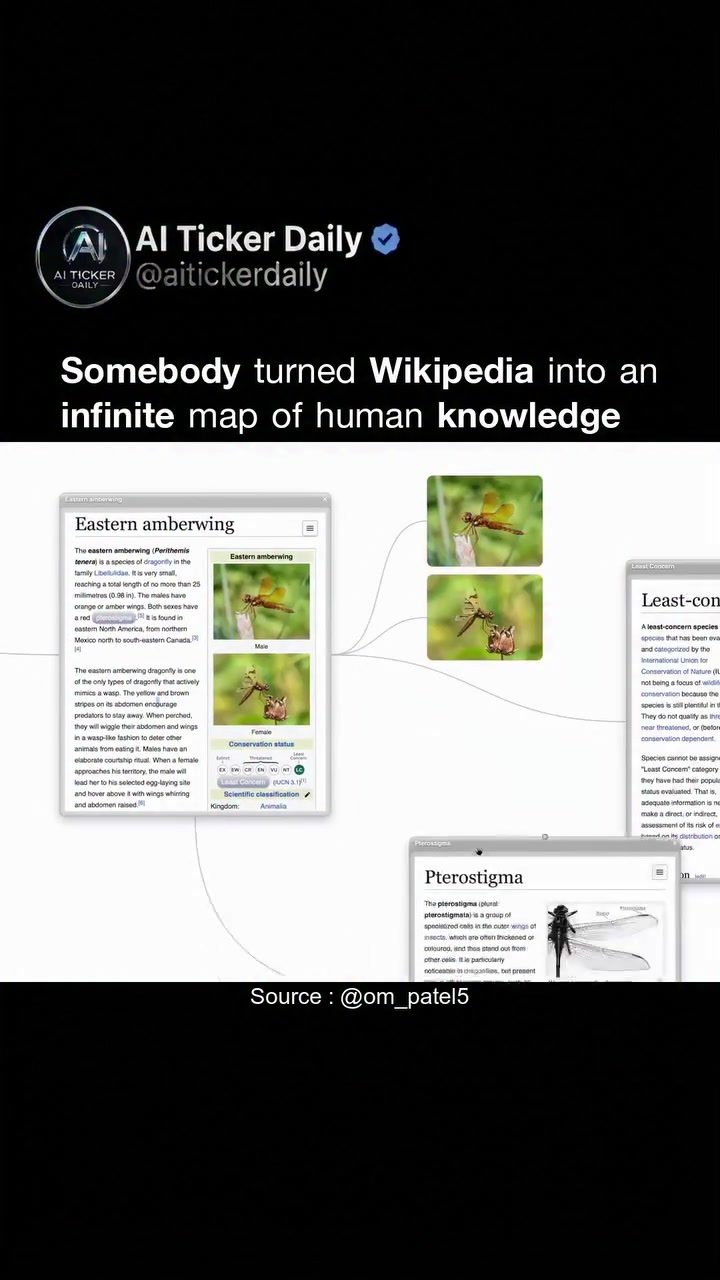
Wikipedia Visualization
Navigating Wikipedia can often feel like a journey through an infinite expanse of knowledge, where one click leads to another, and before you know it, you're lost in a labyrinth of tabs and forgotten search intentions. This is exactly the problem that WikiBoard aims to solve. Developed by a Reddit user known as u/Technical-Emu-7760, WikiBoard transforms the traditional Wikipedia experience into an interactive, visual map of interconnected knowledge.
Context / Why this matters
Wikipedia is an invaluable resource, containing a vast repository of human knowledge. However, its linear interface, designed in 2001, can be challenging to navigate. The traditional structure of hyperlinked text often leads to a disorganized browsing experience, making it easy to lose track of where you started and how different topics are connected.
This is where WikiBoard comes in. By visualizing Wikipedia articles as a network, WikiBoard turns the sum of human knowledge into an explorable, visually connected map. This transformation not only makes the browsing experience more intuitive but also enhances our understanding of how different pieces of knowledge are interconnected.
Main discussion
The Infinite Map of Knowledge
WikiBoard's primary innovation is its visualization of Wikipedia articles as an infinite, zoomable map. Instead of opening articles in new tabs, WikiBoard displays each article as a card on a visual canvas. Clicking on a link between articles draws a visible connection, creating a web of knowledge that can be navigated and explored at will.
This visual representation has several advantages. For one, it eliminates the clutter of multiple tabs, allowing users to maintain a clear overview of their information journey. It also makes the interconnectedness of knowledge more apparent, helping users understand how different topics relate to one another.
Navigating the Map
At the start of the journey, the visual map focuses on a single article, in this case, the 'Eastern amberwing' dragonfly. From there, the visualization expands to include related topics such as 'Pterostigma' and 'Aerostability.' Each article is displayed as a card, and every link between articles is a visible connection, making the entire rabbit hole into one zoomable mind map.
This approach has significant benefits for researchers, students, and anyone seeking to explore a topic in depth. By visualizing the interconnectedness of knowledge, WikiBoard helps users see the bigger picture and understand how different pieces of information fit together. This can lead to a deeper, more holistic understanding of a subject than traditional linear reading.
From Linear to Networked Knowledge
Traditional Wikipedia navigation follows a linear path, where one article leads to another in a straightforward sequence. In contrast, WikiBoard transforms this linear structure into a networked map. This shift from a path to a network has profound implications for how we understand and interact with information.
When knowledge is presented as a network, users can see multiple connections and pathways at once. This makes it easier to spot patterns, make connections, and gain a broader perspective on a topic. It also encourages a more exploratory approach to learning, where users can follow their curiosity and discover unexpected links between seemingly unrelated subjects.
Practical tips
If you're ready to dive into the world of WikiBoard and transform your Wikipedia experience, here are some practical tips to get you started:
Explore Related Topics
When you start with a specific article, take the time to explore the related topics that branch out from it. This can lead you to unexpected connections and a deeper understanding of the subject.
Use the Zoom Feature
The zoomable nature of WikiBoard allows you to get a bird's-eye view of your information journey. Use this feature to step back and see the bigger picture, then zoom in to dive deeper into specific areas of interest.
Save and Share Your Maps
WikiBoard allows you to save your mind maps, making it easy to pick up where you left off or share your exploration with others. This feature is particularly useful for collaborative research or teaching purposes.
Experiment with Different Starting Points
Don't be afraid to start with a seemingly unrelated article and see where it takes you. WikiBoard's visual map can reveal surprising connections and spark new lines of inquiry.
Important takeaways
WikiBoard represents a significant leap forward in how we interact with and understand knowledge. By visualizing Wikipedia articles as a network, it transforms the traditional linear browsing experience into an explorable, interconnected map. This shift has several important takeaways:
Knowledge as a Network
WikiBoard demonstrates that knowledge is best understood as a network rather than a linear path. This perspective encourages a more holistic and interconnected view of information.
Enhanced Navigation
The visual map provided by WikiBoard makes navigation more intuitive and less cluttered, helping users maintain a clear overview of their information journey.
Deeper Understanding
By making the interconnectedness of knowledge more apparent, WikiBoard can lead to a deeper, more insightful understanding of a topic.
Encourages Exploration
The visual and interactive nature of WikiBoard encourages a more exploratory approach to learning, where users can follow their curiosity and discover unexpected connections.
Universally Accessible
WikiBoard is a completely free tool, available to anyone with an internet connection. This accessibility makes it a valuable resource for researchers, students, and curious minds alike.
Conclusion
WikiBoard is more than just a tool for navigating Wikipedia; it's a paradigm shift in how we interact with and understand knowledge. By visualizing the sum of human knowledge as a network, WikiBoard allows users to explore, connect, and gain new insights. Whether you're a researcher, student, or simply curious about a topic, WikiBoard offers a fresh, intuitive way to dive into the vast expanse of human knowledge.
Questions readers ask
How does WikiBoard enhance the traditional Wikipedia experience?
WikiBoard transforms the traditional Wikipedia experience by providing a visual, interactive map. This allows users to see the relationships between different topics at a glance, making it easier to navigate and explore interconnected information.
Who developed the Wikiboard project and what inspired it?
The Wikiboard project was developed by a Reddit user known as u/Technical-Emu-7760. The inspiration behind it was to address the challenge of navigating Wikipedia's vast, interconnected resources, which can often lead to a disorganized and overwhelming browsing experience.
What is the significance of the dragonfly icon on WikiBoard?
The dragonfly icon on WikiBoard serves as a visual cue to help users understand that the tool allows them to zoom in and out, navigate, and explore the vast repository of Wikipedia articles in a non-linear, interactive way.
How can WikiBoard help users understand the relationships between different Wikipedia topics?
WikiBoard helps users understand the relationships between different Wikipedia topics by visually mapping out connections. This allows users to see how articles are linked and to quickly jump between related topics, providing a more intuitive way to comprehend the interconnected nature of information on Wikipedia.
Can I access specific Wikipedia articles directly from WikiBoard?
Yes, WikiBoard allows users to access specific Wikipedia articles directly from the interactive map. By clicking on a node or topic, users can dive deeper into the information while still maintaining the visual context of how it relates to other topics.
How do I begin exploring Wikipedia topics using WikiBoard?
To begin exploring Wikipedia topics using WikiBoard, simply navigate to the WikiBoard website and enter a topic or keyword. The tool will generate a visual, zoomable map centered around that topic, allowing you to explore related articles and understand their connections in an interactive and engaging way.
What makes WikiBoard different from other Wikipedia navigation tools?
WikiBoard stands out from other Wikipedia navigation tools by offering a unique, visual interface that allows users to zoom in and out, providing a comprehensive and interactive view of Wikipedia's vast, interconnected resources. This is particularly beneficial for users who prefer a visual approach to knowledge exploration, and it helps to avoid the disorganization and overwhelm that can accompany traditional navigation.
Related deep dives
Similar reads based on topic and creator.



Recent articles
Fresh deep dives from the latest Reels we unpacked.




Comments
Be the first to comment.