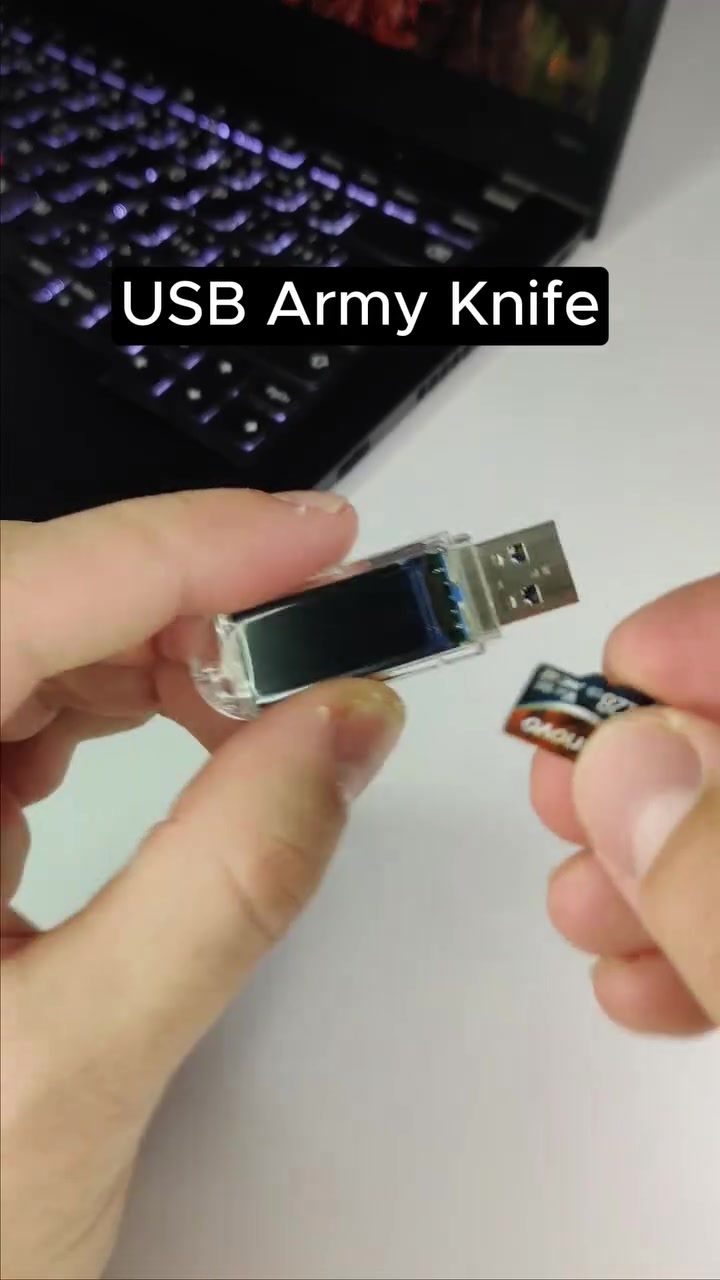
USB Army Knife: A Versatile Gadget for Close Access Penetration Testing
The USB Army Knife is a compact yet powerful tool designed for close access penetration testing. This device packs multiple functions into a small form factor, making it an invaluable asset for cybersecurity professionals. With capabilities like remote keystroke injection, VNC (Virtual Network Computing), and more, it offers a comprehensive suite of tools for various testing scenarios.
Context / Why this matters
In the realm of cybersecurity, penetration testing is a critical process for identifying and mitigating vulnerabilities in systems. The USB Army Knife is designed to facilitate close access penetration testing, which involves physically connecting to a target device to assess its security. This type of testing is essential for understanding how a system might be exploited if an attacker gains physical access.
Main discussion
Key Features of the USB Army Knife
The USB Army Knife is equipped with a range of features that make it a versatile tool for penetration testers. Here are some of its key functionalities:
- Remote Keystroke Injection: This feature allows users to inject keystrokes into a connected device remotely. This can be used to simulate user input and test how a system responds to unexpected commands.
- VNC (Virtual Network Computing): VNC enables remote control of a device's graphical user interface. This is useful for accessing and interacting with a target system from a distance.
- USB Network Adapter: The device can act as a USB network adapter, providing network connectivity to devices that may not have it. This can be particularly useful in scenarios where network access is restricted.
- EvilAP: This feature allows the device to create a fake Wi-Fi access point, which can be used to trick users into connecting to it. This is a common technique used in man-in-the-middle attacks.
- Marauder: Marauder is a tool for performing wireless network assessments. It can be used to detect and analyze wireless networks, identify vulnerabilities, and gather information about connected devices.
- Microphone Recording: The device can record audio from the microphone, which can be useful for capturing conversations or ambient sounds in the vicinity of the target device.
- Web Interface with LCD Screen: The USB Army Knife is controlled through a web interface, and it features a small LCD screen for displaying status information and other relevant data.
Compatibility and Connectivity
The USB Army Knife is designed to be compatible with a variety of devices. In the demonstration, the device is shown connecting to a ThinkPad laptop. This indicates that it can work with standard USB ports found on most modern laptops and computers. Additionally, the device can connect to mobile devices, as seen in the demonstration where a phone displays a 5G modem connection screen.
Versatility in Penetration Testing
The versatility of the USB Army Knife makes it a valuable tool for different types of penetration testing. Its ability to act as a USB network adapter, for example, can be useful in scenarios where network access is restricted or where additional network interfaces are needed. The device's capability to inject keystrokes remotely can also be used to test the security of systems that rely on user input for authentication or other critical functions.
Practical tips
Setting Up the USB Army Knife
Setting up the USB Army Knife is relatively straightforward. Here are some steps to get you started:
- Connect the Device: Insert the USB Army Knife into the target device's USB port.
- Access the Web Interface: Open a web browser and navigate to the device's IP address to access the web interface.
- Configure the Tools: Use the web interface to configure the various tools and features according to your testing requirements.
- Monitor the LCD Screen: Keep an eye on the LCD screen for status updates and other relevant information.
Ensuring Ethical Use
While the USB Army Knife is a powerful tool for penetration testing, it's crucial to use it ethically and responsibly. Always ensure you have explicit permission to test a system before using the device. Unauthorized access or testing can have legal and ethical implications.
Important takeaways
The USB Army Knife is a highly versatile and powerful tool for close access penetration testing. Its range of features, including remote keystroke injection, VNC, USB network adapter, EvilAP, Marauder, and microphone recording, make it an essential tool for cybersecurity professionals. The device's compatibility with a variety of devices and its user-friendly web interface further enhance its usability. However, it is important to use this tool responsibly and ethically, always obtaining proper authorization before conducting any tests.
Conclusion
The USB Army Knife is a game-changer in the field of close access penetration testing. With its comprehensive set of features and ease of use, it provides cybersecurity professionals with the tools they need to thoroughly assess and secure systems. Whether you're testing for vulnerabilities in a corporate network or evaluating the security of a personal device, the USB Army Knife is a reliable and versatile tool that can help you achieve your goals.
Questions readers ask
What is the USB Army Knife and what are its primary uses in cybersecurity?
The USB Army Knife is a compact, multi-functional device designed for close access penetration testing in cybersecurity. Its primary uses include assessing and mitigating physical access vulnerabilities in systems, network connectivity, and simulating user input to evaluate system responses.
How does remote keystroke injection work on the USB Army Knife?
Remote keystroke injection on the USB Army Knife allows cybersecurity professionals to send keystrokes to a target device as if they were typed by a user. This feature is crucial for simulating user actions and testing how systems respond to various inputs, helping to identify potential security weaknesses.
What is VNC and how is it utilized in the USB Army Knife?
VNC, or Virtual Network Computing, enables remote control of another computer. In the context of the USB Army Knife, VNC allows cybersecurity professionals to access and control a target device remotely, which is essential for close access penetration testing and evaluating system vulnerabilities.
Can the USB Army Knife be used for remote penetration testing?
While the USB Army Knife is primarily designed for close access penetration testing, which involves physical proximity to the target device, it can also facilitate remote penetration testing through its VNC capabilities. This allows for some level of remote control and assessment of the target system.
What makes the USB Army Knife indispensable for cybersecurity professionals?
The USB Army Knife is indispensable for cybersecurity professionals due to its compact size, versatile features, and comprehensive suite of tools. It enables professionals to conduct thorough assessments of physical access vulnerabilities, making it an essential tool for close access penetration testing.
How does the USB Army Knife help in simulating user input for cybersecurity testing?
The USB Army Knife's keystroke injection feature allows professionals to simulate user input by sending precise keystrokes to the target device. This helps in evaluating how the system responds to different inputs, identifying potential security flaws, and understanding the impact of various user actions on the system's security.
Is the USB Army Knife suitable for use in various penetration testing scenarios?
Yes, the USB Army Knife is highly versatile and suitable for a wide range of penetration testing scenarios. Its suite of tools, including remote keystroke injection and VNC, make it an excellent choice for assessing and mitigating vulnerabilities in various systems and environments, from small networks to complex corporate setups.
Related deep dives
Similar reads based on topic and creator.




Recent articles
Fresh deep dives from the latest Reels we unpacked.




Comments
Be the first to comment.