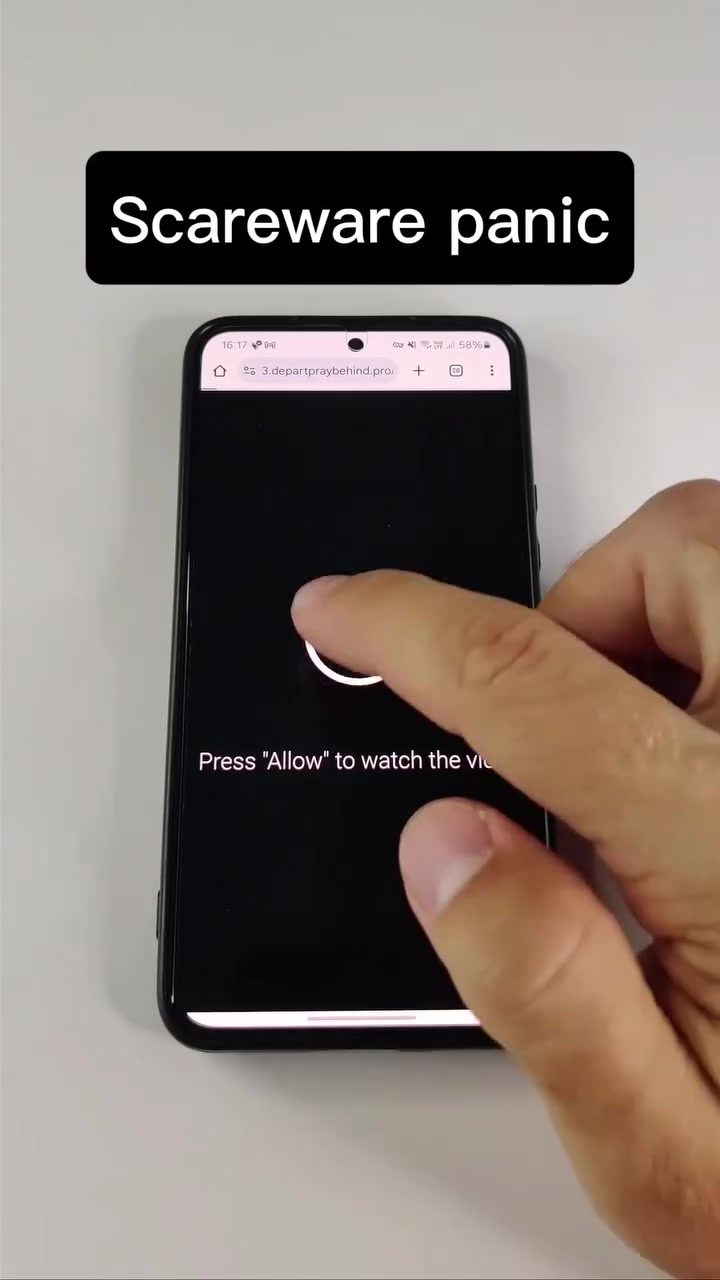
Phone Scam Scareware
Phone scams are a growing problem in the digital age, with scammers employing various tactics to trick users into paying for unnecessary services. One of the most common methods is scareware, a type of malware designed to scare users into thinking their device is infected with a virus. These scareware pop-ups often mimic legitimate software warnings, such as those from well-known security brands like McAfee, to appear more convincing.
Why This Matters
Scareware is particularly dangerous because it preys on users' fears and anxieties about their device's security. By creating a sense of urgency, these pop-ups can trick even the most cautious users into clicking on malicious links or providing sensitive information. Understanding how scareware works and how to avoid it is crucial for protecting your smartphone and personal data.
Main Discussion
What is Scareware?
Scareware is a type of malicious software designed to trick users into believing their device is infected with a virus. These pop-ups often mimic legitimate security software warnings, such as those from well-known brands, to appear more convincing. The goal is to scare the user into taking immediate action, such as clicking on a link or downloading a fake antivirus program.
Scareware typically appears as a pop-up window on your smartphone screen, claiming that your device has been infected with a virus. The message usually urges you to take immediate action to fix the issue, often by paying for a service or downloading a program. The on-screen text might include phrases like "Remove virus," "Your phone is faulty," or "Spy virus detected." These messages are designed to create a sense of urgency and panic, making it more likely that you will follow the instructions provided.
How Scareware Works
The scam usually begins with a pop-up that looks like a legitimate security alert. For example, you might see a message that says, "Your phone is faulty. In order for the phone to continue working, you need to remove the virus." The message might include a call to action, such as "Remove virus" or "Press 'Allow' to watch the video." If you click on the link or button, you could be directed to a fake website or prompted to download a malicious program. These actions can lead to further infections or the theft of your personal information.
Scareware often impersonates well-known security software, such as McAfee. By mimicking familiar and trusted brands, scammers can make their messages appear more legitimate. For example, you might see a pop-up with the word "McAfee" prominently displayed, along with warnings about "Cookie Collector detected" or "Hidden mobile app detected." These tactics are designed to create a sense of legitimacy and urgency, making it more likely that you will take the desired action.
Common Scareware Tactics
Scareware tactics can vary, but they often share common elements. One of the most common tactics is the fake virus alert. This pop-up will claim that your device is infected with a virus and urge you to take immediate action to remove it. The message might include phrases like "Spy virus detected" or "Hidden mobile app detected." The goal is to create a sense of urgency and panic, making it more likely that you will follow the instructions provided.
Another common tactic is the fake update or patch notification. This pop-up will claim that your device needs an urgent update or patch to fix a security issue. The message might include phrases like "Update required" or "Patch available." If you click on the link or button, you could be directed to a fake website or prompted to download a malicious program. These actions can lead to further infections or the theft of your personal information.
Practical Tips
Staying Safe from Scareware
To stay safe from scareware, it's essential to be cautious of any unsolicited pop-ups or warnings on your device. If you encounter a pop-up that claims your device is infected with a virus, do not click on any links or buttons. Instead, close the pop-up and scan your device using a reputable antivirus program. If the warning persists, contact a trusted technician for assistance.
It's also important to be wary of any messages that urge you to take immediate action. Scareware often relies on creating a sense of urgency to trick users into taking action. If you receive a message that claims your device is infected with a virus, take a moment to verify the legitimacy of the warning. Look for signs that the message is a scam, such as poor grammar, misspelled words, or unusual formatting.
Protecting Your Data
To protect your data from scareware, it's essential to use a reputable antivirus program and keep it up-to-date. Regularly scan your device for malware and other threats, and be cautious of any unsolicited pop-ups or warnings.
If you suspect that your device has been compromised, take immediate action to secure your personal information. Change your passwords, monitor your bank statements, and contact your credit card company if necessary. It's also a good idea to back up your data regularly, so you have a copy in case of a security breach.
Important Takeaways
Scareware is a serious threat to smartphone users, and it's essential to be aware of the tactics scammers use to trick users into taking action. Be cautious of unsolicited pop-ups and warnings, and always verify the legitimacy of any message before taking action. Use a reputable antivirus program and keep it up-to-date, and regularly scan your device for malware and other threats. By taking these steps, you can protect your smartphone and personal data from scareware and other security threats.
Conclusion
Scareware is a common and dangerous tactic used by scammers to trick users into taking action. By understanding how scareware works and how to avoid it, you can protect your smartphone and personal data. Be cautious of any unsolicited pop-ups or warnings, and always verify the legitimacy of any message before taking action. Use a reputable antivirus program and keep it up-to-date, and regularly scan your device for malware and other threats. By taking these steps, you can stay safe from scareware and other security threats.
Questions readers ask
What are scareware scams and how do they work?
Scareware scams are deceptive tactics used by cybercriminals to trick users into believing their device is infected with a virus. These scams often display false alerts or pop-ups that mimic legitimate security warnings, creating a sense of urgency to prompt users into taking immediate, often harmful, actions.
How can I recognize a scareware pop-up?
Scareware pop-ups typically use alarming language and graphics to mimic authentic security alerts. They often claim that your device is infected and urge you to take immediate action, such as clicking a link or calling a support number. Be wary of any pop-ups that appear suddenly and demand urgent action, especially if they come from unfamiliar sources.
What should I do if I encounter a scareware alert on my phone?
If you encounter a scareware alert, do not click on any links or buttons within the pop-up. Close the alert by pressing the back button or home button. Make sure to update your security software and run a thorough scan to identify and remove any potential threats. Avoid calling any phone numbers listed in the alert, as they may connect you to scammers.
How can I protect my phone from scareware scams?
To protect your phone from scareware scams, ensure that your operating system and all apps are up to date. Use reliable antivirus software and enable pop-up blockers. Be cautious of suspicious emails and messages, and avoid downloading apps from unofficial sources. Regularly back up your data to minimize potential losses in case of an attack.
What steps should I take for scareware removal from my device?
If you suspect your device is infected with scareware, the first step is to disconnect from the internet to prevent further damage. Use your device's safe mode to run a scan with your installed antivirus software. Follow the scanner's instructions to remove any detected threats. If you're unsure, consult a professional for assistance.
How do scammers benefit from scareware scams?
Scammers benefit from scareware scams by deceiving users into paying for unnecessary security services or downloading malware that can steal personal information. Once they have your payment details, they can use them for fraudulent activities. In some cases, the scareware itself may contain ransomware that encrypts your data and demands a ransom for its return.
Related deep dives
Similar reads based on topic and creator.




Recent articles
Fresh deep dives from the latest Reels we unpacked.




Comments
Be the first to comment.