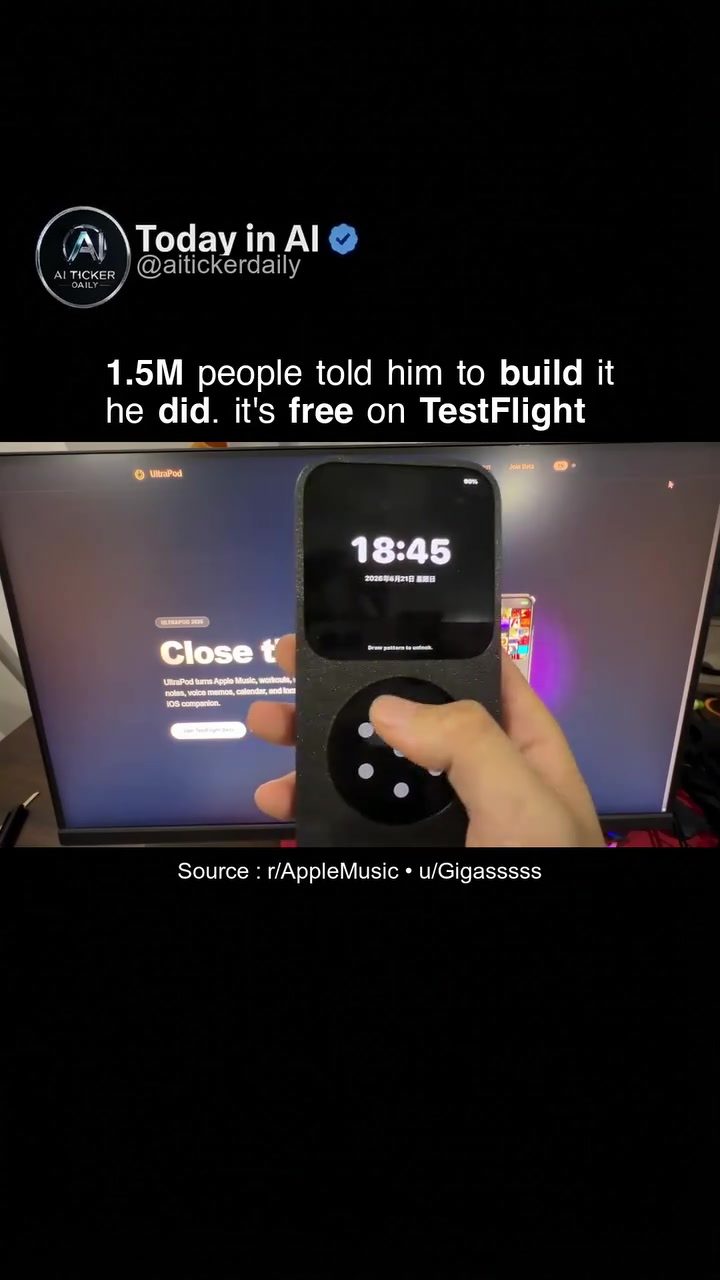
UltraPod: The All-in-One iOS Companion for Apple Music and More
Apple Music enthusiasts, meet UltraPod. This innovative mobile app combines the power of Apple Music with a suite of other iOS tools to create a unified, streamlined experience. Developed by a solo developer, UltraPod has garnered significant attention, particularly after a design concept was shared on Chinese social media and sparked a remarkable response. Let's dive into what makes UltraPod a compelling addition to the Apple Music ecosystem and explore its features and functionalities.
Why UltraPod Matters
With the increasing integration of music into our daily lives, having a single app that can handle multiple tasks while providing a seamless music experience is a game-changer. UltraPod aims to do just that by combining Apple Music with various other tools, making it a versatile companion for iOS users. This app is not just about music; it also integrates functionalities like workouts, reading, note-taking, and more, all within a single interface.
The Birth of UltraPod
The journey of UltraPod began with a simple design concept posted by a solo developer on Chinese social media. The response was overwhelming, with 1.5 million people encouraging the developer to bring the concept to life. After months of dedicated coding, the app was born, and it's now available for testing on TestFlight. The developer has opened 10,000 free slots, allowing users to get a hands-on experience with UltraPod before its official release.
Main Features of UltraPod
UltraPod stands out with its comprehensive set of features designed to enhance user experience. Here are some of the key attributes that make it a must-try for Apple Music users:
Full Dumbphone Mode
For those who prefer a minimalistic approach, UltraPod offers a full dumbphone mode. This mode strips down the interface to the essentials, providing a clean and distraction-free experience. It's perfect for users who want to focus on their music without the clutter of additional features.
15 Mini-Apps
One of the standout features of UltraPod is its integration of 15 mini-apps. These include:
- Cover Flow Music: A retro-styled music player that allows users to navigate through their music library with a swipe.
- Retro Camera: A vintage-style camera app for capturing nostalgic moments.
- Workouts: A fitness companion with various workout routines and tracking features.
- Reading: An e-book reader for those who enjoy reading on-the-go.
- Photos: A photo gallery with basic editing tools.
- Notes: A note-taking app for jotting down quick thoughts and ideas.
- Voice Memos: A voice recorder for capturing audio notes.
- Calendar: A calendar app for managing appointments and events.
- Local Tools: Tools tailored for different regions, making the app more versatile.
Free 3D-Printable Case
In addition to the software features, UltraPod is set to release a free 3D-printable case. This case is designed to protect your device while adding a personalized touch. The 3D-printable case is a unique addition, allowing users to customize their phone's appearance to match their style.
How to Get UltraPod
UltraPod is currently available for testing on TestFlight. In order to get access, follow these steps:
- Sign Up for TestFlight: If you're not already a TestFlight user, sign up for the platform.
- Join the Testing Group: Look for the UltraPod testing group on TestFlight and join.
- Download the App: Once you're in the group, you can download the app directly from TestFlight.
Practical Tips for Using UltraPod
To make the most out of UltraPod, here are some practical tips:
- Explore the Mini-Apps: Take some time to explore each of the 15 mini-apps to understand their functionalities. You might find hidden gems that enhance your daily routine.
- Customize Your Interface: Adjust the interface settings to suit your preferences. Whether you prefer a minimalistic look or a more feature-rich experience, UltraPod has you covered.
- Utilize the Cover Flow Music: If you enjoy a retro feel, the Cover Flow music player is a great way to navigate your music library. Swipe through your albums and playlists with ease.
Important Takeaways
- Unified Experience: UltraPod offers a seamless integration of Apple Music with other essential tools, creating a unified experience for users.
- Versatility: The app's 15 mini-apps cater to various needs, from fitness to note-taking, making it a versatile companion.
- Customization: With features like the dumbphone mode and a 3D-printable case, UltraPod allows for personalization, ensuring it meets individual preferences.
Conclusion
UltraPod is more than just an Apple Music app; it's a comprehensive iOS companion designed to streamline your digital life. From its retro camera and Cover Flow music player to its 15 integrated mini-apps, UltraPod offers a unique and versatile experience. If you're an Apple Music user looking for a more integrated and personalized experience, UltraPod is definitely worth exploring.
Questions readers ask
What is UltraPod and how does it enhance my Apple Music experience on iOS?
UltraPod is an iOS app that integrates Apple Music with other tools to create a unified iOS experience. It enhances your Apple Music experience by offering features for workouts, reading, and note-taking, all within a single, streamlined interface, making it easier to enjoy music while being productive.
Who developed UltraPod and why is it notable?
UltraPod was developed by a solo developer. It gained significant attention after a design concept was shared on Chinese social media, sparking a remarkable response. This attention highlights its potential to revolutionize the way users interact with Apple Music and other iOS functionalities.
What kind of features does UltraPod offer for workouts?
UltraPod provides features tailored for workouts, allowing users to listen to their favorite Apple Music tracks while tracking their fitness activities. This integration helps to create a seamless and motivating workout experience, keeping users engaged with their favorite songs.
Can I use UltraPod for reading and note-taking while listening to Apple Music?
Yes, UltraPod supports reading and note-taking alongside Apple Music. This means you can enjoy your favorite tunes while reading articles or taking notes, making it a versatile tool for various daily activities.
How does UltraPod differentiate itself from other iOS apps for music lovers?
UltraPod stands out by providing a unified interface that combines Apple Music with other essential iOS functionalities, such as workouts, reading, and note-taking. This comprehensive approach allows users to manage multiple tasks within a single app, enhancing productivity and enjoyment.
What is the UltraPod Apple Music iOS testflight, and how can I access it?
The UltraPod Apple Music iOS TestFlight is a beta version of the app that allows users to test and provide feedback on new features before the official release. To access it, you typically need to sign up through the TestFlight platform or follow instructions provided by the developer.
How can UltraPod help streamline my daily music routine on iOS?
UltraPod helps streamline your daily music routine by integrating various tasks into a single app. Whether you're working out, reading, or taking notes, you can enjoy Apple Music seamlessly, reducing the need to switch between multiple apps and enhancing your overall user experience.
Related deep dives
Similar reads based on topic and creator.




Recent articles
Fresh deep dives from the latest Reels we unpacked.




Comments
Be the first to comment.