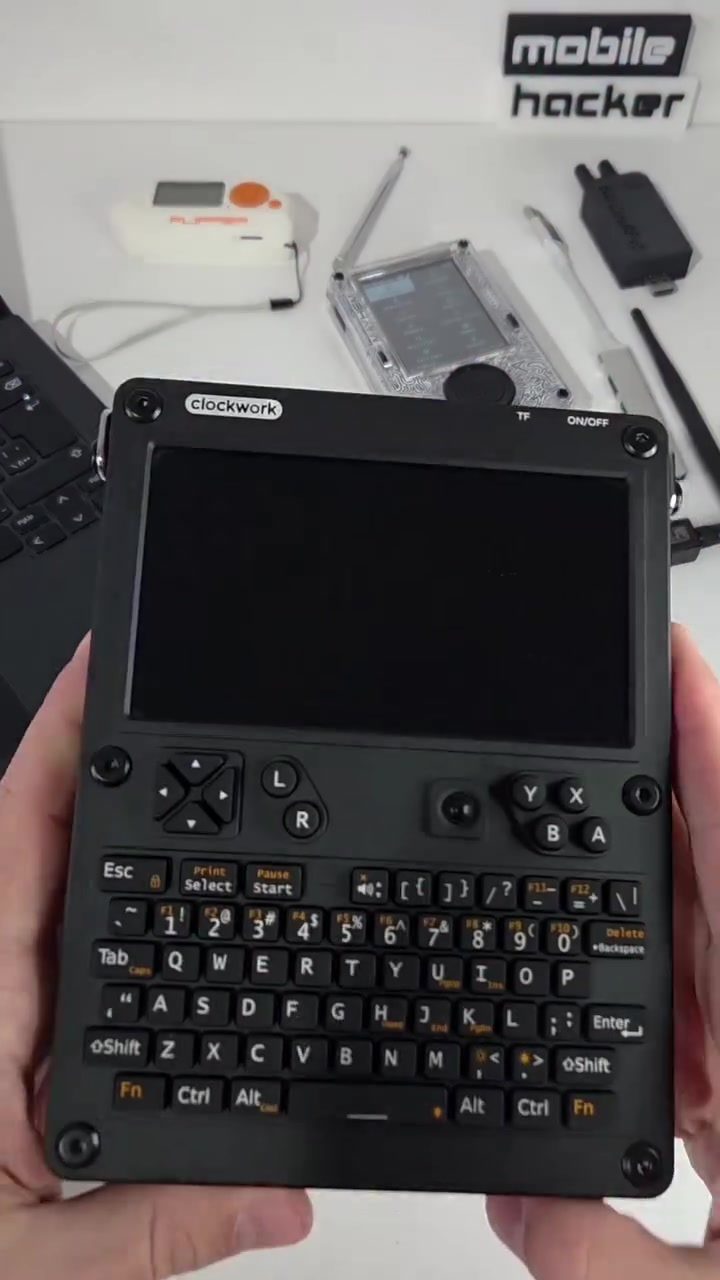
The Ultimate Portable Computing Platform: uConsole for Hacking and IoT Projects
The uConsole is a versatile, handheld Linux device designed for makers, developers, and tech enthusiasts. It offers a modular platform that combines flexibility and power, making it ideal for coding, hacking, or building IoT projects on the go.
Why Portable Computing Matters
In today's fast-paced world, the ability to work and create from anywhere is invaluable. The uConsole addresses this need by providing a compact, yet powerful computing solution that can be used in various scenarios. Whether you are a developer, a hacker, or an IoT enthusiast, having a portable and versatile device can significantly enhance your productivity and creativity.
Hacking and IoT Projects with uConsole
Raspberry Pi as the Core
The uConsole utilizes a Raspberry Pi as its core processing unit. The Raspberry Pi is a popular choice among developers and tech enthusiasts due to its versatility and strong community support. The Raspberry Pi Compuate Module 4 Lite (CM4 Lite) integrates seamlessly into the uConsole, allowing it to be utilized to its full potential.
Kali Linux Integration
One of the standout features of the uConsole is its integration with Kali Linux. Kali Linux is a well-known distribution tailored for penetration testing and security auditing. It comes pre-installed with a variety of tools and libraries that are useful for security professionals and hackers. The uConsole leverages this integration to provide a powerful, portable hacking platform.
BlueDuck Tools
In addition to Kali Linux, the uConsole features BlueDuck tools, which are designed for wireless penetration testing. These tools allow users to perform various types of wireless attacks, making the uConsole a comprehensive tool for security auditing and penetration testing.
The integration of Kali Linux and BlueDuck tools, combined with the portability of the uConsole, makes it a formidable device for hacking and security testing. Users can conduct on-site assessments, test wireless networks, and more, all from a compact, handheld device.
Custom Keyboard and Screen
The uConsole is equipped with a custom keyboard and screen, designed specifically for command-line access. This setup allows users to perform tasks that require detailed command inputs and real-time monitoring. The screen displays command-line interfaces and code related to Kali Linux and BlueDuck, making it a seamless experience for users who are familiar with these tools.
Wireless Communication and Antenna
The uConsole includes an antenna for wireless communication, enhancing its capabilities as a portable hacking station. The antenna allows for extended range and better signal reception, which is crucial for tasks that involve wireless penetration testing.
The antenna, along with other electronic components, makes the uConsole a versatile tool for a variety of applications. Whether you are conducting a site assessment or testing wireless networks, the uConsole provides the necessary tools to get the job done efficiently.
Practical Tips for Getting the Most Out of Your uConsole
Setting Up Your uConsole
To get started with the uConsole, you need to follow a few steps to set it up properly. First, ensure that you have the necessary components, including the Raspberry Pi CM4 Lite, the custom keyboard, and screen, as well as the antenna. Once you have all the components, you can assemble the uConsole according to the instructions provided. Make sure to connect all the components securely to avoid any disruptions during use.
Customizing Your uConsole
One of the advantages of the uConsole is its customizability. You can modify the setup to suit your specific needs. For example, you can add additional peripherals, such as a USB hub or a secondary screen, to expand the capabilities of the uConsole. Additionally, you can install various software tools and libraries to enhance its functionality.
Maintenance and Upgrades
Regular maintenance is essential to keep your uConsole in top condition. Ensure that all components are clean and free of dust. Regularly update the software and firmware to benefit from the latest features and security patches. If you need to upgrade any components, make sure to choose compatible parts that are designed for the uConsole.
Important Takeaways
The uConsole is a powerful, portable computing platform that offers a range of features for makers, developers, and tech enthusiasts. Its integration with Kali Linux and BlueDuck tools, along with a custom keyboard and screen, makes it an ideal tool for hacking and IoT projects. The uConsole's versatility and portability make it a valuable asset for anyone looking to enhance their productivity and creativity on the go.
Conclusion
The uConsole is a versatile, handheld Linux device designed for tech enthusiasts, makers, and developers. Its modular design, integration with Kali Linux and BlueDuck tools, and wireless communication capabilities make it a powerful tool for hacking and IoT projects. Whether you are a security professional, a developer, or an IoT enthusiast, the uConsole provides the flexibility and power you need to succeed in your projects.
Questions readers ask
What are the key features of the uConsole for hacking and IoT projects?
The uConsole stands out with its Raspberry Pi core, pre-installed Kali Linux for security auditing, and BlueDuck tools for wireless penetration testing. It's designed to be a modular, portable computing platform, making it ideal for diverse hacking and IoT projects.
How does the uConsole benefit hacking enthusiasts?
For hacking enthusiasts, the uConsole offers a powerful, portable tool that combines the flexibility of Linux with specialized tools for security auditing and wireless penetration testing. Its handheld design allows users to perform hacking tasks from anywhere, enhancing efficiency and convenience.
Can the uConsole be used for IoT development?
Absolutely. The uConsole is an excellent choice for IoT development. Its Linux-powered environment and modular platform make it well-suited for coding and building IoT projects on the go, providing developers with the tools they need in a compact, portable device.
What makes the uConsole a versatile tool for developers?
The uConsole's versatility lies in its combination of a powerful Raspberry Pi core, Kali Linux, and BlueDuck tools. This setup allows developers to perform a wide range of tasks, from coding and hacking to IoT project development, all from a single, portable device.
How does the uConsole enhance productivity for tech enthusiasts?
By offering a compact, yet powerful computing solution, the uConsole enables tech enthusiasts to work and create from anywhere. This portability significantly boosts productivity and creativity, making it easier to turn ideas into reality, regardless of location.
What is the advantage of using Kali Linux on the uConsole?
Kali Linux on the uConsole provides a robust environment for security auditing and penetration testing. It comes pre-installed with a suite of tools tailored for these tasks, allowing users to easily perform security assessments and hacking projects directly from the handheld device.
what is the role of BlueDuck tools in the uConsole?
BlueDuck tools on the uConsole are specifically designed for wireless penetration testing. They complement the device's hacking capabilities, enabling users to conduct thorough assessments of wireless networks and systems, making the uConsole a comprehensive tool for hackers and security enthusiasts.
Related deep dives
Similar reads based on topic and creator.




Recent articles
Fresh deep dives from the latest Reels we unpacked.




Comments
Be the first to comment.