Understanding CPU Cooling: The Journey of Heat from the Chip to the Outside World
Inside every computer, there is a constant battle against heat. The processor, or CPU, is the engine of your computer, and it generates a significant amount of heat during operation. If this heat is not managed properly, it can cause performance issues and even permanent damage to your system. Fortunately, modern laptops and desktops are equipped with sophisticated cooling systems to dissipate this heat effectively. Let's explore how this process works, focusing on the critical role of thermal paste and the journey of heat from the CPU to the outside world.
Why This Matters
Understanding how your CPU stays cool is essential for anyone who wants to optimize their computer's performance and extend its lifespan. By grasping the fundamentals of thermal management, you can make informed decisions about hardware upgrades, maintenance, and troubleshooting. Whether you're a casual user or a DIY enthusiast, knowing how to keep your CPU cool can save you time, money, and frustration.
The Role of Thermal Paste
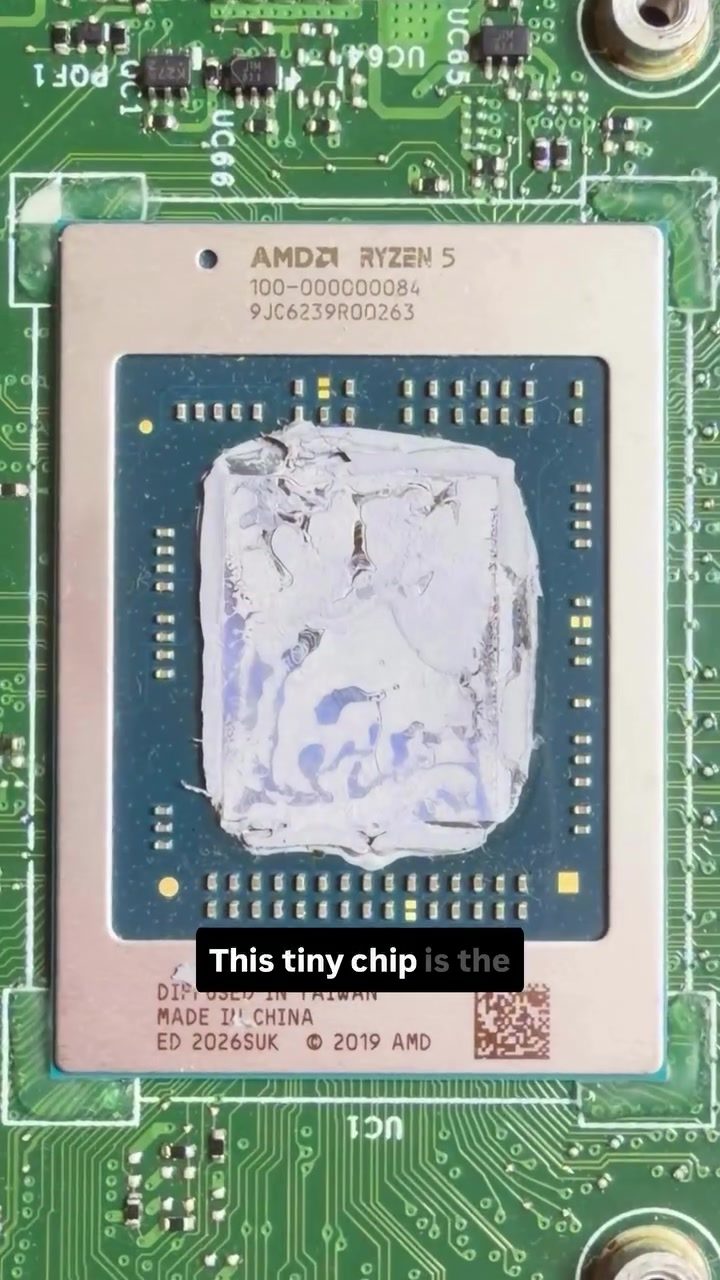
Thermal paste, also known as thermal compound or thermal grease, is a crucial component in the cooling system of modern computers. This gray paste is designed to improve heat transfer between the CPU and the heatsink, which is responsible for dissipating heat. The AMD Ryzen 5 processor, for instance, relies on thermal paste to ensure that heat is efficiently transferred from the chip to the heatsink. This tiny chip is the heart of your computer, and keeping it cool is vital for maintaining optimal performance.
The Application Process
Applying thermal paste to a CPU involves several steps. First, you need to prepare the surface of the CPU and the heatsink by cleaning them thoroughly. Any dust, debris, or old thermal paste must be removed to ensure a smooth and even application. Once the surfaces are clean, you can apply a small amount of thermal paste to the center of the CPU. The amount of paste should be just enough to cover the surface area of the CPU without spreading too thin or too thick. Spread the paste evenly using a spatula or a similar tool, ensuring that the entire surface is covered.
Application of gray paste to a heatsink The next step is to carefully align the heatsink with the CPU and secure it in place. The heatsink should make direct contact with the thermal paste, creating a thermal bridge that allows heat to flow from the CPU to the heatsink. Once the heatsink is properly installed, the cooling system can begin dissipating the heat generated by the CPU.
The Journey of Heat
Once the thermal paste is applied, the journey of heat from the CPU to the outside world begins. This journey involves several key components, each playing a critical role in the cooling process.
From CPU to Heatsink
The heat generated by the CPU is transferred to the heatsink through the thermal paste. The heatsink is designed to maximize surface area, allowing for efficient heat dissipation. The larger the surface area, the more effectively the heatsink can dissipate heat into the surrounding air. This is why heatsinks often feature numerous fins or other heat dissipation structures.
From Heatsink to Air
The heat absorbed by the heatsink is then transferred to the surrounding air. This process is facilitated by a cooling fan, which forces air over the heatsink's surface. The moving air helps to dissipate the heat more quickly, preventing the CPU from overheating. The fan's speed and airflow are critical factors in determining how effectively the heatsink can cool the CPU. In some high-performance systems, liquid cooling systems may be used instead of or in addition to traditional air cooling.
From Air to the Outside World
Finally, the heat is carried away from the heatsink by the moving air and expelled from the computer case. This process ensures that the heat generated by the CPU does not build up inside the case, which could lead to overheating and performance issues. Proper case ventilation is essential for maintaining optimal cooling and ensuring that the heat can escape efficiently.
Practical Tips for Effective CPU Cooling
Proper thermal paste application and maintenance are crucial for effective CPU cooling. Here are some practical tips to help you keep your CPU running smoothly:
Choose the Right Thermal Paste
Not all thermal pastes are created equal. There are different types of thermal paste available, each with its own advantages and disadvantages. Common types include:
- Ceramic thermal paste: Known for its non-conductive properties, making it a safe choice for DIY enthusiasts.
- Metallic thermal paste: Offers higher thermal conductivity but may be electrically conductive, requiring careful application.
- Liquid metal thermal paste: Provides excellent thermal conductivity but is more challenging to apply and may pose a risk if not handled properly.
Apply the Correct Amount
Appusing too much or too little thermal paste can affect its effectiveness. A common guideline is to use a small amount, about the size of a grain of rice, and spread it evenly across the CPU surface. This ensures optimal contact between the CPU and the heatsink without excess paste that could cause conductivity issues.
Ensure Proper Contact
When installing the heatsink, ensure that it makes direct contact with the thermal paste. Any gaps or air pockets can reduce the effectiveness of the thermal paste, leading to poor heat transfer. Use a small amount of pressure to ensure a secure fit, but be careful not to over-tighten, which could damage the CPU or heatsink.
Regular Maintenance
Thermal paste can degrade over time, becoming less effective at dissipating heat. It's a good idea to reapply thermal paste every few years or whenever you notice a significant increase in CPU temperatures. Regular maintenance helps ensure that your cooling system remains efficient and that your CPU stays cool.
Monitor Temperatures
Use monitoring tools to keep an eye on your CPU temperatures. Most modern systems come with built-in temperature sensors that can be accessed through software like Core Temp, HWMonitor, or the BIOS/UEFI. If you notice consistently high temperatures, it may be a sign that your thermal paste needs to be reapplied or that there is an issue with your cooling system.
Important Takeaways
Understanding the journey of heat from the CPU to the outside world is essential for effective thermal management. By applying the right type and amount of thermal paste, ensuring proper contact between the CPU and heatsink, and maintaining your cooling system, you can keep your CPU running smoothly and efficiently. Regular monitoring and maintenance are key to preventing overheating and prolonging the lifespan of your computer.
Conclusion
The process of keeping your CPU cool involves a delicate balance of thermal paste application, efficient heat dissipation, and proper ventilation. By following the guidelines outlined above, you can ensure that your computer's cooling system works optimally, protecting your CPU from overheating and maintaining peak performance. Whether you're a casual user or a DIY enthusiast, understanding the fundamentals of CPU cooling is a valuable skill that can save you time, money, and frustration in the long run.
Questions readers ask
What is the primary function of thermal paste in an AMD Ryzen 5 system?
Thermal paste serves as a crucial bridge between the AMD Ryzen 5 CPU and the heatsink, enhancing heat transfer from the CPU to the heatsink where it can be dissipated more effectively. This process helps maintain optimal temperatures, preventing performance throttling and potential damage to the processor.
How does thermal paste help in managing the heat generated by an AMD Ryzen 5 CPU?
Thermal paste fills microscopic air gaps between the CPU and the heatsink, which can impede heat flow. By creating a more efficient thermal path, the paste ensures that the heat generated by the AMD Ryzen 5 CPU is transferred more effectively to the heatsink and subsequently dissipated into the surrounding air.
What are some common signs that the thermal paste on an AMD Ryzen 5 CPU needs to be replaced?
If your AMD Ryzen 5 CPU is running hotter than usual, experiencing frequent throttling, or shutting down unexpectedly, it might be a sign that the thermal paste has degraded and needs replacing. Additionally, if your system has been running for several years without a thermal paste change, it's a good idea to inspect and replace it to maintain optimal cooling performance.
What is the best way to apply thermal paste to an AMD Ryzen 5 CPU?
The most effective method for applying thermal paste to an AMD Ryzen 5 CPU is the 'pea-sized dot' method. Place a small, pea-sized amount of thermal paste in the center of the CPU and spread it evenly using the heatsink’s pressure when installing it. This ensures a thin, uniform layer that covers the entire contact area, maximizing thermal conductivity.
Can using too much or too little thermal paste affect the cooling performance of an AMD Ryzen 5 CPU?
Yes, using too much or too little thermal paste can negatively impact cooling performance. Excessive paste can cause spillage, leading to electrical shorts and reduced heat transfer. Conversely, too little paste may not cover the entire CPU surface, resulting in inadequate heat dissipation and higher operating temperatures.
How often should I check and replace the thermal paste on my AMD Ryzen 5 CPU?
It's generally recommended to check and replace the thermal paste on your AMD Ryzen 5 CPU every 2-3 years, or if you notice any performance issues or unusual heat buildup. Regular maintenance of the thermal paste can help ensure that your CPU remains cool and performs optimally over time.
What are some additional tips to improve the cooling of an AMD Ryzen 5 CPU?
In addition to using high-quality thermal paste, ensure proper case airflow by cleaning dust from fans and heatsinks regularly, using additional case fans if necessary, and maintaining a clean, unobstructed airflow path. Monitoring CPU temperatures and adjusting fan curves in the BIOS or with software tools can also help optimize cooling performance.
Related deep dives
Similar reads based on topic and creator.




Recent articles
Fresh deep dives from the latest Reels we unpacked.




Comments
Be the first to comment.