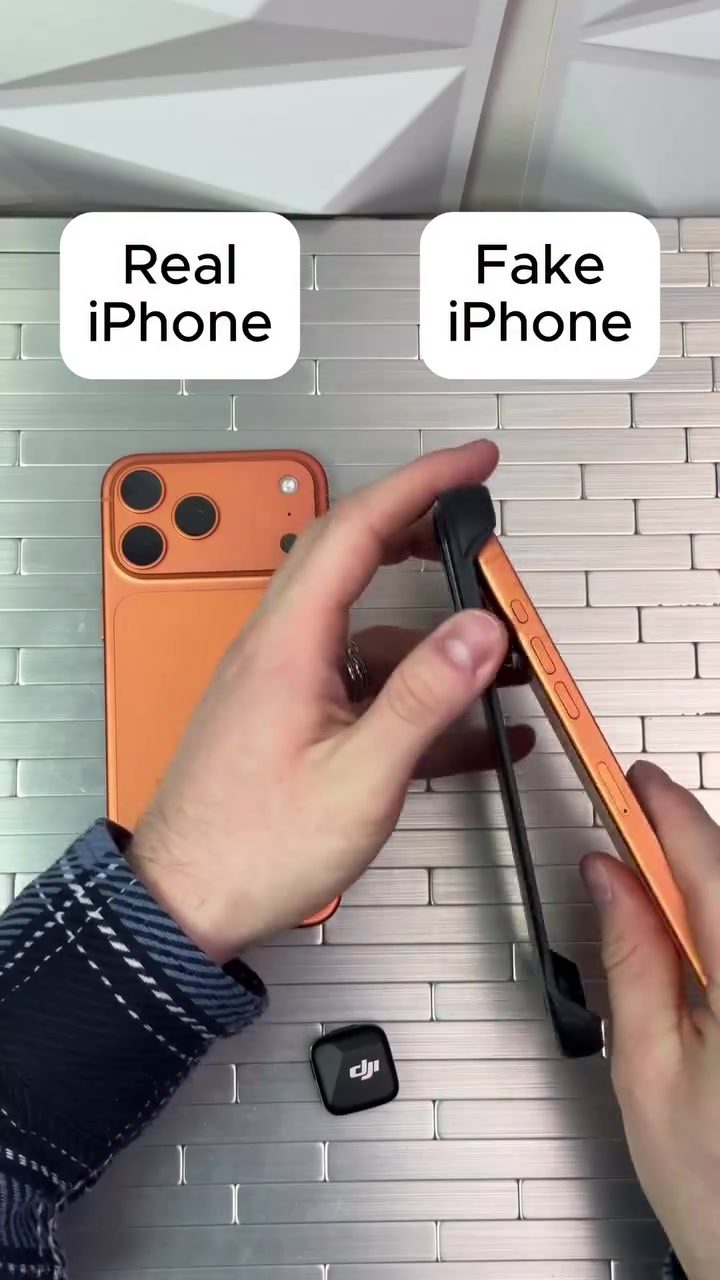
Identifying Fake iPhones: A Comprehensive Comparison
Purchasing a new iPhone can be an exciting experience, but the risk of buying a counterfeit device is a genuine concern. Knowing how to spot a fake iPhone is crucial for ensuring you get the authentic product and features you’re paying for. This guide will walk you through key differences between real and fake iPhones, focusing on design, screen quality, gaming performance, and camera functionality.
Why This Matters
The market for counterfeit electronics is vast, and iPhones are among the most commonly imitated devices. Fake iPhones can be surprisingly convincing, but there are telltale signs that can help you differentiate between a genuine Apple product and a clever imitation. Understanding these differences can save you from the frustration and potential security risks associated with counterfeit devices.
Main Discussion
Design and Build Quality
One of the first indicators of a fake iPhone is the overall design and build quality. Real iPhones are known for their premium materials and meticulous craftsmanship. The camera arrangement on the back of a genuine iPhone is specific and consistent across models. For instance, the camera module is usually neatly aligned and flush with the back panel. In contrast, fake iPhones often have a different, less refined camera design, sometimes with misaligned lenses or a bulkier camera module.
Screen Quality
Screen quality is another key differentiator. Real iPhones boast high-resolution Retina displays with vibrant colors and sharp clarity. When comparing a real iPhone to a fake one, the difference in screen quality becomes evident. For example, a real iPhone displaying a weather app will have a clear and crisp interface, while a fake iPhone might show a different app with lower resolution and less detailed graphics.
Gaming Performance
Gaming performance is a reliable test for a device’s authenticity. Real iPhones offer smooth and lag-free gaming experiences, thanks to their powerful processors and optimized software. In a comparison test, a real iPhone running a game like Subway Surfers will display the game smoothly, with fluid animations and quick response times. On the other hand, a fake iPhone may struggle with performance, experiencing lag, and graphical issues, making the gaming experience less enjoyable.
Camera Features and Interface
Camera features and interface can also be indicators of authenticity. Real iPhones have a standard camera app interface with consistent layouts and features across different models. The camera app on a genuine iPhone is known for its intuitive design and advanced functionalities. In contrast, fake iPhones may have a different or less functional camera app, with missing features or an unpolished interface.
Practical Tips
When shopping for a new iPhone, especially from less reputable sources, it’s essential to be vigilant. Here are some practical tips to help you identify a fake iPhone:
- Inspect the Camera: Look closely at the rear camera design. Real iPhones have a specific camera arrangement that is consistent across models. Any deviations from this design could indicate a counterfeit.
- Check the Screen Display: Compare the screen quality by running a high-resolution app or game. Fake iPhones often have lower-quality screens with less detail and clarity.
- Test Gaming Performance: Run a demanding game and observe the performance. Real iPhones should handle gaming smoothly, while fake iPhones may lag or have graphical issues.
- Evaluate the Camera Interface: Open the camera app and check the layout and features. Real iPhones have a standard and consistent camera app interface.
- Look for Unique Accessories: Authentic iPhones come with genuine Apple accessories like charging cables and adapters. Fake iPhones might come with lower-quality or mismatched accessories.
Important Takeaways
Identifying a fake iPhone involves careful inspection of several aspects, including design, screen quality, gaming performance, and camera functionality. Real iPhones have specific features and build quality that set them apart from counterfeits. Visual inspection, screen clarity, and performance tests are effective methods for spotting a fake iPhone. By being aware of these differences, you can make a more informed purchase and avoid the pitfalls of buying a counterfeit device.
Conclusion
Spotting a fake iPhone requires a keen eye for detail and an understanding of the key differences between real and counterfeit devices. Whether you’re inspecting the rear camera design, evaluating screen quality, testing gaming performance, or checking the camera app interface, these practical tips will help you make an informed decision. By being vigilant and informed, you can ensure that you’re getting the genuine iPhone experience you deserve.
Questions readers ask
What are some common design flaws in fake iPhones?
Fake iPhones often exhibit design inconsistencies such as misaligned buttons, uneven edges, and poor-quality materials. The logo on the back may be incorrectly placed or have a slightly different texture than the genuine Apple logo. Additionally, the overall build quality of counterfeit devices is usually inferior, with noticeable discrepancies in the assembly and finish.
How can I check the screen quality of an iPhone to determine its authenticity?
Genuine iPhones have high-resolution displays with vibrant colors and sharp text. To check screen quality, look for any discoloration, pixelation, or uneven backlighting. Fake iPhones often have lower screen resolutions, resulting in a less crisp and duller display. Additionally, fake displays may exhibit color distortions or poor viewing angles.
What are the signs of poor gaming performance in a counterfeit iPhone?
Authentic iPhones offer smooth and responsive gaming performance, thanks to their powerful processors. To evaluate an iPhone's performance, try running graphic-intensive games. Counterfeit devices often lag, freeze, or have choppy frame rates. You may also notice longer loading times or apps crashing more frequently on a fake iPhone.
Why do fake iPhones have camera issues?
Counterfeit iPhones often have camera lenses that are misaligned or poorly integrated. This can result in blurry photos, distorted images, or significant lag in camera activation. Additionally, the camera app may lack features or filters found in genuine iPhones, and video performance may be subpar with noticeable frame drops or poor stabilization.
How can I compare the build quality of a genuine iPhone to a counterfeit?
Genuine iPhones are known for their premium build quality, with precise assembly and high-quality materials. To compare, check for any loose parts, uneven gaps, or flimsy buttons on the counterfeit device. Authentic iPhones also have a satisfying click when the buttons are pressed and smooth, seamless edges, whereas counterfeit ones often feel cheap and flimsy.
What should I look for when comparing the iPhone's branding?
Fake iPhones may have inconsistencies in branding, such as a slightly off color or texture in the Apple logo, or incorrect font and placement of text. Authentic iPhones have precise and consistent branding. Check the packaging, manuals, and any accompanying items for missing information, poor translations, or low-quality printing, which are often found in counterfeit products.
Related deep dives
Similar reads based on topic and creator.




Recent articles
Fresh deep dives from the latest Reels we unpacked.




Comments
Be the first to comment.