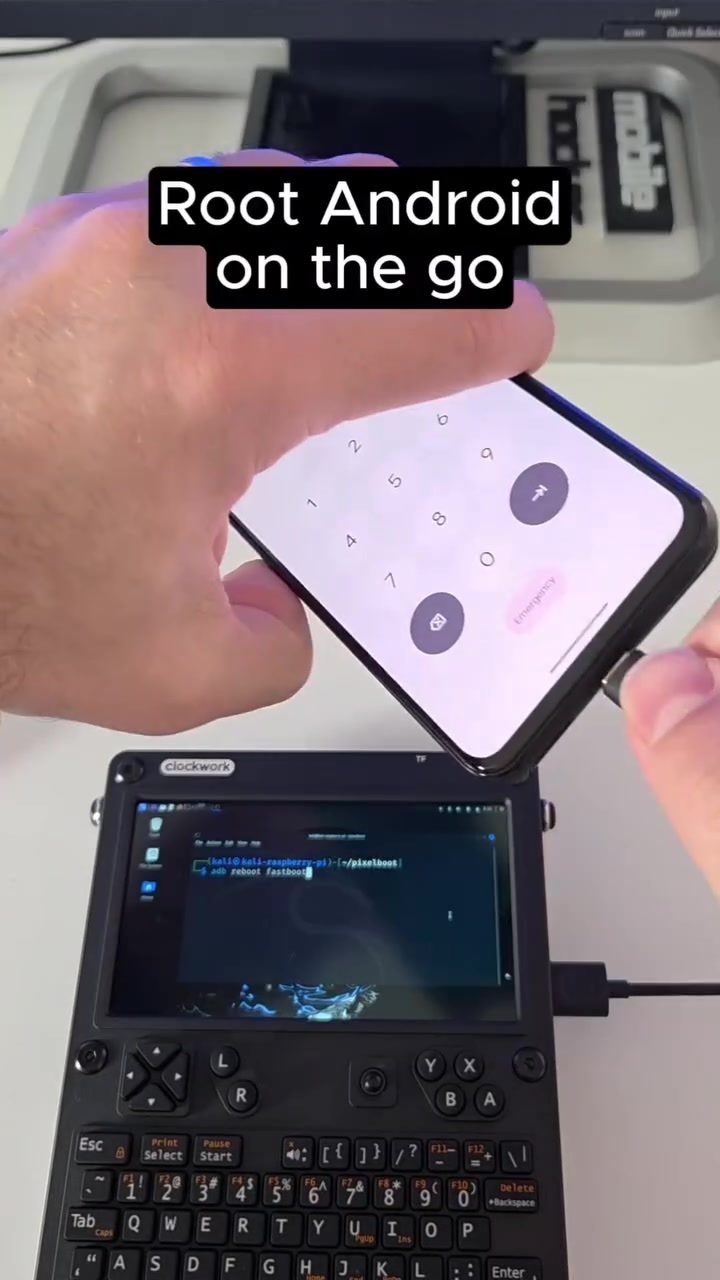
Root Android on the Go with a Raspberry Pi and Portable Keyboard
Rooting an Android device typically requires a computer and some technical know-how. But what if you could do it on the go, with just a Raspberry Pi and a portable keyboard? This setup, demonstrated by hacker mobile, shows how to root an Android device using fastboot and a compact, mobile-friendly configuration. This approach is perfect for developers and enthusiasts who need to work from anywhere.
Context / Why This Matters
Rooting an Android device provides users with administrative access, allowing them to customize their device, remove bloatware, and install custom firmware. Traditionally, this process involves connecting the device to a computer and using tools like fastboot. However, having a portable, on-the-go setup changes the game. It enables users to root their devices or flash custom ROMs without being tethered to a desktop or laptop. This is particularly useful for travelers, digital nomads, or anyone who needs to work from different locations.
Main Discussion
The Hardware: Portable Keyboard and Raspberry Pi
The core of this mobile setup is a Raspberry Pi, a small, affordable, and versatile single-board computer. Paired with a portable keyboard and a small screen, this configuration offers a complete, compact development environment. The portable keyboard, such as the uConsole, provides a convenient input method, while the Raspberry Pi handles the processing and execution of commands.
The Software: Fastboot and Clockwork Mod
Fastboot is a powerful protocol that allows you to modify the Android bootloader. It is commonly used for flashing custom ROMs, kernels, and recovery images. ClockworkMod, on the other hand, is a custom recovery tool that provides additional features and allows for more advanced customization.
In this setup, the Raspberry Pi is used to run fastboot commands, enabling users to root their Android devices. The process involves connecting the Android device to the Raspberry Pi, executing the necessary fastboot commands, and rebooting the device into a rooted state.
The Process
-
Setup the Raspberry Pi: Connect the portable keyboard and screen to the Raspberry Pi. Ensure that the Raspberry Pi is running a compatible operating system, such as Raspberry Pi OS.
-
Install Fastboot: Download and install the fastboot tool on the Raspberry Pi. This can usually be done via the command line.
-
Connect the Android Device: Using a USB cable, connect the Android device to the Raspberry Pi. Ensure that the device is in fastboot mode, which usually involves holding down a specific button combination during boot.
-
Execute Commands: Use the portable keyboard to input the necessary fastboot commands on the Raspberry Pi. These commands will vary depending on the specific device and the desired outcome, but they generally involve flashing a custom bootloader or recovery image.
-
Reboot the Device: Once the commands have been executed, reboot the Android device. It should now be in a rooted state, allowing for further customization and modifications.
On-Screen Text: Hacker Mobile and Root Android on the Go
During the process, several key phrases appear on the screen, such as "hacker mobile" and "Root Android on the Go." These phrases highlight the mobile nature of the setup and the ability to root Android devices with ease, thanks to the fastboot tool and the Raspberry Pi's capabilities.
Practical Tips
Choosing the Right Portable Keyboard
When selecting a portable keyboard for this setup, consider the following:
- Size and Weight: The keyboard should be compact and lightweight to ensure portability.
- Battery Life: A long battery life is essential for extended use.
- Connectivity Options: Ensure the keyboard supports USB, Bluetooth, or other connectivity options compatible with the Raspberry Pi.
- Durability: A rugged design can withstand the rigors of travel.
Ensuring a Smooth Fastboot Experience
To make the most of the fastboot process, keep these tips in mind:
- Backup Data: Before rooting, always back up your data to prevent loss.
- Check Compatibility: Ensure that your Android device is compatible with the fastboot commands and the custom ROMs or recovery images you plan to use.
- Follow Guides: Refer to device-specific guides and documentation to avoid common pitfalls and errors.
- Use Reliable Tools: Ensure that the fastboot tool and other software components are up-to-date and reliable.
Important Takeaways
- Portability: The combination of a Raspberry Pi, portable keyboard, and small screen creates a highly portable and versatile development environment.
- Flexibility: This setup allows for rooting and customization of Android devices from virtually anywhere, making it ideal for travelers and remote workers.
- Efficiency: The use of fastboot and ClockworkMod provides a streamlined process for flashing and customizing Android devices.
Conclusion
Rooting an Android device on the go is now more accessible than ever, thanks to the combination of a Raspberry Pi, portable keyboard, and fastboot. This setup offers a compact, mobile-friendly solution for developers and enthusiasts who need to work from different locations. By following the outlined steps and practical tips, you can root your Android device with ease, unlocking a world of customization and flexibility.
Questions readers ask
What is rooting and why would I want to root my Android device?
Rooting is the process of gaining superuser (administrative) access to an Android device. This allows users to customize their device extensively, remove pre-installed apps (bloatware), and install custom firmware, potentially improving performance and adding new features.
Can I root my Android device without using a computer?
Yes, by using a Raspberry Pi and a portable keyboard, you can root your Android device on the go without needing a traditional computer. This setup utilizes Fastboot, a protocol for flashing device images, and allows for a mobile-friendly rooting process.
What is Fastboot and how does it relate to rooting an Android device?
Fastboot is a diagnostic protocol that enables flashing of device images and partitioning tables. It is instrumental in rooting because it allows users to unlock the bootloader, which is a critical step in gaining root access to the device.
What equipment do I need to root an Android device using a Raspberry Pi?
To root an Android device with a Raspberry Pi, you'll need a Raspberry Pi, a portable keyboard, and a USB cable to connect the Android device to the Raspberry Pi. Additionally, you'll need some technical knowledge to execute the necessary fastboot commands.
Is it safe to root my Android device?
Rooting can potentially void your warranty and, if not done correctly, can brick your device. However, if you follow a reliable guide and understand the risks, rooting can provide greater control over your device. Always ensure you use trusted sources for rooting instructions and tools.
What are the benefits of using a Raspberry Pi for rooting an Android device?
Using a Raspberry Pi for rooting offers mobility and convenience. Its compact size and portability make it ideal for on-the-go tasks, allowing you to root your Android device from anywhere. This is particularly useful for developers and Android enthusiasts who need to work in various locations.
Related deep dives
Similar reads based on topic and creator.




Recent articles
Fresh deep dives from the latest Reels we unpacked.




Comments
Be the first to comment.