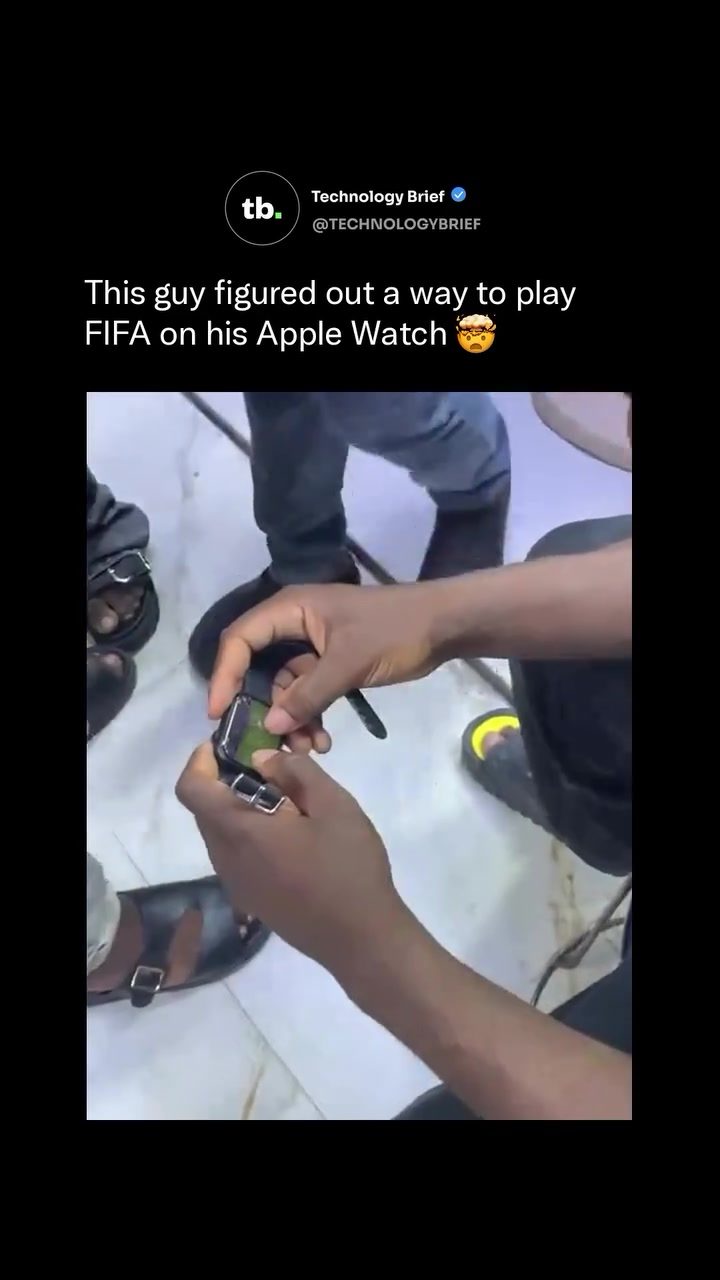
Playing FIFA on an Apple Watch
Playing high-quality games like eFootball on an Apple Watch is an unconventional feat. The concept challenges both the hardware and software limitations of the device, offering an intriguing glimpse into the potential and constraints of modern wearable technology. Let's delve into this unique endeavor and explore the implications for both gaming enthusiasts and tech aficionados.
Why This Matters
The Apple Watch has evolved from a simple health and fitness tracker to a versatile device capable of running a variety of apps. Pushing the boundaries of what an Apple Watch can do, such as playing a full-fledged soccer game, highlights the device's evolving capabilities and the ingenuity of its users. This feat also raises questions about the future of mobile gaming and the potential for more immersive gaming experiences on wearable devices.
Main Discussion
The Game: eFootball
eFootball, formerly known as Pro Evolution Soccer, is a beloved soccer simulation game that has been around since 1995. Initially launched on consoles and later adapted for mobile platforms, eFootball offers a rich gaming experience with realistic gameplay, extensive team management options, and regular updates based on real-world football events. Konami’s decision to make eFootball free-to-play has garnered a massive player base, making it a popular choice for mobile gamers.
The Device: Apple Watch
The Apple Watch, a central player in the wearable technology market, is renowned for its sleek design and robust functionality. However, its small touchscreen and limited processing power make it a less-than-ideal platform for complex games like eFootball. The screen, measuring under two inches diagonally, presents a formidable challenge for precise and responsive gameplay.
The Setup
To play eFootball on an Apple Watch, the player must rely on their thumbs to navigate the tiny interface. The cracked screen adds an extra layer of difficulty, making the gameplay less intuitive. Despite these challenges, the player manages to control a live match, demonstrating the resilience and adaptability of modern gaming technologies.
Gameplay Experience
Playing eFootball on an Apple Watch results in a cramped and demanding experience. The small screen and limited input methods force the player to make quick, precise movements, which can be frustrating. However, the ability to follow the match action clearly shows that the game has been optimized for the smallest of displays, albeit with significant compromises.
Practical Tips
Getting Started
If you want to emulate this experience, you will need to install eFootball from the App Store. While the game is designed for iPhone and iPad, it can be installed on an Apple Watch via the paired iPhone. Ensure that your Apple Watch is fully charged and that you have a stable Wi-Fi connection for the best performance.
Handling the Small Screen
Navigating the small screen of an Apple Watch requires patience and precision. Use your thumbs to tap and swipe the screen, and try to avoid excessive pressure to prevent further damage to the cracked screen. Familiarize yourself with the game controls and practice making quick, accurate movements.
Optimizing Performance
To optimize your gaming experience, consider the following tips:
- Reduce Distractions: Find a quiet, well-lit area to play, ensuring that you can focus on the screen without interference.
- Adjust Settings: Customize the game settings to suit the small screen. For instance, reduce the field of view or adjust the sensitivity of the touch controls.
- Practice: Take the time to practice your movements on the small screen. The more accustomed you become to the limited input methods, the easier it will be to navigate the game.
Important Takeaways
Innovation and Adaptability
Playing eFootball on an Apple Watch showcases the innovative spirit of gamers and their willingness to push technological boundaries. This unique use case highlights the adaptability of modern gaming technologies and the potential for even more immersive experiences on wearable devices.
Hardware Limitations
While the Apple Watch can handle basic tasks and light gaming, its hardware limitations make it challenging for more complex games. The small screen and limited processing power present significant barriers to a seamless gaming experience. Future advancements in wearable technology may address these limitations, paving the way for more immersive gaming experiences on the go.
Future of Mobile Gaming
The ability to play eFootball on an Apple Watch opens up new possibilities for mobile gaming. As wearable technology continues to evolve, we can expect to see more innovative use cases and enhanced gaming experiences. Whether it's through improved hardware, advanced software, or a combination of both, the future of mobile gaming is bright and full of potential.
Conclusion
Playing eFootball on an Apple Watch is a testament to human ingenuity and the boundless potential of modern technology. While the experience is challenging and unconventional, it offers a unique perspective on the future of mobile gaming. As wearable technology advances, we can look forward to even more immersive and innovative gaming experiences, pushing the limits of what is possible and redefining the way we interact with our devices.
Questions readers ask
Can the Apple Watch run high-quality games like eFootball?
While the Apple Watch faces significant hardware and software limitations, tech enthusiasts have found ways to run games like eFootball by making clever adjustments and employing innovative techniques. The small screen and limited processing power necessitate creative solutions to ensure a playable experience, showcasing the evolving capabilities of the device.
What challenges does playing eFootball on an Apple Watch present?
Playing eFootball on an Apple Watch involves overcoming several challenges, including the small screen size, limited processing power, and the device's primary focus on health and fitness tracking. Additionally, the lack of traditional gaming controls requires innovative input methods, such as touchscreen gestures and voice commands.
How do users control eFootball on an Apple Watch?
Controlling eFootball on an Apple Watch requires users to adapt to the device's unique input methods. This often involves using touchscreen gestures, the digital crown, and even voice commands to navigate the game and execute actions. Some users have also developed customized control schemes to enhance the gaming experience.
What are some common display issues when playing eFootball on an Apple Watch?
The small screen of the Apple Watch can make it difficult to see all the action in a game like eFootball. Players may struggle with seeing all on-screen elements, including player positions, scores, and UI elements. To work around this, some gamers use zooming and panning techniques, as well as customizing display settings to better fit the small screen.
Can a cracked Apple Watch still be used to play eFootball?
Playing eFootball on a cracked Apple Watch is not recommended. A cracked screen can interfere with touch input, making it difficult to control the game accurately. Additionally, a cracked screen may pose a risk to the user, as broken glass can cause injury. It's best to have any screen damage repaired before attempting to play games on the device.
What are some alternative games to eFootball on the Apple Watch?
Given the Apple Watch's limitations, games that are less demanding and more suited to the small screen and touch controls are typically more enjoyable. Alternatives to eFootball could include puzzle games, simple arcade games, or even text-based adventure games. These games are designed to be played in short sessions and can make better use of the Apple Watch's unique interface.
Related deep dives
Similar reads based on topic and creator.




Recent articles
Fresh deep dives from the latest Reels we unpacked.




Comments
Be the first to comment.