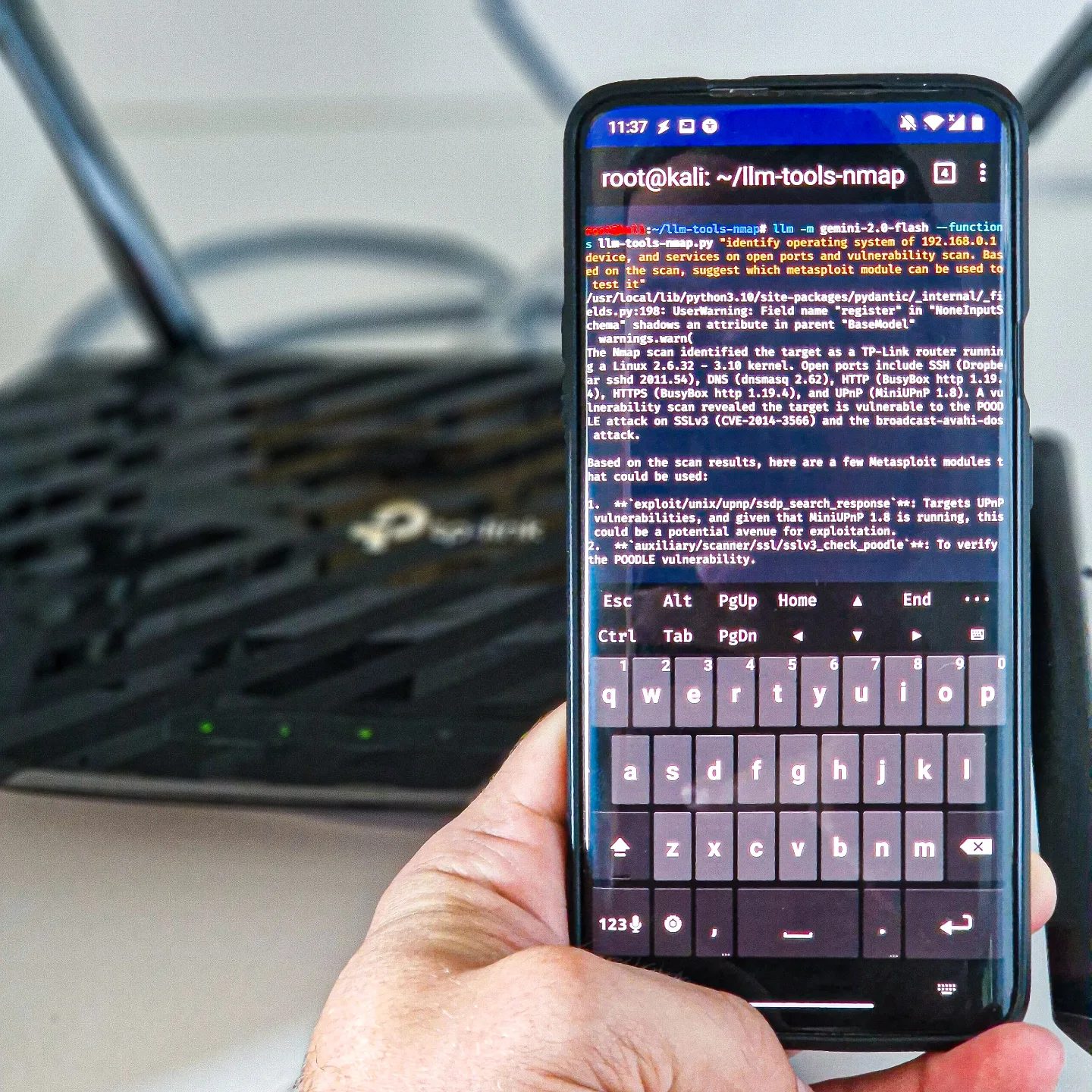
Hacking with Nmap Using Android
Cybersecurity scans are essential for identifying vulnerabilities in networks and devices. One of the tools commonly used for this purpose is Nmap, a powerful network scanning tool. While Nmap is traditionally associated with desktop systems, it can also be effectively utilized on Android devices, offering flexibility and portability.
Context / Why this matters
With the increasing use of mobile devices for various tasks, including those related to cybersecurity, it is crucial to understand how tools like Nmap can be leveraged on Android platforms. This opens up new possibilities for mobile hackers, security professionals, and enthusiasts who need to perform scans on the go or in environments where a traditional laptop might not be practical.
Main discussion
What is Nmap?
Nmap, short for Network Mapper, is a versatile tool used for network discovery and security auditing. Originally designed for Linux, it has since been ported to other operating systems, including Android. Nmap is capable of performing a variety of tasks, from simple host discovery to more complex vulnerability assessments.
Installing and Using Nmap on Android
There are several ways to install and use Nmap on an Android device. One common method is through the use of third-party applications that include Nmap or through the installation of a terminal emulator that supports Nmap. For instance, users might install a terminal emulator like Termux, which allows for the execution of Linux commands and scripts on Android. Once installed, Nmap can be downloaded and installed within Termux, enabling users to perform scans directly from their mobile devices.
Mobile Hacking with Nmap
Mobile hacking with Nmap on Android involves several steps. First, users need to ensure that their Android device is rooted, as this grants the necessary permissions to perform network scans. Once rooted, the user can download and compile Nmap on the device, or use a precompiled version available from the Termux repository. Once configured, users can execute Nmap commands to scan networks, analyze traffic, and identify potential vulnerabilities.
Example Use Cases
One example of a practical use case for Nmap on Android is scanning for open ports on a TP-Link router. By targeting the router, users can identify which ports are open, closed, or filtered. This can be particularly useful for assessing the security of a home or small business network. The scan output typically includes commands and results related to exploits and Common Vulnerabilities and Exposures (CVEs), providing a detailed overview of potential weaknesses.
Practical tips
Ensure Proper Permissions
Before using Nmap on Android, ensure your device has the necessary permissions. This often involves rooting the device, which grants the required administrative access. Rooting can be risky and may void the warranty, so proceed with caution.
Use Terminal Emulators
Terminal emulators like Termux are invaluable for running Nmap on Android. These emulators provide a Linux-like environment where you can install and use Nmap as you would on a desktop system.
Understand the Commands
Familiarize yourself with common Nmap commands. For example, the nmap -sP command can be used to perform a simple ping scan, while the nmap -sV command identifies the version of services running on open ports. Understanding these commands can help you perform more effective and precise scans.
Analyze Results
Once you have performed a scan, take the time to analyze the results. Look for open ports, running services, and any signs of potential vulnerabilities. By understanding the output, you can make informed decisions about network security and take appropriate actions to mitigate risks.
Use Ethical Hacking Principles
Always ensure that your use of Nmap and other hacking tools is ethical and legal. Unauthorized scanning of networks can be illegal and unethical. Always obtain permission before performing any security assessments on networks you do not own.
Important takeaways
Flexibility and Portability
One of the key benefits of using Nmap on an Android device is the flexibility and portability it offers. Security professionals can perform scans from anywhere, making it easier to respond to security incidents and assess networks in remote or challenging environments.
Versatility of Nmap
Nmap is a highly versatile tool that can be used for a wide range of tasks, from simple network discovery to complex vulnerability assessments. Its versatility makes it an essential tool for both beginners and experienced security professionals.
Ethical Considerations
While the use of Nmap on Android can be highly beneficial, it is essential to consider the ethical implications. Always ensure that you have permission to scan and assess networks, and use the information responsibly.
Conclusion
Using Nmap on Android devices opens up a world of possibilities for mobile hacking and cybersecurity assessments. By leveraging the flexibility and portability of mobile devices, security professionals can perform scans in situations where traditional methods might not be feasible. Whether you are a seasoned security expert or a curious enthusiast, understanding how to use Nmap on Android can enhance your capabilities and provide valuable insights into network security.
Questions readers ask
Can Nmap be used on Android devices to scan networks?
Yes, Nmap can be installed and used on Android devices. This allows for flexible and portable network scanning, making it a convenient tool for security professionals who need to perform scans on the go.
What are the benefits of using Nmap on an Android device for scanning TP-Link routers?
Using Nmap on an Android device for scanning TP-Link routers offers several benefits, including ease of use, portability, and the ability to quickly identify vulnerabilities in the router's network settings and configurations.
How do I install Nmap on my Android device?
To install Nmap on an Android device, you can use the termux app. First, download and install Termux from the Google Play Store, then update the package list. After that, install Nmap by entering 'pkg install nmap' in the termux terminal.
What kind of vulnerabilities can be identified in a TP-Link router using Nmap?
Using Nmap, you can identify various vulnerabilities in a TP-Link router, such as open ports, weak passwords, outdated firmware, and other misconfigurations that could be exploited by malicious actors. This allows you to quickly identify and address potential security issues.
Can Nmap on Android be used for other types of network scans besides routers?
Yes, Nmap on Android can be used for a wide range of network scans beyond just routers. This includes scanning for open ports, identifying live hosts on a network, and detecting operating systems and services running on devices.
Is it legal to scan networks and devices with Nmap on an Android device?
The legality of scanning networks and devices with Nmap on an Android device depends on whether you have explicit permission to do so. Scanning networks and devices without authorization is illegal and unethical. Always ensure you have proper permission before conducting any scans.
What are some alternative network scanning tools available for Android?
Some alternative network scanning tools available for Android include Fing, Network Analyzer, and Angry IP Scanner. These tools offer various features for network discovery, vulnerability assessment, and monitoring, providing additional options for mobile cybersecurity tasks.
Related deep dives
Similar reads based on topic and creator.




Recent articles
Fresh deep dives from the latest Reels we unpacked.




Comments
Be the first to comment.