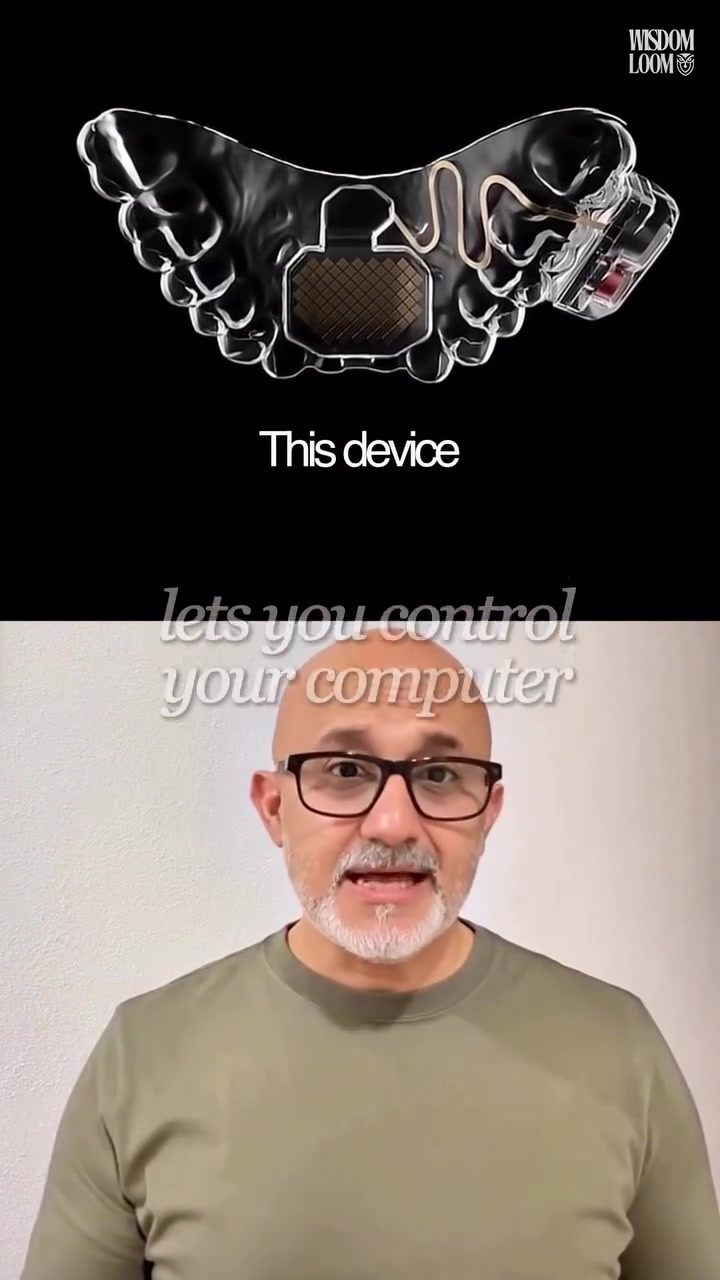
MouthPad: Revolutionizing Computer Interaction with Tongue Control
MouthPad is an innovative assistive technology device that allows users to control their computers through tongue movements. It represents a significant advancement in human-computer interaction, especially for individuals with mobility challenges. The device is designed to be a practical, non-invasive alternative to more invasive technologies like brain implants.
Context
The integration of advanced technology into daily life has always been a goal for innovators. Devices like MouthPad showcase how modern technology can bridge the gap between physical limitations and digital interaction. This device isn't just about convenience; it's about providing a lifeline for those who need it.
The Need for Assistive Technology
For individuals with mobility challenges, traditional computer input devices like keyboards and mice can be impractical or even impossible to use. This is where assistive technology comes into play. Devices like MouthPad offer a new way to interact with computers, making technology more accessible to a broader range of users.
Main Discussion
How MouthPad Works
MouthPad is designed to fit against the roof of the mouth like a retainer. It is custom-fitted from a dental scan, ensuring a comfortable and secure fit. The device translates tongue movements into cursor movements on the computer screen, allowing users to perform actions like clicking, right-clicking, and scrolling.
The device operates via Bluetooth and is compatible with every platform, making it a versatile tool for various computing environments. Weighing only 10 grams, it is lightweight and unobtrusive, with a battery life of up to 7 hours.
Key Features
Some of the standout features of MouthPad include:
- Custom Dental Fit: Ensures comfort and stability.
- Bluetooth Connectivity: Allows for seamless integration with various devices.
- Cursor Control: Precision control over cursor movements on the screen.
- Platform Compatibility: Works on every operating system.
- Accessibility Focus: Specifically designed to assist individuals with mobility challenges.
Real-World Applications
MouthPad has already made a significant impact on the lives of over 100 users with mobility challenges, some of whom use it for up to 16 hours a day. This level of use underscores the device's practicality and reliability. The device's design allows users to interact with their computers without the need for invasive procedures, making it a more accessible and user-friendly option compared to brain implants.
Comparing MouthPad to Neuralink
Neuralink, a brain-computer interface developed by Elon Musk's company, requires brain surgery for installation. This invasive procedure is a significant barrier for many potential users. In contrast, MouthPad requires only a dental scan, making it a much less invasive and more accessible option. The tongue, with its eight muscles, is a more flexible and durable input device compared to the complex and delicate nature of brain implants.
The Science Behind the Tongue
The tongue is a powerful tool for interaction, thanks to its unique anatomy and functionality. With eight muscles and almost no fatigue, the tongue is an ideal input device for continuous use. MouthPad leverages this natural advantage, providing a reliable and efficient way to control a computer.
Practical Tips
Getting Started with MouthPad
If you or someone you know is considering using MouthPad, here are some practical tips to get started:
- Consult a Professional: Ensure you get a proper dental scan for the best fit.
- Practice: Like any new input device, it takes time to get used to controlling the cursor with your tongue.
- Explore Settings: Customize the settings to suit your specific needs and comfort level.
Maintenance and Care
Maintaining the device is crucial for its longevity and effectiveness:
- Clean Regularly: Keep the device clean to prevent bacterial buildup.
- Battery Management: Charge the device regularly to ensure it’s always ready when you need it.
- Check for Updates: Regularly check for software updates to take advantage of new features and improvements.
Important Takeaways
MouthPad represents a groundbreaking advancement in assistive technology. It provides a non-invasive, practical, and efficient way for individuals with mobility challenges to interact with computers. The device's custom fit, Bluetooth connectivity, and platform compatibility make it a versatile tool for various users.
By leveraging the natural capabilities of the tongue, MouthPad offers a unique and effective solution for those who may otherwise struggle with traditional input devices. Its real-world applications and positive impact on users highlight its potential to transform the way we think about accessibility in technology.
Conclusion
MouthPad is more than just a gadget; it's a gateway to greater independence and accessibility for individuals with mobility challenges. By offering a non-invasive and efficient way to control computers, MouthPad opens up new possibilities for how we interact with the digital world. As technology continues to evolve, devices like MouthPad will play a crucial role in making technology more inclusive and accessible for everyone.
Questions readers ask
How does MouthPad enable tongue-controlled computer interaction?
MouthPad translates tongue movements into commands that a computer can understand. It uses sensors to track the position and motion of the tongue, allowing users to control the cursor, click, and perform other essential functions on their computer.
What makes MouthPad a non-invasive assistive device?
MouthPad is non-invasive because it does not require any surgical procedures or implants. Users simply wear the device in their mouth, and it can be easily removed and adjusted as needed. It is a wearable dental assistive device.
Can MouthPad be used with any computer?
Yes, MouthPad is designed to be compatible with most computers. It connects via Bluetooth, making it easy to pair with various devices, including Windows and Mac computers. It emulates a standard keyboard and mouse and doesn’t need special software.
How does MouthPad compare to brain-controlled computer technology?
Unlike brain-controlled computer technology, which involves more invasive procedures like implants, MouthPad offers a non-invasive solution. It provides a practical and accessible way for users to interact with computers through natural tongue movements, making it a more convenient option for many.
What are the long-term benefits of using MouthPad for computer accessibility?
MouthPad offers long-term benefits by providing a durable and reliable method of computer interaction for users with mobility challenges. It can help improve daily productivity and independence, making it a valuable assistive tool for long-term use.
Is MouthPad suitable for users with dental issues?
MouthPad is designed to be comfortable and adaptable, but users with specific dental issues should consult with a healthcare provider before use. The device is adjustable and can be customized to fit individual needs, ensuring comfort and proper functionality.
How does MouthPad help with computer accessibility for users with mobility challenges?
MouthPad enhances computer accessibility by offering a hands-free, non-invasive method of controlling a computer. This is particularly beneficial for individuals with mobility impairments, allowing them to navigate and interact with digital content more easily and independently.
Related deep dives
Similar reads based on topic and creator.




Recent articles
Fresh deep dives from the latest Reels we unpacked.




Comments
Be the first to comment.