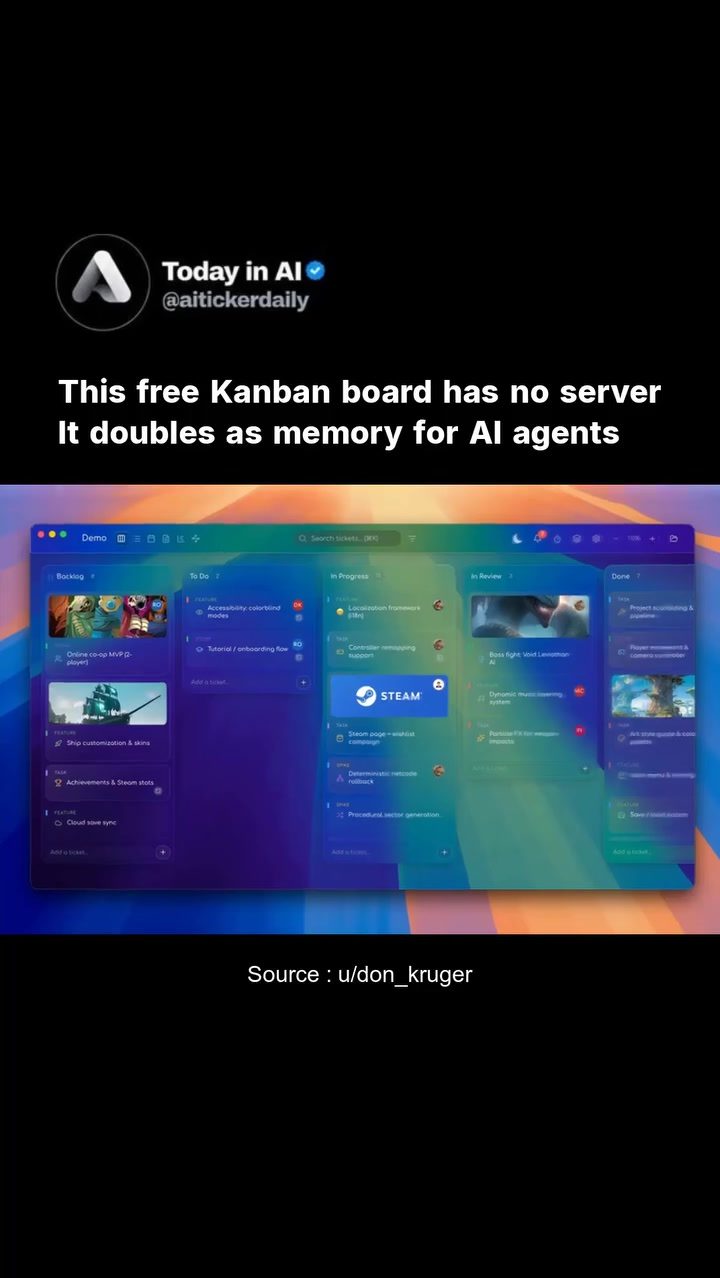
Kanban Boards for Task Management and AI Agents
Kanban boards are versatile tools that have evolved beyond simple task management. They serve a dual purpose: organizing tasks and acting as a memory layer for AI agents. This combination makes them indispensable for productivity and AI integration.
Why This Matters
In today's fast-paced environment, efficient task management and seamless AI integration are crucial. Kanban boards offer a structured way to handle tasks while also providing a persistent memory layer for AI agents. This dual functionality can greatly enhance productivity and streamline workflows, especially for users who rely on local AI agents like OpenClaw.
The Evolution of Kanban Boards
Kanban boards have traditionally been used for task management, helping individuals and teams visualize their workflow. They provide a clear overview of tasks, from to-do to in-progress to completed. This visual representation aids in identifying bottlenecks and improving efficiency.
Kanban Board: Memory for AI Agents
Recent advancements have seen Kanban boards taking on an additional role as a memory layer for AI agents. This means that AI agents can read and write their context, tool outputs, and task states directly into an offline board. This integration is particularly beneficial for local AI agents, which can now operate more effectively without needing constant online access.
Kanban Pro: A Free, Local-First Solution
Kanban Pro is a notable example of this evolution. It is a free, local-first Kanban board that operates without the need for accounts, a server, or subscriptions. Tasks are stored as Markdown tickets and YAML on disk, making them easily accessible and editable. The app's recent update includes an embedded terminal that runs Claude Code CLI directly inside a project, enhancing its utility for developers and AI agents.
One of the standout features of Kanban Pro is its ability to serve as a persistent memory layer for OpenClaw agents. This allows local AI agents to read and write their context, tool outputs, and task states directly into an offline board. While this wasn't the original intent of the tool, it has proven to be a valuable use case.
Integrating AI with Kanban Boards
AI agents can significantly enhance the functionality of Kanban boards. By leveraging the board as a memory layer, AI agents can perform tasks more autonomously and efficiently. This integration allows for a seamless workflow where tasks are managed and executed by both human users and AI agents.
Benefits of AI Integration
- Automated Task Management: AI agents can automatically update task states, reducing the need for manual intervention.
- Contextual Awareness: AI agents can read and write context, tool outputs, and task states, providing a more comprehensive view of the workflow.
- Offline Functionality: The ability to operate offline ensures that tasks can be managed even without an internet connection, making it ideal for environments with limited connectivity.
- Enhanced Efficiency: By automating repetitive tasks, AI agents can free up time for more complex and creative work.
Practical Tips for Using Kanban Boards
Setting Up Kanban Pro
- Installation: Kanban Pro is easy to install and set up. Follow the official installation guide to get started.
- Task Creation: Create tasks as Markdown tickets and YAML on disk. This format ensures compatibility with various tools and applications.
- Embedded Terminal: Utilize the embedded terminal to run Claude Code CLI directly inside a project. This feature is particularly useful for developers and AI agents.
- AI Integration: Integrate AI agents to leverage the board as a memory layer. This allows for automated task management and enhanced contextual awareness.
Managing Tasks Effectively
- Visual Organization: Use the visual representation of tasks to identify bottlenecks and prioritize tasks.
- Regular Updates: Keep tasks updated to ensure that both human users and AI agents have the most current information.
- Collaboration: Encourage collaboration by sharing the board with team members and AI agents. This ensures that everyone is on the same page and can contribute effectively.
Important Takeaways
- Versatility: Kanban boards have evolved from simple task management tools to versatile productivity solutions that can also serve as memory layers for AI agents.
- Efficiency: The integration of AI agents with Kanban boards enhances efficiency by automating repetitive tasks and providing contextual awareness.
- Accessibility: The local-first approach of Kanban Pro ensures that tasks can be managed offline, making it a reliable solution for environments with limited connectivity.
Conclusion
Kanban boards, particularly Kanban Pro, offer a powerful combination of task management and AI integration. By serving as a memory layer for AI agents, Kanban boards can significantly enhance productivity and streamline workflows. Whether you're a developer, a project manager, or an AI enthusiast, incorporating Kanban boards into your workflow can provide a range of benefits, from automated task management to enhanced contextual awareness.
Questions readers ask
What are the primary benefits of using Kanban board software for task management?
Kanban board software offers a visual representation of tasks and workflows, making it easier to identify bottlenecks and track progress. It helps users organize tasks efficiently, enhancing productivity and ensuring that nothing falls through the cracks. Additionally, it provides a clear overview of the project's status, enabling better decision-making and prioritization.
How do AI Kanban boards enhance productivity?
AI Kanban boards serve as a memory layer for AI agents, allowing them to remember past tasks and decisions. This integration enables AI agents to provide more accurate recommendations and automate routine tasks, freeing up users' time. By learning from the Kanban workflow, AI agents can suggest improvements and optimizations, further boosting productivity.
What is the best way to get started with a free Kanban board?
To get started with a free Kanban board, choose a user-friendly platform that offers essential features like task creation, drag-and-drop functionality, and customizable columns. Begin by creating a board for your project and adding tasks. Organize tasks into columns representing different stages of your workflow, such as To Do, In Progress, and Done. Regularly update and review your board to maintain its effectiveness.
How can Kanban boards be integrated with AI agents like OpenClaw?
Kanban boards can be integrated with AI agents by using APIs or plugins that enable two-way communication. The board serves as a memory layer, storing task data that the AI can access and learn from. The AI agent can then assist with task management by providing suggestions, automating repetitive tasks, and offering insights based on the data from the Kanban board.
What key features should I look for in the best Kanban software?
When searching for the best Kanban software, look for features such as customizable workflows, real-time collaboration, and integration capabilities with other tools and AI agents. Additional useful features include task assignment, deadlines, and progress tracking. A robust search and filter functionality can also help users quickly find specific tasks or boards.
Can Kanban boards be used for personal productivity, or are they limited to team use?
Kanban boards are versatile and can be used for both personal and team productivity. For personal use, they help manage daily tasks, goals, and projects by providing a clear visual overview. For teams, they facilitate collaboration, ensure everyone is aligned, and track collective progress. Many Kanban software tools offer features tailored to both individual and team needs.
How does a Kanban memory layer assist in workflow management?
A Kanban memory layer stores historical data and task information, allowing AI agents to analyze past performance and make data-driven suggestions. This assists in workflow management by identifying inefficiencies, predicting future bottlenecks, and providing insights on how to optimize the process. By integrating this memory layer, Kanban boards become a dynamic tool that continuously improves workflow efficiency.
Related deep dives
Similar reads based on topic and creator.




Recent articles
Fresh deep dives from the latest Reels we unpacked.




Comments
Be the first to comment.