Running Kali Linux on a Raspberry Pi Zero for a Portable Hacking Lab
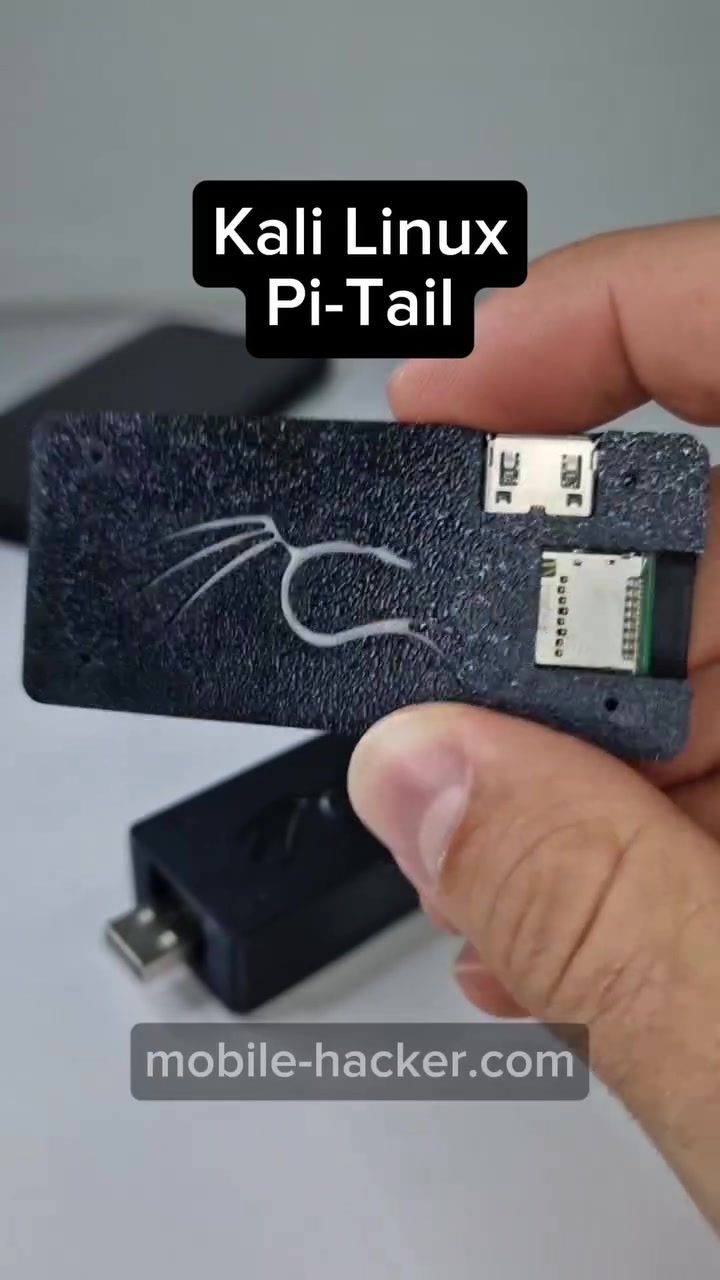
Creating a portable hacking lab using a Raspberry Pi Zero and Kali Linux is an efficient way to have a powerful, mobile testing device. The Kali Linux Pi-Tail is a portable hacking tool that leverages the Raspberry Pi Zero 2 W for a compact, yet powerful solution.
Context / Why this matters
Portable hacking labs are invaluable for security professionals, ethical hackers, and IT enthusiasts. These devices allow for on-the-go penetration testing, security assessments, and more. The Raspberry Pi Zero 2 W, with its small form factor and low power consumption, is an ideal platform for this purpose.
Main discussion
What is the Kali Linux Pi-Tail?
The Kali Linux Pi-Tail is a USB device that runs the Kali Linux operating system on a Raspberry Pi Zero 2 W. This setup allows you to have a powerful hacking tool that fits in your pocket. The device can be powered and controlled directly from a smartphone or other devices, making it highly versatile.
Setting Up the Kali Linux Pi-Tail
Setting up the Kali Linux Pi-Tail involves several steps, but the process is straightforward. Here’s a general overview:
-
Hardware Requirements: You will need a Raspberry Pi Zero 2 W, a microSD card (at least 8GB), a USB cable, and a power supply.
-
Installing Kali Linux: Download the Kali Linux image for Raspberry Pi from the official Kali Linux website. Use a tool like Balena Etcher to flash the image onto the microSD card.
-
Connecting to the Pi-Tail: Insert the microSD card into the Raspberry Pi Zero 2 W and connect it to your device via USB. Power it on and your Pi-Tail will be ready for use.
-
Remote Access: Control the device via SSH or VNC from your smartphone for a graphical interface. This allows you to access the terminal or graphical desktop of your Pi-Tail remotely.
Using the Kali Linux Pi-Tail
Once set up, the Pi-Tail is a powerful tool for various hacking and security tasks. The terminal interface allows you to run a wide range of Linux commands and scripts, making it a versatile tool for penetration testing.
The Role of Mobile Devices
The ability to control the Pi-Tail from a smartphone is a significant advantage. By using SSH or VNC, you can access your Pi-Tail from anywhere, making it an essential tool for remote testing and assessments. This setup can be particularly useful for fieldwork, where having a portable and powerful device is crucial.
Practical Applications
The Kali Linux Pi-Tail can be used for a variety of tasks, including network scanning, vulnerability assessments, and penetration testing. Its portability makes it ideal for on-the-go security assessments, allowing you to test networks and systems in different environments.
Practical tips
Optimizing Performance
To get the most out of your Pi-Tail, consider the following tips:
-
Choose a Good Power Supply: Ensure you have a reliable power supply to keep your Pi-Tail running smoothly.
-
Use a Secure Network: When connecting to your Pi-Tail via SSH or VNC, make sure you are using a secure network to protect your data.
-
Regular Updates: Keep your Kali Linux software up to date to benefit from the latest security patches and new features.
-
Backup Your Data: Regularly back up your configurations and important data to avoid losing progress in case of hardware failure.
Troubleshooting Common Issues
If you encounter issues with your Pi-Tail, consider the following troubleshooting steps:
-
Check Connections: Ensure that all cables are properly connected and that the power supply is working.
-
Verify SSH/VNC Settings: Double-check your SSH or VNC settings to ensure that you can connect to your Pi-Tail remotely.
-
Review Logs: Check the system logs for any error messages that might indicate what is going wrong.
-
Consult Documentation: If you are unsure about a specific issue, refer to the official Kali Linux documentation or seek help from online communities.
Important takeaways
The Kali Linux Pi-Tail is a powerful and portable tool for security professionals and enthusiasts. By leveraging the Raspberry Pi Zero 2 W, you can create a compact, yet powerful hacking lab that can be controlled from a smartphone. This setup offers flexibility, portability, and a wide range of applications for penetration testing and security assessments.
Conclusion
Running Kali Linux on a Raspberry Pi Zero 2 W, or Kali Linux Pi-Tail, provides a fantastic way to create a portable, powerful testing device. Whether you are a security professional or an IT enthusiast, this setup offers a versatile tool for various hacking and security tasks. With the right setup and optimization, the Pi-Tail can be an invaluable asset for your work.
Questions readers ask
What is the Kali Linux Pi-Tail and how does it work?
The Kali Linux Pi-Tail is a portable hacking device that utilizes the Raspberry Pi Zero 2 W to run the Kali Linux operating system. It functions as a mobile penetration testing lab, allowing users to perform security assessments and other tests directly from a USB device.
Why is the Raspberry Pi Zero 2 W suitable for a portable hacking lab?
The Raspberry Pi Zero 2 W is compact, energy-efficient, and has robust processing capabilities, making it an excellent choice for a portable hacking lab. Its small size and low power consumption allow it to be easily carried and used in various environments.
Can I use the Kali Linux Pi-Tail for mobile penetration testing?
Yes, the Kali Linux Pi-Tail is specifically designed for mobile penetration testing. Its portable nature allows security professionals and enthusiasts to conduct tests on-the-go, making it an invaluable tool for various security assessments and penetration testing tasks.
Is the Kali Linux Pi-Tail compatible with other Raspberry Pi models?
The Kali Linux Pi-Tail is designed to work with the Raspberry Pi Zero 2 W. While it may be possible to adapt it for other models, the guide and support are specifically tailored for the Raspberry Pi Zero 2 W, ensuring optimal performance and compatibility.
What are the benefits of using a portable hacking lab like the Kali Linux Pi-Tail?
Using a portable hacking lab like the Kali Linux Pi-Tail offers numerous benefits, including the ability to conduct security assessments in diverse locations, enhanced flexibility, and the convenience of having a powerful testing device at your fingertips. It is particularly useful for professionals who need to perform on-the-go testing and assessments.
How can I create a portable hacking lab using a Raspberry Pi Zero 2 W?
To create a portable hacking lab using a Raspberry Pi Zero 2 W, you need to set up the Raspberry Pi Zero 2 W to run Kali Linux. This involves installing the necessary software and configuring the device to function as a portable hacking tool. Detailed guides are available to assist with the setup process.
Related deep dives
Similar reads based on topic and creator.




Recent articles
Fresh deep dives from the latest Reels we unpacked.




Comments
Be the first to comment.