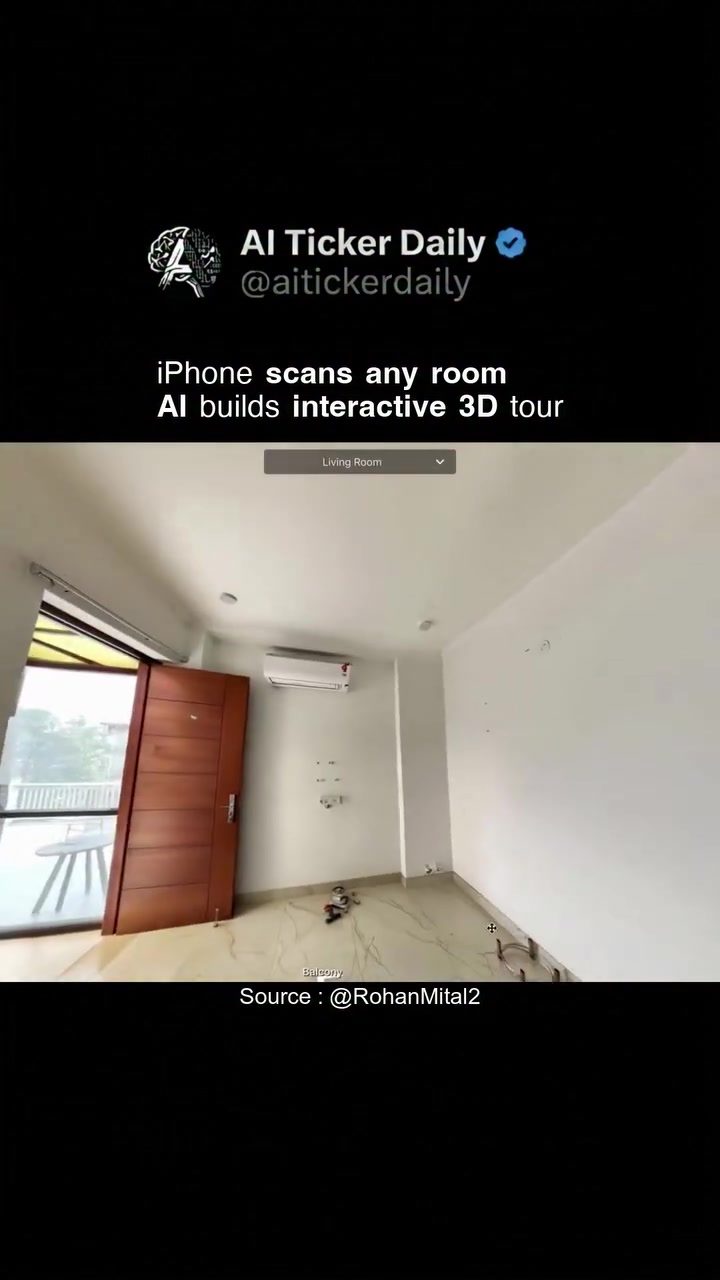
AI-Powered 3D Room Scanning
AI-powered 3D room scanning, is revolutionizing the way we capture and interact with spatial data. Using a smartphone, anyone can now scan a room and generate an interactive 3D tour. This technology leverages the camera on devices like the iPhone to create detailed 3D models, which can be navigated virtually. The iPhone app demonstrates this capability by scanning various rooms, such as a living room and a bedroom, and generating 3D tours that can be viewed on the device.
Why This Matters
Room scanning technology has broad applications, from real estate to interior design and virtual tourism. It allows for immersive experiences without physical presence. In real estate, for example, potential buyers can tour properties from anywhere in the world. Interior designers can visualize and plan spaces more effectively. Virtual tourism can offer a new way to explore destinations, making travel more accessible.
Main Discussion
Technology Behind 3D Room Scanning
The technology behind AI-powered 3D room scanning involves sophisticated algorithms that process images and depth data captured by the smartphone camera. The app, utilizing AI, stitches together these data points to create a comprehensive 3D model. This process, which was once the domain of professional photographers and specialized rigs, is now available to anyone with a smartphone.
The Scanning Process
Here's a breakdown of how it works:
- Capture: Walk through the room while the app captures images and depth data using the smartphone camera. No special equipment is needed.
- Processing: The app processes the captured data in real-time, using AI to generate a 3D model.
- Interactive Tour: The resulting 3D model can be navigated on the smartphone screen. Users can explore the space virtually, moving through the room as if they were physically present.
Applications and Use Cases
The applications of this technology are vast. Let's explore a few key areas:
Real Estate
In real estate, virtual tours have become an essential tool. Buyers can explore properties from the comfort of their own homes, saving time and resources. AI-powered 3D room scanning enhances this experience by providing high-quality, interactive tours that offer a more immersive view of the property.
Interior Design
Interior designers can use 3D room scanning to create detailed plans and visualizations. Clients can see how different elements will fit within a space before any physical changes are made. This not only improves the design process but also helps in winning client approval.
Virtual Tourism
Virtual tourism is another exciting application. Travelers can explore destinations virtually, getting a sense of the layout and atmosphere of a place before they visit. This is particularly useful for planning trips and making informed decisions about travel destinations.
Practical Tips
Using AI-Powered 3D Room Scanning Effectively
To get the most out of AI-powered 3D room scanning, follow these practical tips:
Choosing the Right App
Ensure that the app you use is reliable and has positive reviews. Look for features like real-time processing and high-quality 3D models. For instance, apps that offer interactive tours and easy navigation are preferable.
Lighting and Environment
Ensure that the room is well-lit. Good lighting improves the quality of the 3D model by providing clear and detailed images. Avoid moving objects in the room during the scan, as this can distort the final model.
Optimal Movement
Walk through the room at a steady pace. Avoid sudden stops or changes in direction, as this can affect the accuracy of the scan. Keep the smartphone at a consistent height and angle for the best results.
Important Takeaways
- Accessibility: Anyone with a smartphone can create detailed 3D models of rooms.
- Applications: This technology has wide-ranging applications in real estate, interior design, and virtual tourism.
- Quality and Ease: The resulting 3D models are of high quality and can be navigated easily, providing an immersive virtual experience.
- Cost-Effective: No need for professional equipment or photographers, making it a cost-effective solution.
Conclusion
AI-powered 3D room scanning is transforming the way we capture and interact with spaces. From real estate and interior design to virtual tourism, the applications are vast and impactful. With the right app and proper technique, anyone can create detailed and interactive 3D tours, opening new possibilities for how we experience and design our environments.
Questions readers ask
How does iPhone 3D room scanning work?
iPhone 3D room scanning utilizes the device's camera and AI capabilities to capture spatial data. By moving the iPhone around a room, the app processes images in real-time. This creates a detailed 3D model that users can navigate virtually, offering an immersive experience of the scanned space.
Which iPhone models support 3D room scanning?
The 3D room scanning feature is available on iPhone models equipped with LiDAR scanner technology. This includes the iPhone 12 Pro, iPhone 12 Pro Max, iPhone 13 Pro, iPhone 13 Pro Max, iPhone 14 Pro, and iPhone 14 Pro Max. These models have the necessary hardware to support the AI-powered 3D scanning capabilities.
What are the benefits of using a 3D room scanner app for real estate?
3D room scanner apps offer several benefits for real estate, including the ability to create virtual tours of properties. This allows potential buyers to explore houses from anywhere in the world, saving time and resources. Additionally, 3D models can help highlight unique features and layouts, potentially speeding up the sales process.
Can I use the 3D room scanning feature for interior design purposes?
Absolutely. Interior designers can use this tool to scan rooms and create 3D models for clients, enabling them to visualize proposed changes. The technology helps in making informed decisions about furniture placement, color schemes, and overall design aesthetics without needing to be physically present in the room.
Are there any limitations to using a 3D room scanner app?
While AI-powered 3D room scanning is impressive, it does have some limitations. The quality of the 3D model depends on the lighting conditions and the complexity of the room. Additionally, the app may struggle with very large or highly reflective surfaces. For the best results, ensure the room is well-lit and free of obstructions.
Related deep dives
Similar reads based on topic and creator.




Recent articles
Fresh deep dives from the latest Reels we unpacked.




Comments
Be the first to comment.