Using the iPhone's Camera Control for Seamless Payments
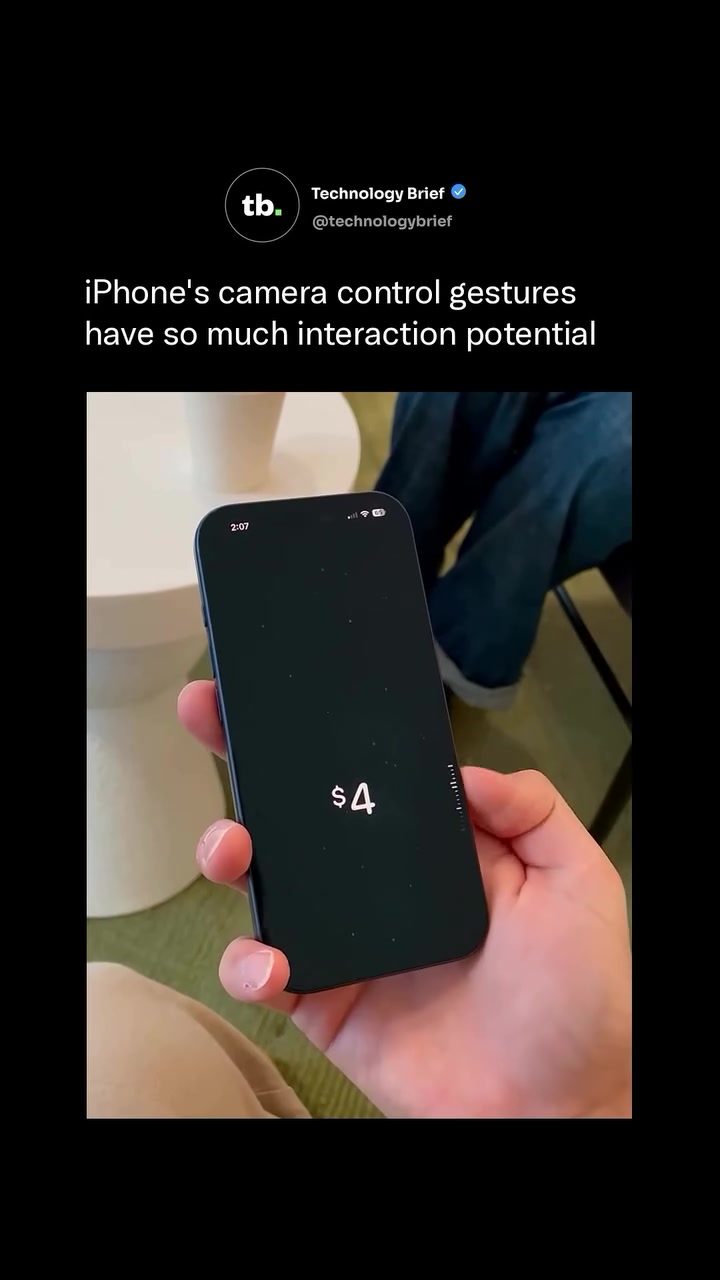
The introduction of Apple Cash and the iPhone 16's Camera Control button have opened up new possibilities for seamless, gesture-based interactions. Imagine being able to send money to a friend with just a few quick gestures and a double-click. This concept, demonstrated by a developer, shows how the iPhone's Camera Control button can be repurposed to create a frictionless payment experience.
Context: The Evolution of Mobile Payments
Mobile payment systems have come a long way, from early apps that required manual entry of recipient details to seamless, app-based transactions. Apple's entry into the mobile payment arena with Apple Cash has further streamlined the process, allowing users to send and receive money directly through their iPhones. The integration of this service with the Wallet app and Messages has made mobile transactions more convenient than ever.
The iPhone 16's Camera Control button is a physical feature designed for photography gestures like swiping and tapping. However, its touch-sensitive surface suggests potential for other uses. The concept demonstrated by this developer leverages this potential, showcasing a new way to perform quick, efficient transactions.
Main Discussion
The Concept: Gesture-Based Payments
The concept involves using the iPhone 16's Camera Control button as a scroll wheel to set a payment amount, then sending the money through Apple Cash with a double-click of the side button. This interaction takes just a few seconds: swipe the Camera Control to dial up the dollar amount, then double-click to confirm and send. The demonstration shows the potential for low-friction, gesture-based payment methods.
How It Works
- Setting the Amount: The Camera Control button acts as a scroll wheel, allowing users to quickly set the payment amount.
- Confirming the Payment: A double-click of the side button confirms and sends the payment.
The Potential of Gesture Support
Dedicated hardware buttons with gesture support, like the iPhone 16's Camera Control button, have a broader potential beyond their original purpose. This concept highlights how such buttons could serve as shortcut controls for various functions, enhancing user interactions and simplifying tasks.
Apple Cash and Its Integration
Apple Cash is already a robust system that enables users to send and receive money directly from the Wallet app or through Messages. Its acceptance at over 85 percent of U.S. retailers underscores its growing popularity and utility.
The Future of Gesture-Based Interactions
While it remains to be seen whether Apple will build something like this natively, the demo illustrates how little friction a payment interaction could realistically have. The concept opens up possibilities for more intuitive and efficient interactions on smartphones.
Practical Tips
If you're an iPhone user looking to streamline your payment processes, consider the following tips:
- Explore Apple Cash: Familiarize yourself with Apple Cash and how it integrates with your Wallet app and Messages. This will help you understand the fundamental process of mobile payments on your iPhone.
- Experiment with Gestures: Take advantage of the iPhone 16's Camera Control button for gestures. Even if it's not currently used for payments, it can enhance your photography experience and give you an idea of how gesture controls work.
- Stay Updated: Keep an eye on updates from Apple. The company is always innovating, and future iOS updates might include new, intuitive features for mobile payments or other interactions.
Important Takeaways
- The iPhone 16's Camera Control button has the potential for more than just photography gestures.
- Gesture-based interactions can significantly enhance the user experience, making tasks like payments quicker and more intuitive.
- Apple Cash is a powerful tool for mobile payments, and its integration with other iPhone features can make transactions seamless.
- The future of mobile interactions is likely to involve more gesture-based controls, simplifying tasks and improving user experience.
Conclusion
The concept of using the iPhone 16's Camera Control button for gesture-based payments is a fascinating glimpse into the future of mobile interactions. By leveraging the touch-sensitive surface of the Camera Control button, this demo shows how little friction a payment interaction could have. This innovative use of hardware buttons could pave the way for more intuitive and efficient interactions on smartphones. As technology continues to evolve, we can expect to see more creative uses of hardware features, making our interactions with devices more seamless and enjoyable.
Questions readers ask
How does the iPhone 16's Camera Control button facilitate money transfers?
The iPhone 16's Camera Control button allows Apple Cash users to send money with a simple double-click, streamlining the process and making mobile transactions more intuitive. This feature enables users to set an amount and send funds quickly without navigating through multiple screens.
Can I send money using the iPhone 16's Camera Control button if I don't have Apple Cash set up?
No, to use the Camera Control button for sending money, you must have Apple Cash set up on your iPhone 16. Apple Cash is the payment method integrated with this feature, allowing for seamless and secure transactions.
What are the steps to send money using the iPhone 16's double-click payment feature?
To send money using the double-click payment feature, first ensure Apple Cash is set up, open the Camera app or a compatible third-party app, and then quickly double-click the Camera Control button. Select the recipient and specify the amount to complete the transaction.
Is there a limit to how much money can be sent using the iPhone 16's Camera Control button?
As of now, there is no specific information on transaction limits for sending money via the Camera Control button, but standard Apple Cash limits apply. These limits typically depend on the user's verification status and can be checked within the Wallet app.
Can I use the iPhone 16's Camera Control button to send money to anyone, or do they need to have an Apple device?
To send money using the iPhone 16's Camera Control button, the recipient must have an Apple device with Apple Cash set up. This ensures a seamless and secure transaction process, as both parties need to be within the Apple Cash ecosystem.
What if I accidentally double-click the Camera Control button?
If you accidentally double-click the Camera Control button, the feature is designed to prevent accidental transactions. You will need to confirm the payment amount and the recipient before the transfer is completed, adding an extra layer of security to the process.
Related deep dives
Similar reads based on topic and creator.




Recent articles
Fresh deep dives from the latest Reels we unpacked.




Comments
Be the first to comment.