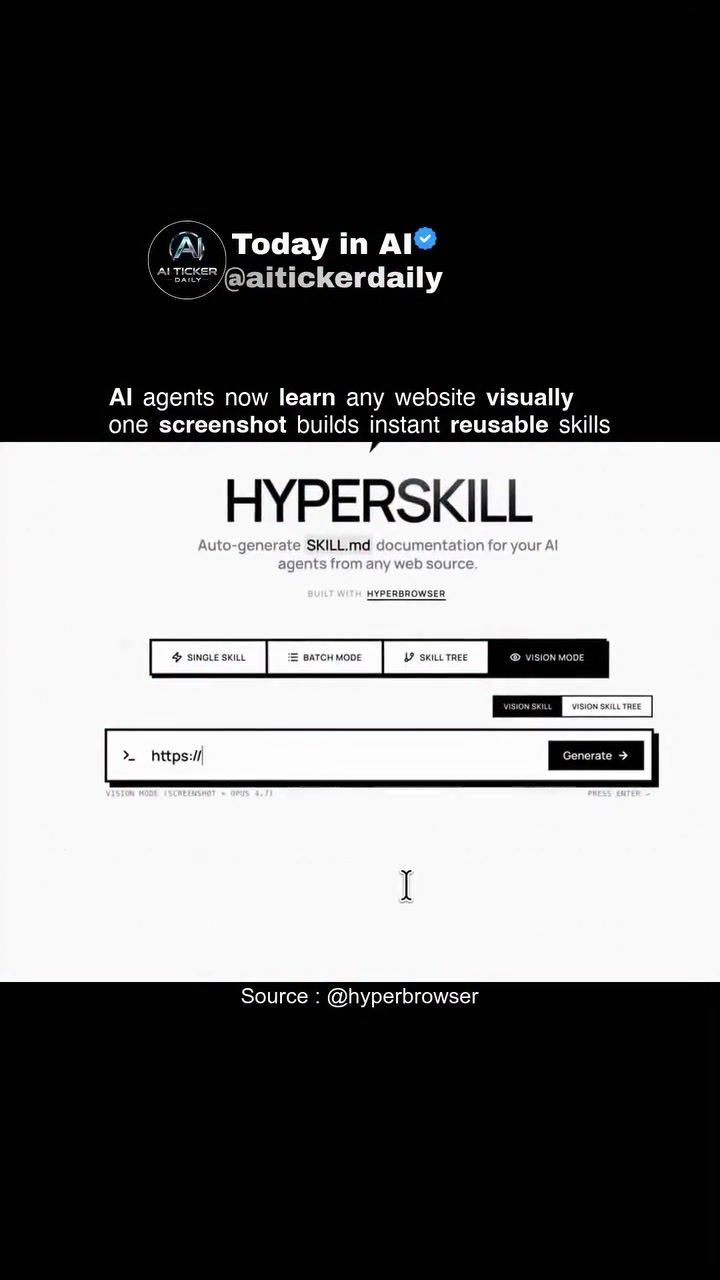
AI Skill Generation: Automating Documentation for AI Agents
AI Skill Generation tools like Hyperbrowser represent a significant advancement in automating the creation of reusable skills for AI agents. This software empowers users to generate comprehensive SKILL.md documentation from any website using a single screenshot. The workflow is straightforward: capture a screenshot of a webpage, and the tool transforms the layout and UI cues into a skill that AI agents can instantly utilize.
Why This Matters
The ability to automate the documentation process for AI agents is a game-changer in the field of AI development. By streamlining the creation of reusable skills, developers can significantly reduce the time and effort required to train AI agents, making the process more efficient and scalable. This is particularly useful for projects that involve web scraping, testing, and browser automation, where manual documentation can be time-consuming and error-prone.
Main Discussion
Hyperbrowser: The Powerhouse Behind AI Skill Generation
Hyperbrowser is the core technology behind the AI Skill Generation process. It's a cloud browser infrastructure service designed specifically for AI agents. The service provides on-demand headless browsers via API, which can be used for web scraping, testing, browser automation, and AI agent web interactions. By leveraging Puppeteer/Playwright in the cloud, Hyperbrowser implements browser automation, making it a versatile tool for a wide range of applications.
Single Skill Generation
One of the key features of Hyperbrowser is its ability to generate single skills from a single screenshot. This means that for any webpage, users can create a reusable skill that AI agents can use to interact with that specific page. This is particularly useful for tasks that require frequent updates or changes, as the skill can be quickly regenerated and reused.
Batch Mode and Skill Tree
In addition to single skill generation, Hyperbrowser also offers batch mode and skill tree functionalities. Batch mode allows users to generate multiple skills simultaneously, which is ideal for large-scale projects or when multiple pages need to be documented. The skill tree feature, on the other hand, organizes skills in a hierarchical structure, making it easier to manage and navigate complex documentation.
Vision Skills and Vision Skill Trees
Hyperbrowser's vision skills and vision skill trees take the automation a step further. These features enable AI agents to learn from visual cues on a webpage, such as layout and UI elements. This means that the agents can understand and interact with webpages in a more intuitive and human-like manner, enhancing their overall effectiveness.
Practical Tips
When using Hyperbrowser for AI Skill Generation, there are several practical tips to keep in mind:
-
Verify Accuracy: Always verify the accuracy of the generated skills on your own targets before relying on them in production. This ensures that the skills are reliable and perform as expected.
-
Open-Source Framing: Utilize the open-source framing provided in the post to understand the underlying mechanisms and customize the skills according to your specific needs.
-
Batch Processing: For large-scale projects, make use of the batch mode to generate multiple skills simultaneously, saving time and effort.
-
Skill Tree Organization: Organize your skills using the skill tree feature to maintain a clear and structured documentation process, especially for complex projects.
Important Takeaways
-
Efficiency: AI Skill Generation tools like Hyperbrowser significantly improve the efficiency of AI agent documentation by automating the process.
-
Versatility: The software supports a wide range of applications, from web scraping and testing to browser automation, making it a versatile tool for developers.
-
Customization: The open-source framing and customizable features allow users to tailor the skills to their specific requirements, enhancing the overall effectiveness of the AI agents.
Conclusion
AI Skill Generation, powered by Hyperbrowser, offers a revolutionary approach to automating the documentation process for AI agents. By leveraging a single screenshot to generate reusable skills, developers can save time and effort, making the process more efficient and scalable. Whether you're working on a small project or a large-scale application, Hyperbrowser's features like single skill generation, batch mode, and skill tree organization provide a comprehensive solution for automating AI agent documentation.
Questions readers ask
How does Hyperbrowser generate AI skills from screenshots?
Hyperbrowser utilizes AI to analyze the layout and UI elements of a webpage from a screenshot. It then transforms these visual cues into functional skills that AI agents can use, effectively automating the skill generation process for web scraping, testing, and automation projects.
What types of projects can benefit from Hyperbrowser's AI skill generation?
Hyperbrowser is particularly useful for web scraping, AI-powered web testing, and automation projects. By generating reusable AI skills from screenshots, it enhances the efficiency and scalability of these projects, making it easier to train AI agents for various web-based tasks.
Can Hyperbrowser automate the documentation process for AI agents?
Yes, Hyperbrowser automates the documentation process by generating comprehensive SKILL.md documentation from a single screenshot of a webpage. This eliminates the need for manual documentation, saving developers significant time and effort.
What are the key steps in using Hyperbrowser for AI skill generation?
The process is simple: capture a screenshot of the webpage you want to analyze. Hyperbrowser then processes this screenshot, transforming the visual layout into a reusable AI skill that can be immediately utilized by AI agents.
How does Hyperbrowser improve the efficiency of AI agent training?
By automating the creation of reusable skills from screenshots, Hyperbrowser reduces the manual work required to train AI agents. This streamlined process allows developers to focus on other tasks, enhancing overall productivity and project scalability.
What makes Hyperbrowser different from other web scraping tools?
Hyperbrowser stands out because it generates AI skills from screenshots, which is a unique approach compared to traditional web scraping tools. This capability allows for more intuitive and efficient automation of web-based tasks, as it directly translates visual layouts into functional skills.
Can Hyperbrowser be used for visual web layout analysis?
Yes, Hyperbrowser is designed to perform visual web layout analysis. It interprets the structure and elements of a webpage from a screenshot and converts this information into actionable skills for AI agents, making it a powerful tool for AI web automation and testing.
Related deep dives
Similar reads based on topic and creator.




Recent articles
Fresh deep dives from the latest Reels we unpacked.




Comments
Be the first to comment.