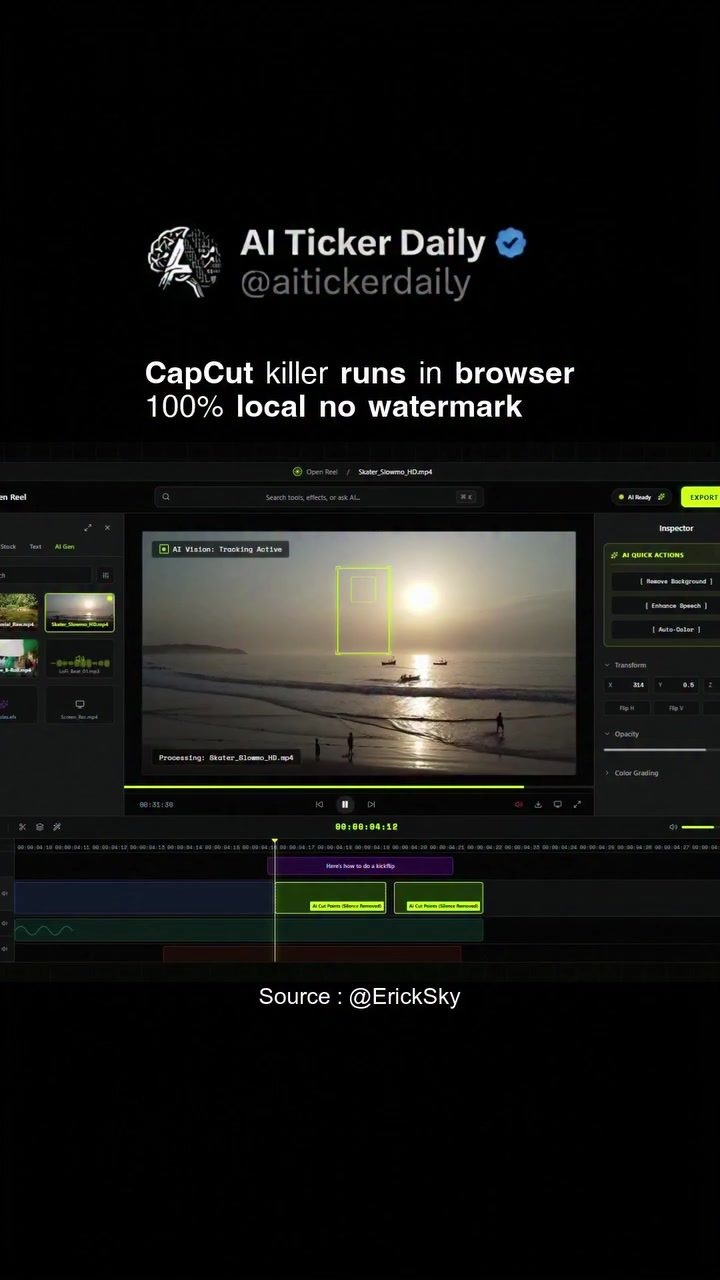
CapCut: Browser-Based Video Editing with AI Features
CapCut is a versatile video editing software that operates directly within a web browser, offering a range of powerful features designed to simplify the editing process. This software is particularly notable for its AI-powered tools and local processing capabilities, which enhance both functionality and user convenience.
Context: Why CapCut Matters
The rise of video content has made video editing software an essential tool for creators. Traditional video editing software often requires substantial hardware resources and can be complex to navigate. CapCut addresses these challenges by providing an accessible, user-friendly interface that operates entirely within a browser. This means you can edit videos on virtually any device with an internet connection, without the need for high-end hardware or extensive software installations.
CapCut's browser-based approach is particularly beneficial for those who prioritize privacy and control over their data. Unlike many cloud-based editing tools, CapCut processes all video edits locally on your machine, ensuring that your footage is never uploaded to an external server. This feature is crucial for users who handle sensitive or proprietary content and want to avoid potential security risks.
Main Discussion
AI-Powered Features
CapCut stands out with its suite of AI-powered features, designed to streamline the editing process. These tools include background removal, speech enhancement, and various quick actions that can automate repetitive tasks.
Background Removal
The background removal tool is particularly useful for creating professional-looking videos. Whether you're looking to isolate a subject from a busy background or create a transparent overlay, this feature allows for precise and efficient editing. The AI-driven technology ensures that the edges of the subject are cleanly extracted, even in complex scenes.
Speech Enhancement
Clear audio is crucial for engaging video content. CapCut’s speech enhancement feature uses AI to improve the quality of recorded audio, making it easier to understand and more pleasant to listen to. This is especially valuable for podcasts, interviews, and any content where dialogue is a key component.
Local Processing
One of the most compelling aspects of CapCut is its local processing capability. This means that all editing tasks are performed directly on your machine, rather than being sent to a remote server. This not only enhances privacy but also reduces latency and potential downtime, allowing for a smoother editing experience.
Watermarks and Licensing
CapCut is free to use and comes with an MIT license, making it a cost-effective solution for creators of all levels. Additionally, the software does not add watermarks to your videos, ensuring a professional finish without any branding overhead.
Performance in Context
In this tutorial, CapCut demonstrates its ease of use with a clean, intuitive interface. The screen recording shows the software in action, highlighting key features such as vision tracking, background removal, and speech enhancement. The tutorial emphasizes the convenience of using CapCut directly in a browser, making it accessible to a wide range of users, from beginners to experienced editors.
Practical Tips
Getting Started with CapCut
To begin using CapCut, simply open your preferred web browser and navigate to the CapCut website. There's no need for a complex installation process; you can start editing immediately. Upload your footage and explore the various editing tools available. The interface is designed to be user-friendly, with intuitive controls and clear labels for each feature.
Maximizing AI Features
Make the most of CapCut’s AI capabilities by experimenting with different tools. For example, try using the background removal feature on various types of footage to see how it handles different subjects and backgrounds. Similarly, test the speech enhancement tool on different audio clips to understand its effectiveness in various scenarios.
Ensuring Privacy and Security
Since CapCut processes all edits locally, it’s crucial to ensure that your device is secure. Keep your system updated with the latest security patches and consider using antivirus software to protect your data. By doing so, you can take full advantage of CapCut’s privacy benefits without compromising on security.
Building an Editing Workflow
CapCut's quick actions and AI-powered tools can significantly speed up your editing workflow. Take the time to familiarize yourself with these features and integrate them into your routine. For instance, use the AI vision tracking for consistently smooth movements, and enhance speech for clear, professional audio. Over time, you’ll develop a streamlined process that saves time and produces high-quality results.
Important Takeaways
CapCut offers a robust set of features that make it a standout choice for video editing. Its AI-powered tools, local processing, and browser-based interface provide a flexible and secure editing environment. The software's MIT license and lack of watermarks make it an attractive option for both hobbyists and professionals.
Conclusion
CapCut redefines the video editing experience with its user-friendly, browser-based platform and powerful AI features. Whether you're a beginner or an experienced editor, CapCut provides the tools and flexibility needed to create high-quality videos efficiently. By keeping all processing local and ensuring no watermarks, CapCut prioritizes both user convenience and data privacy. Explore the capabilities of CapCut and elevate your video editing to new heights.
Questions readers ask
Can I use CapCut without downloading any software?
Yes, CapCut is a browser-based video editor, so you can access and use it directly from your web browser without the need for any downloads or installations. This makes it convenient to use on various devices, including Chromebooks and other computers with limited storage.
What are some key AI features offered by CapCut?
CapCut provides a variety of AI-powered tools that simplify video editing. These include automatic scene detection, smart trimming, and AI-powered effects. These features help users create polished videos with minimal effort, making the editing process more efficient.
How does CapCut ensure the privacy of my videos?
CapCut processes videos locally within your browser, meaning your data never leaves your device. This local processing ensures that your content remains private and secure, giving you full control over your data.
Can I edit videos on CapCut without worrying about watermarks?
Yes, CapCut allows you to edit and export videos without watermarks. However, some features may be limited in the free version. You can upgrade to a premium subscription to access the full range of features without any restrictions or watermarks.
Is CapCut suitable for beginners in video editing?
Absolutely. CapCut is designed to be user-friendly, with an intuitive interface that makes it easy for beginners to start editing videos. The AI-powered tools further simplify the process, helping new users achieve professional results quickly.
What devices can I use to access CapCut?
CapCut can be accessed on any device with a web browser, including Windows, Mac, Chromebooks, and even mobile devices. Whether you're at home or on the go, you can edit videos seamlessly with CapCut.
Does CapCut provide any tutorials for new users?
Yes, CapCut offers a range of tutorials and guides to help new users get started. These resources cover everything from basic editing techniques to advanced AI features, ensuring that users can make the most of the software right from the start.
Related deep dives
Similar reads based on topic and creator.




Recent articles
Fresh deep dives from the latest Reels we unpacked.




Comments
Be the first to comment.