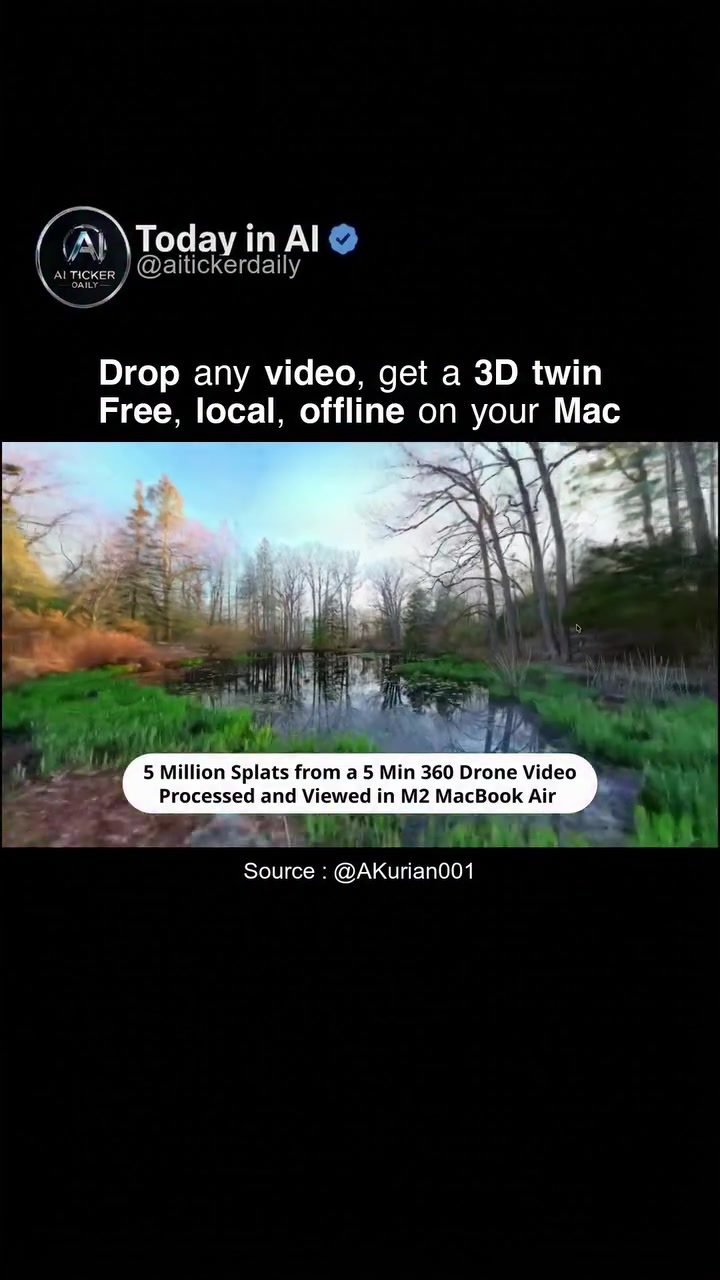
AI 3D Video Conversion
AI 3D video conversion has revolutionized the way we interact with digital environments. With AirVis Studio, turning any video into a walkable digital twin on your Mac is now a straightforward process. This software, developed by aitickerdaily, allows users to create 3D twins from regular or 360° footage, offering a local, private, and offline experience.
Why This Matters
The ability to convert videos into 3D digital twins has significant implications for various fields, including real estate, interior design, and virtual tourism. Traditional methods often required cloud uploads, subscriptions, and waiting on a server, which can be inconvenient and privacy-invasive. AirVis Studio eliminates these barriers by operating locally and offline on a Mac, ensuring that your spaces stay private.
The Advantages of Local Processing
Local processing means that all data remains on your device, providing an extra layer of security and privacy. This is particularly important for users who deal with sensitive information or prefer to keep their data offline. Additionally, the software's offline capabilities free users from the need for a constant internet connection, making it accessible from anywhere.
From 360° Footage to Walkable Environments
The software processes both regular and 360° drone footage, allowing users to create highly detailed 3D environments. For instance, a 5-minute 360° drone video can generate 5 million splats, resulting in a highly detailed and immersive 3D model. This detailed approach ensures that the digital twin closely resembles the real-world environment, making it ideal for applications where accuracy is crucial.
Main Discussion
How AirVis Studio Works
AirVis Studio uses Gaussian Splats to build 3D models. This technique involves slicing the video into numerous points in 3D space, known as splats, which are then rendered to create the 3D environment. The process is initiated by dropping a video into the software, which then processes the footage and allows users to view and share the resulting 3D twin. The software is designed to be user-friendly, enabling even those without technical expertise to create high-quality 3D models.
Creating and Managing Workspaces
One of the key features of AirVis Studio is the ability to create and manage workspaces. Users can specify the destination for their 3D models, ensuring that all files are organized and easily accessible. The workspace interface allows users to name their projects and store them in designated folders, such as ~/Documents/AirVis/.
Viewing and Sharing
Once the 3D model is created, users can publish it in AirVis and view it on mobile devices or in VR. This feature adds a layer of versatility, allowing users to experience their 3D environments in different ways. By supporting VR, AirVis Studio enhances the immersive experience, making it an ideal tool for virtual tours and remote inspections.
Compatibility and Future Enhancements
Currently, AirVis Studio is available for macOS, with Windows compatibility coming soon. This ensures that a broad range of users can take advantage of the software's capabilities, regardless of their operating system. The upcoming Windows version will expand the software's reach, making it accessible to a larger audience.
Practical Tips
-
Choose High-Quality Footage: The quality of the input video significantly impacts the final 3D model. Use high-resolution, stable footage for the best results.
-
Organize Your Workspaces: Create a systematic naming and storage system for your workspaces to keep your projects organized and easily accessible.
-
Experiment with Different Environments: Try converting videos from various settings, such as indoor and outdoor spaces, to see the versatility of the software.
-
Utilize VR for Immersion: For a more immersive experience, use VR to view your 3D models, allowing you to walk through and interact with your digital twins.
-
Stay Updated: Keep an eye on software updates and new features, especially the upcoming Windows version, to take full advantage of AirVis Studio's capabilities.
Important Takeaways
-
Privacy and Security: AirVis Studio's local and offline processing ensures that your data remains private and secure, providing peace of mind for users handling sensitive information.
-
Versatility and Accessibility: The software's ability to process both regular and 360° footage, as well as its cross-platform compatibility, makes it a versatile tool for a wide range of applications.
-
User-Friendly Interface: The intuitive interface and straightforward workflow allow users to create and manage 3D models easily, making the software accessible to beginners and professionals alike.
-
Detailed and Immersive Models: The use of Gaussian Splats ensures that the resulting 3D models are highly detailed and immersive, offering a close-to-reality experience.
-
Future-Proofing: With the upcoming Windows version, AirVis Studio is poised to become an essential tool for anyone looking to convert videos into walkable digital twins.
Conclusion
AI 3D video conversion has opened up new possibilities for digital twins, and AirVis Studio is at the forefront of this technology. By offering a local, private, and offline solution, the software provides users with a secure and convenient way to create, view, and share 3D environments. Whether you're a real estate professional, interior designer, or simply curious about the technology, AirVis Studio offers a powerful and versatile tool for turning videos into walkable digital twins.
Questions readers ask
What is a 3D digital twin and how is it created from a video using AirVis Studio on a Mac?
A 3D digital twin is an interactive, three-dimensional replica of a real-world environment. Using AirVis Studio on a Mac, you can create a 3D digital twin by uploading your video footage (either regular or 360°) into the software which utilizes advanced AI algorithms to convert the video into a walkable 3D environment. This process allows users to explore the space virtually and offers a unique and immersive experience.
Can AirVis Studio convert 360° videos into 3D digital twins on a Mac?
Yes, AirVis Studio is fully equipped to convert 360° videos into 3D digital twins. This feature is particularly useful for creating immersive virtual tours, as it allows users to capture and recreate a full 360-degree view of an environment. The conversion process is efficient, and the results are high-quality, providing a seamless experience for users.
What are the privacy benefits of using Airvis Studio for 3D video conversion on a Mac?
AirVis Studio offers a significant privacy advantage by performing 3D video conversion locally and offline on your Mac. This means that your video footage never leaves your device, eliminating the need for cloud uploads and reducing the risk of data breaches or unauthorized access. This is particularly important for sensitive or proprietary content.
What types of fields can benefit from creating 3D digital twins from videos?
Several fields can greatly benefit from creating 3D digital twins from videos. Real estate professionals can offer virtual tours of properties, interior designers can show clients different layouts and designs, and virtual tourism can provide immersive experiences of remote locations. Additionally, industries like architecture and construction can use 3D digital twins for project planning and visualization.
How does offline 3D video conversion work in AirVis Studio?
Offline 3D video conversion in AirVis Studio means that the entire conversion process takes place directly on your Mac, without the need for an internet connection. This local processing ensures that your data remains private and secure, and it also allows for faster processing times. The software utilizes advanced AI algorithms to convert the video into a 3D digital twin efficiently and effectively.
Can I convert my 3D video to a walkable digital twin from any video format?
AirVis Studio supports a wide range of video formats, making it versatile for users. You can convert both regular and 360° videos into walkable 3D digital twins, ensuring that you can use footage from various sources and formats. Always check the supported formats in the software documentation or on the official website to ensure compatibility.
What is the process for beginners to create a 3D digital twin from a video using AirVis Studio on a Mac?
Getting started with AirVis Studio is straightforward. Begin by importing your video footage into the software. The user-friendly interface guides you through the conversion process, which involves selecting the desired settings and running the AI-driven conversion. Once complete, you can explore and interact with your 3D digital twin, navigating through the recreated environment seamlessly.
Related deep dives
Similar reads based on topic and creator.




Recent articles
Fresh deep dives from the latest Reels we unpacked.




Comments
Be the first to comment.