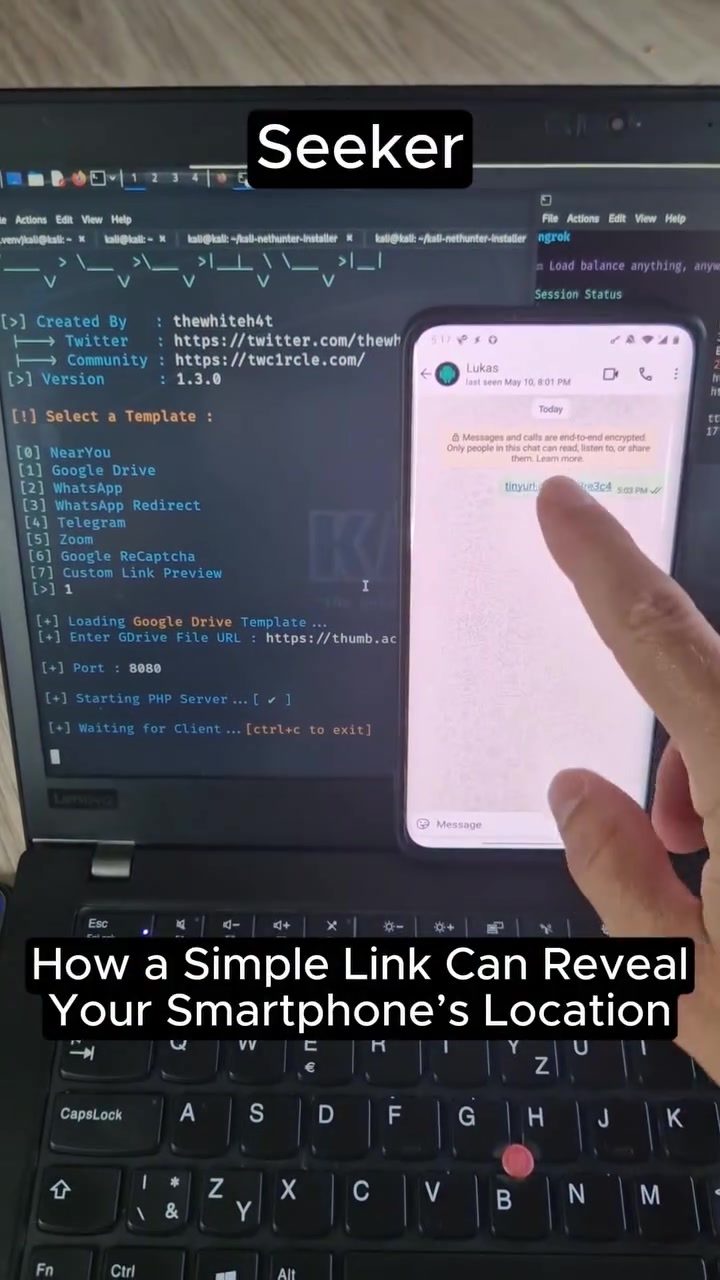
Can Your Smartphone Be Tracked Without Installing Malicious Software?
Yes, it is possible for your smartphone to be tracked without installing any malicious apps. This can be achieved through simple links that exploit the way smartphones interact with certain online services. Here’s how it works, the risks involved, and how to protect yourself.
Why This Matters
Understanding how location tracking can occur without explicit malicious apps is crucial for maintaining privacy and security. With the rise of location-based services and the ease of sharing data, it’s important to be aware of the potential risks and how to mitigate them.
How Simple Links Can Reveal Your Location
The Mechanism Behind Location Tracking
A script called 'seeker' can retrieve your location data by utilizing a terminal interface like Kali Linux. This script interacts with Google Maps to fetch precise location information. The process involves:
- Link Generation: A maliciously crafted link is sent to the targeted user.
- Location Request: When the user clicks on the link, the device’s browser sends a request to Google Maps.
- Data Retrieval: The 'seeker' script captures this data, which includes the user’s latitude, longitude, and other relevant information.
What Happens When You Click the Link
When you click on a specially crafted link, your smartphone’s browser will send a request to Google Maps, including your device’s location. This data is then captured and displayed in the terminal interface, revealing your exact location. The process is seamless and often goes unnoticed by the user.
Example of Location Data Retrieved
For instance, if you receive a link and click on it, the terminal interface might display:
Continent : Asia
Country : Japan
Region : Tokyo
City : Shibuya
Latitude : X
Longitude : X
The Role of Kali Linux and Terminal Interface
Kali Linux is a popular operating system used for penetration testing and security auditing. Its terminal interface allows for the execution of various scripts, including 'seeker,' which can retrieve location data. The terminal display crucial information such as:
Seeker
root@kali: ~/seeker
The Script 'Seeker'
The 'seeker' script is designed to access Google Maps and retrieve location data. Here’s a breakdown of how it works:
- Template Selection: The script offers different templates like 'NearYou,' 'Google Drive,' and 'Google ReCaptcha.'
- Link Input: The user is prompted to enter a Google Maps URL.
- Data Retrieval: The script then retrieves and saves the location data, which can be viewed in a terminal display.
How Easy Is It to Set Up?
Setting up the 'seeker' script is straightforward. It involves:
- Downloading the Script: Obtaining the 'seeker' script from a trusted source.
- Running the Script: Executing the script in a terminal interface.
- Entering the URL: Inputting the relevant Google Maps URL to initiate the data retrieval process.
The setup process is relatively simple, requiring only basic knowledge of terminal commands and scripting.
Practical Tips for Preventing Location Tracking
Reviewing Browser Permissions
One of the most effective ways to prevent location tracking is by reviewing and managing your browser permissions. Here’s how:
- Access Browser Settings: Open your browser settings.
- Location Permissions: Navigate to the location permissions section.
- Disable Unnecessary Permissions: Turn off location services for websites that do not need access to your location.
Avoiding Suspicious Links
Another crucial tip is to avoid clicking on random or suspicious links. These links can be craftily designed to exploit your device’s permissions and retrieve your location data. Always be cautious of:
- Unknown Sources: Avoid clicking on links from unknown or untrusted sources.
- Unexpected Emails: Be wary of emails or messages that contain unexpected links.
- Phishing Attempts: Recognize and avoid phishing attempts that can lead to malicious websites.
Important Takeaways
- Simple Links Can Track You: It’s possible for your smartphone to be tracked by simply clicking on a malicious link.
- Review Permissions: Regularly review and manage your browser permissions to prevent unauthorized access to your location data.
- Be Cautious: Avoid clicking on random or suspicious links to minimize the risk of being tracked.
- Use Trusted Tools: If you need to run scripts like 'seeker,' ensure they are from trusted sources and understand the risks involved.
Conclusion
Smartphones are powerful devices that can be tracked without installing malicious apps. By understanding how this tracking works and taking proactive measures, you can protect your privacy and security. Always be cautious of the links you click and review your browser permissions regularly. By staying informed and vigilant, you can minimize the risks and enjoy the benefits of technology without compromising your personal information.
Questions readers ask
What is the 'seeker' script and how does it work?
The 'seeker' script is a tool used by hackers to exploit simple links and retrieve your location data. It works by leveraging the way smartphones interact with online services, such as Google Maps, to pinpoint your precise location without needing to install any software on your device.
Can hackers track my smartphone without any physical access?
Yes, hackers can track your smartphone without any physical access to your device. By sending you a specially crafted link, they can exploit vulnerabilities in how your smartphone handles certain online services, allowing them to extract your location data.
What should I do if I suspect my phone has been tracked through a link?
If you suspect your phone has been tracked through a link, immediately delete the suspicious link and avoid clicking on any similar links in the future. Additionally, review your privacy settings and consider using tools that can help monitor and alert you to any unusual activity on your device.
How can I protect my smartphone from being tracked via simple links?
To protect your smartphone from being tracked via simple links, be cautious about clicking on unfamiliar or suspicious links, even if they appear to come from trusted sources. Ensure your device's software is up-to-date and consider using privacy-focused browsers and apps that offer enhanced security features.
What role does Google Maps play in smartphone tracking?
Google Maps can be exploited by hackers to track your smartphone. The 'seeker' script uses Google Maps to pinpoint your location by exploiting how the service interacts with your device, making it a significant tool in the hands of cybercriminals.
Is there a way to determine if a link is safe before clicking on it?
While there is no foolproof method to determine if a link is safe, you can take several precautions. Hover over the link to see the URL destination, use link-checking tools, and be wary of links that come from unknown or unverified sources. If in doubt, avoid clicking the link altogether.
Related deep dives
Similar reads based on topic and creator.




Recent articles
Fresh deep dives from the latest Reels we unpacked.




Comments
Be the first to comment.