AI 3D Model Editing with GPT Image 2
AI 3D model editing is revolutionizing the way designers and engineers interact with 3D geometries. GPT Image 2, developed by AI Ticker, is at the forefront of this transformation, offering native mesh editing capabilities that allow users to steer 3D geometry with conversational edits. This capability goes beyond generating static images, enabling real-time modifications to 3D models through text prompts.
Why This Matters
In the fast-evolving world of 3D modeling, the ability to make precise and dynamic edits is crucial. Traditional methods often involve complex software and a steep learning curve. GPT Image 2 simplifies this process by allowing users to edit 3D models using natural language commands. This not only speeds up the design process but also makes it more accessible to those without extensive training in 3D modeling software.
Main Discussion
Introducing GPT Image 2
GPT Image 2 is designed to support native mesh editing, a feature that sets it apart from other 3D modeling software. Instead of relying on static image generation, GPT Image 2 allows users to make conversational edits to 3D models. This means that users can describe the changes they want to make, and the software will execute those changes in real time.
Real-Time 3D Model Editing
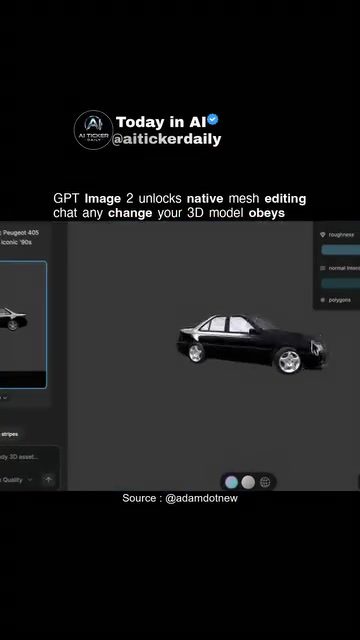
One of the standout features of GPT Image 2 is its ability to modify 3D models in real time. This capability is demonstrated by adding objects like surfboards and roof racks to a car model. The software dynamically updates the 3D model based on user instructions, making the editing process intuitive and efficient. This real-time editing feature is particularly useful for designers who need to make quick adjustments to their models.
Conversational Edits
The conversational editing feature of GPT Image 2 is a game-changer. Users can input text prompts to make changes to their 3D models. For example, the software can add a surfboard and a roof rack to a Peugeot 405 M16 model simply by following a chat command. This feature allows for a more natural and intuitive way of interacting with 3D models, making the design process more seamless and less cumbersome.
Practical Tips
Getting Started with GPT Image 2
To get started with GPT Image 2, users need to input their 3D model into the software. The software supports a variety of file formats, making it compatible with most 3D modeling tools. Once the model is loaded, users can begin making edits using text prompts. It's important to note that the fidelity and topology limits of the edits can vary depending on the specific model and the complexity of the edits.
Best Practices for Editing
When using GPT Image 2, it's essential to start with a high-quality 3D model. The software performs best with models that have a high level of detail and a robust topology. This ensures that the edits made using text prompts are accurate and maintain the integrity of the original model. Additionally, users should experiment with different text prompts to see how the software responds. This will help them understand the capabilities and limitations of the software.
Important Takeaways
The Evolution of 3D Modeling
AI 3D model editing is transforming the way designers and engineers work with 3D geometries. The introduction of GPT Image 2 marks a significant step forward in this evolution, offering users a more intuitive and efficient way to edit 3D models. The ability to make real-time edits and use conversational commands sets GPT Image 2 apart from traditional 3D modeling software.
Future Possibilities
The future of 3D modeling looks bright with advancements like GPT Image 2. As the technology continues to evolve, we can expect to see more sophisticated and intuitive editing tools. These advancements will make 3D modeling more accessible to a wider range of users, from professional designers to hobbyists. The ability to make edits using natural language commands opens up new possibilities for creativity and innovation in the field of 3D modeling.
User Experience
The user experience with GPT Image 2 is designed to be as seamless and intuitive as possible. The software's ability to modify 3D models in real-time and respond to text prompts makes it a powerful tool for designers. The conversational editing feature allows users to make changes to their models quickly and efficiently, saving time and reducing the complexity of the design process.
Conclusion
AI 3D model editing with GPT Image 2 is a significant advancement in the world of 3D modeling. The software's ability to make real-time edits and respond to conversational commands makes it a valuable tool for designers and engineers. As the technology continues to evolve, we can expect to see even more innovative features and capabilities, further enhancing the user experience and opening up new possibilities for creativity and innovation in the field of 3D modeling.
Questions readers ask
How does GPT Image 2 simplify the 3D modeling process?
GPT Image 2 simplifies 3D modeling by enabling users to make real-time edits using natural language commands. This conversational approach eliminates the need for complex software knowledge, making the process more intuitive and efficient.
Can I use GPT Image 2 if I don't have extensive 3D modeling experience?
Absolutely. GPT Image 2 is designed to be user-friendly, even for those without extensive 3D modeling experience. By using natural language commands, it lowers the barrier to entry and allows beginners to create and modify 3D models with ease.
What are the key features of GPT Image 2 in terms of 3D model editing?
GPT Image 2 offers native mesh editing capabilities, allowing users to manipulate 3D model geometries through text prompts. This feature enables real-time modifications, making the design process more dynamic and interactive.
How does GPT Image 2 enhance the accessibility of 3D modeling?
GPT Image 2 enhances accessibility by providing a conversational interface for 3D model editing. Instead of relying on complex software, users can make precise edits using simple text commands, making the 3D modeling experience more approachable for a broader audience.
What makes GPT Image 2 stand out from traditional 3D modeling software?
GPT Image 2 stands out by offering a unique, chat-based approach to 3D design. Unlike traditional software that often requires a steep learning curve, GPT Image 2 allows users to interact with 3D models using natural language, making the editing process more intuitive and user-friendly.
Can GPT Image 2 be used for professional 3D modeling projects?
Yes, GPT Image 2 is a powerful tool for professional projects. Its ability to make precise, real-time edits using natural language commands can significantly speed up the design process, making it valuable for designers and engineers working on complex 3D models.
How does GPT Image 2 ensure precise and dynamic edits to 3D models?
GPT Image 2 ensures precise and dynamic edits by allowing users to input detailed text prompts that directly manipulate the 3D model's geometry. This conversational editing method provides a high level of control, enabling users to make exact changes in real-time.
Related deep dives
Similar reads based on topic and creator.




Recent articles
Fresh deep dives from the latest Reels we unpacked.




Comments
Be the first to comment.