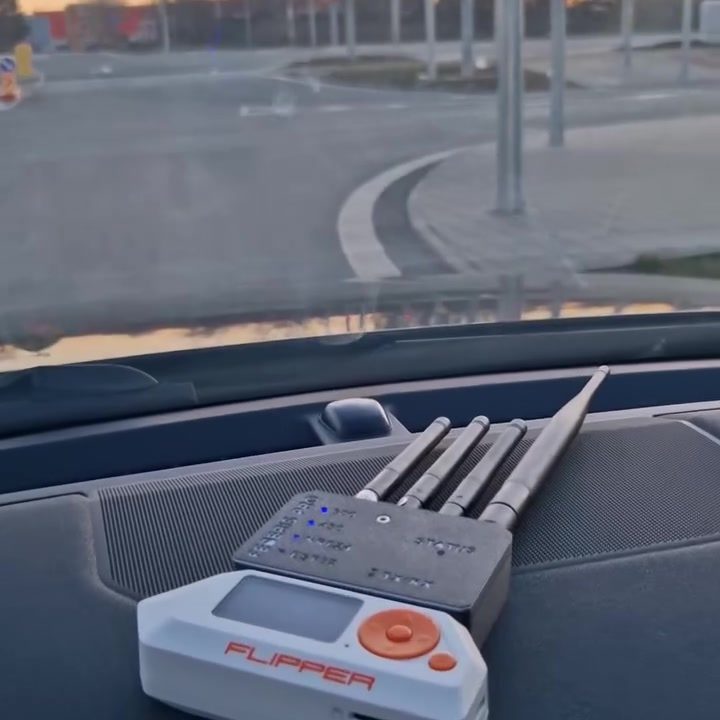
Flipper Zero Device Demo
The Flipper Zero is a versatile multi-tool device designed for mobile hacking and various wireless interactions. It's a handheld tool that allows users to manage and manipulate a wide range of wireless communication protocols.
Context / Why this matters
In today's interconnected world, having a device like the Flipper Zero can be invaluable for both professionals and enthusiasts. It's not just about hacking; it's about understanding and interacting with the wireless technologies that surround us. The Flipper Zero can be a powerful tool for penetration testing, exploring wireless protocols, and even educational purposes. Its compact size and portability make it ideal for on-the-go use, as seen in the demo where it’s placed conveniently on a car dashboard.
Main discussion
What is the Flipper Zero?
The Flipper Zero is a portable device that acts as a Swiss Army knife for wireless interactions. It features multiple antennas to handle various radio frequencies, allowing it to interact with a wide range of wireless devices and systems. This includes RFID, NFC, IR, and more. The device has a user-friendly screen that displays information and allows for easy navigation through its various functions.
Key Features
One of the standout features of the Flipper Zero is its versatility. It can be used to clone keycards, emulate remote controls, and even interact with garage door openers. The device comes with a range of built-in scripts and tools to assist with these tasks, making it accessible even for users who may not have extensive technical knowledge.
The Flipper Zero also supports community-driven development. Users can create and share their own scripts and tools, expanding the device's capabilities and utility. This collaborative approach ensures that the device remains up-to-date with the latest wireless protocols and technologies.
Use Cases
The Flipper Zero has a wide range of use cases, from penetration testing to everyday hacking. It can be used to test the security of wireless systems, identify vulnerabilities, and even bypass security measures. For example, in a car setting, the device can be used to test the security of keyless entry systems, ensuring that they are secure from potential threats.
Practical tips
Getting Started with Flipper Zero
If you're new to the Flipper Zero, the first step is to familiarize yourself with its interface and basic functions. The device comes with a user manual that provides a comprehensive overview of its features and capabilities. Take some time to read through the manual and experiment with the various tools and scripts that come pre-installed.
Customizing the Flipper Zero
One of the best things about the Flipper Zero is its customizability. You can create and share your own scripts and tools, allowing you to tailor the device to your specific needs. The Flipper Zero community is active and supportive, making it a great resource for learning and sharing new scripts and tools.
Best Practices
When using the Flipper Zero, it's important to follow best practices to ensure that you're using the device responsibly and ethically. Always obtain permission before testing or interacting with wireless systems, and be mindful of the potential impacts of your actions.
Important takeaways
The Flipper Zero is a powerful and versatile device that can be used for a wide range of wireless interactions. Its portability, customizability, and extensive feature set make it an invaluable tool for both professionals and enthusiasts. Whether you're a penetration tester, a hobbyist, or just someone interested in understanding wireless technologies, the Flipper Zero has something to offer.
Conclusion
The Flipper Zero is more than just a tool; it's a gateway to understanding and interacting with the wireless world around us. Whether you're using it to test the security of wireless systems or to interact with everyday devices, the Flipper Zero is a powerful and versatile device that can help you explore the boundaries of wireless technology.
Questions readers ask
Can I use the Flipper Zero while driving safely?
Yes, the Flipper Zero is designed to be portable and can be used on-the-go, including while driving. However, it's crucial to prioritize safety and control the device hands-free, perhaps using a dashboard mount. Always ensure that your primary focus remains on driving.
What wireless technologies can the Flipper Zero manipulate while I'm driving?
The Flipper Zero can manipulate various wireless communications, including RFID, NFC, and IR. This means you can potentially interact with RFID cards, NFC tags, and infrared devices even while on the move.
How does the Flipper Zero help in penetration testing on the move?
The Flipper Zero's portability makes it an excellent tool for penetration testing in different environments. While driving, you can test the security of wireless systems in various locations, helping to identify vulnerabilities and understand how they operate in real-time.
Can the Flipper Zero be used to understand wireless technologies while driving?
Yes, understanding wireless technologies can be enhanced by using the Flipper Zero on-the-go. It allows you to explore how different wireless protocols function in various environments, offering insights that might not be apparent in a static setting.
What safety measures should I take when using the Flipper Zero while driving?
Always ensure that using the Flipper Zero does not distract you from driving. Use a secure mount to keep the device in place. Additionally, be mindful of local laws and regulations regarding the use of electronic devices while operating a vehicle.
How can I control the Flipper Zero while driving?
The Flipper Zero can be controlled using its physical buttons and switches. For safer operation while driving, consider using voice commands if the device supports them, or pre-programming tasks before you start driving.
Related deep dives
Similar reads based on topic and creator.




Recent articles
Fresh deep dives from the latest Reels we unpacked.




Comments
Be the first to comment.