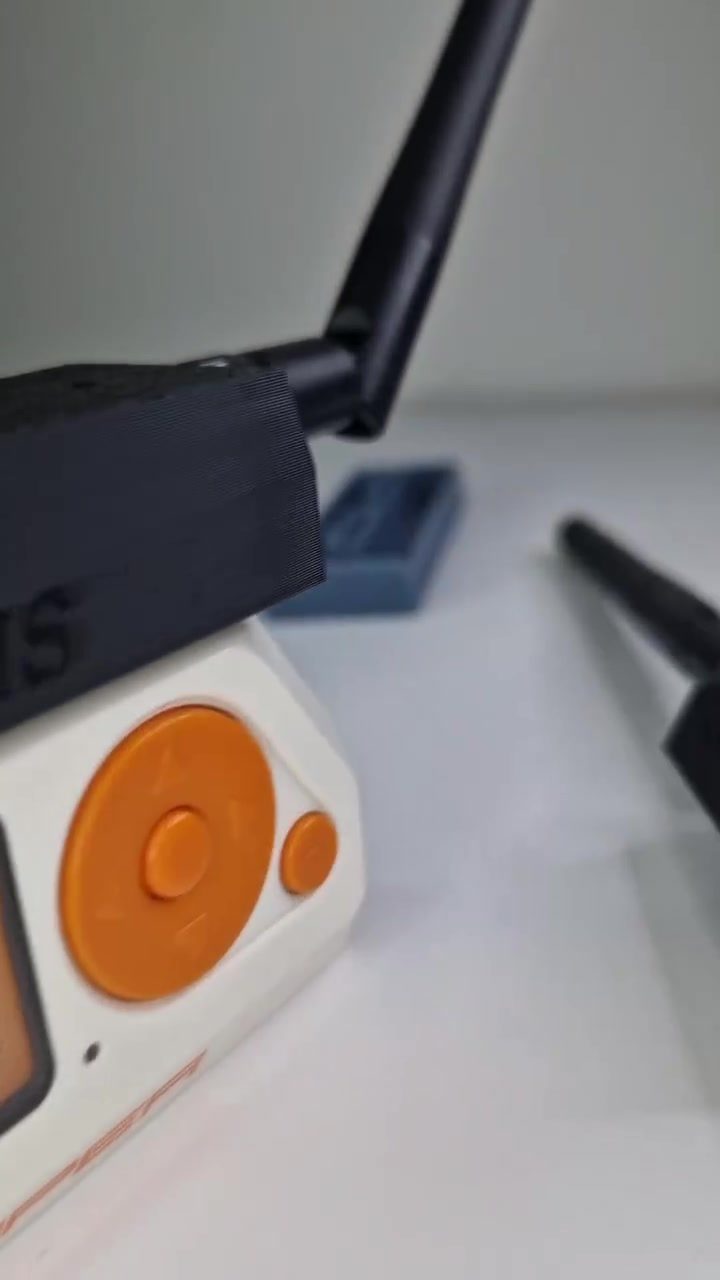
Boosting Flipper Zero with FEBERIS: A 3-in-1 SubGhz, NRF24, and WiFi Board
The FEBERIS 3-in-1 module is a powerful addition to the Flipper Zero ecosystem, offering enhanced functionality through SubGhz, NRF24, and WiFi capabilities. This compact and versatile board integrates seamlessly with the Flipper Zero, providing a range of new features that can be utilized by hobbyists, developers, and security experts alike.
Context / Why This Matters
The Flipper Zero is a popular multi-tool device known for its versatility in radio frequency (RF) interactions, infrared (IR) control, and various other functionalities. By integrating the FEBERIS 3-in-1 module, users can expand the Flipper Zero's capabilities significantly. This module is particularly useful for those interested in wireless communication protocols, making it a valuable tool for both testing and experimental projects.
Main Discussion
FEBERIS Module Overview
The FEBERIS 3-in-1 module is designed to enhance the Flipper Zero's capabilities by adding support for SubGhz, NRF24, and WiFi communications. This module is built around the ESP32 chip, which is well-known for its robust performance and extensive support for various wireless protocols.
Key Features
- SubGhz Communication: The module supports SubGhz frequencies, allowing for interactions with a wide range of devices that operate in this band, such as garage door openers, remote controls, and wireless sensors.
- NRF24 Protocol: With support for the NRF24 protocol, the module can communicate with devices that use this wireless standard, which is commonly found in various IoT applications and remote controls.
- WiFi Connectivity: The inclusion of WiFi capabilities enables the Flipper Zero to connect to wireless networks, opening up possibilities for remote control, data transmission, and internet-based applications.
Installation and Setup
Integrating the FEBERIS module with the Flipper Zero is relatively straightforward. The module connects directly to the Flipper Zero, and users can activate its functionalities through the device's software interface.
Applications
The FEBERIS 3-in-1 module has a wide range of applications, from hobbyist projects to professional security testing. Here are a few examples:
- Wireless Device Control: Use the module to control various wireless devices, such as smart home gadgets, remote-controlled cars, and other RF-controlled equipment.
- Security Testing: Security researchers can utilize the module to test the security of wireless networks and devices, identifying vulnerabilities and potential exploits.
- IOT Projects: Developers can incorporate the module into IoT projects, enabling wireless communication between devices and expanding their capabilities.
Demonstration Highlights
In the demonstration, the FEBERIS module is shown connected to a device with a display, highlighting its ease of use and versatility. The video showcases the module's ability to interact with various wireless devices, demonstrating its potential in real-world applications.
Practical Tips
Getting Started
- Purchase the FEBERIS Module: Ensure you have the FEBERIS 3-in-1 module and the necessary adapters for connecting it to your Flipper Zero.
- Install the Module: Follow the manufacturer's instructions to connect the module to the Flipper Zero. This typically involves attaching the module to the appropriate ports on the device.
- Update Firmware: Make sure your Flipper Zero's firmware is up-to-date to ensure compatibility with the new module.
Configuring the Module
- Access the Settings: Navigate to the settings menu on your Flipper Zero and locate the section for external modules.
- Enable the Module: Follow the on-screen prompts to enable the FEBERIS 3-in-1 module and configure its settings.
- Test the Connections: Use the Flipper Zero's interface to test the module's functionality and ensure it's working correctly with your devices.
Practical Use Cases
- Remote Control Testing: Experiment with the SubGhz capabilities by testing various remote-controlled devices. This can be a fun way to learn about wireless communication and improve your skills.
- IoT Device Integration: Use the NRF24 protocol to integrate the module with your IoT devices, enabling seamless communication and data exchange.
- Wireless Network Testing: Utilize the WiFi capabilities to test the security of wireless networks and identify potential vulnerabilities.
Important Takeaways
- The FEBERIS 3-in-1 module significantly enhances the Flipper Zero's functionality, making it a valuable addition for hobbyists and professionals.
- The module's support for SubGhz, NRF24, and WiFi protocols opens up a wide range of applications, from wireless device control to security testing.
- Integrating the module is straightforward, and the device's user-friendly interface makes it accessible to users of all skill levels.
Conclusion
The FEBERIS 3-in-1 module is a game-changer for Flipper Zero users, offering enhanced wireless capabilities and a wide range of applications. Whether you're a hobbyist, developer, or security expert, this module can significantly expand the possibilities of what you can achieve with your Flipper Zero. By integrating SubGhz, NRF24, and WiFi functionalities, the FEBERIS module opens up new horizons for wireless communication and testing, making it a must-have for anyone looking to boost their Flipper Zero's capabilities.
Questions readers ask
What are the key features of the FEBERIS 3-in-1 ESP32 module for Flipper Zero?
The FEBERIS 3-in-1 module enhances the Flipper Zero with three key features: SubGHz, NRF24, and WiFi capabilities. This allows for a broader range of wireless interactions, making it a powerful tool for various experimental projects and wireless explorations.
How does the FEBERIS 3-in-1 module integrate with the Flipper Zero?
The FEBERIS 3-in-1 module integrates seamlessly with the Flipper Zero through a compact and versatile design. It connects directly to the Flipper Zero, expanding its capabilities without requiring complex setup or additional hardware.
What types of users can benefit from the FEBERIS 3-in-1 module?
The FEBERIS 3-in-1 module is beneficial for a variety of users, including hobbyists, developers, and security experts. It provides new features and functionalities that can be used for wireless experiments, security testing, and various other projects.
What is the benefit of adding WiFi capability to the Flipper Zero?
Adding WiFi capability to the Flipper Zero through the FEBERIS 3-in-1 module enables users to interact with a wider range of wireless devices. This includes smart home gadgets, IoT devices, and other WiFi-enabled hardware, making it a valuable tool for hackers and experimenters.
Can the FEBERIS 3-in-1 module be used for hacking purposes?
Yes, the FEBERIS 3-in-1 module can be used for hacking purposes due to its enhanced wireless capabilities. It allows users to explore and interact with various wireless protocols, making it a useful tool for security testing and penetration testing activities.
What kind of experiments can be conducted with the FEBERIS 3-in-1 module?
With the FEBERIS 3-in-1 module, users can conduct a variety of experiments involving SubGHz, NRF24, and WiFi communications. This includes interacting with remote controls, smart home devices, and other wireless gadgets, providing a rich environment for creative and exploratory projects.
How does the FEBERIS 3-in-1 module compare to other expansions for the Flipper Zero?
The FEBERIS 3-in-1 module stands out due to its comprehensive set of features, including SubGHz, NRF24, and WiFi capabilities, all in a single compact board. This makes it a versatile and powerful addition compared to other expansions that may offer only one or two of these functionalities.
Related deep dives
Similar reads based on topic and creator.




Recent articles
Fresh deep dives from the latest Reels we unpacked.




Comments
Be the first to comment.