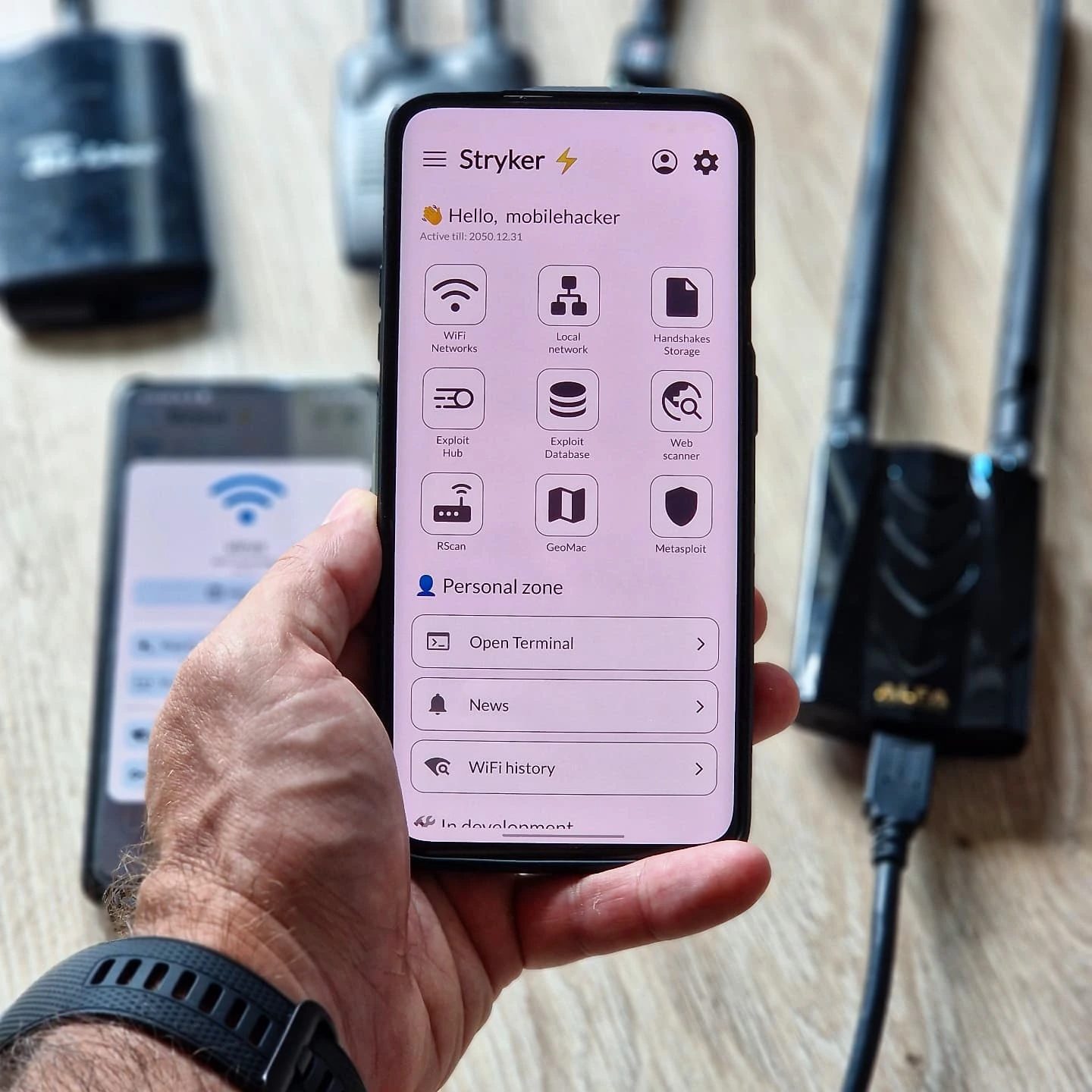
Mobile Pentesting with Stryker: A Comprehensive Android App
Mobile pentesting, or penetration testing, has become an essential practice for securing mobile applications and networks. With the rise of smartphones and mobile devices, the need for robust security measures has never been more critical. Enter Stryker, an Android pentesting app designed to provide comprehensive network analysis and exploitation tools directly from your mobile device.
Why This Matters
In today's interconnected world, mobile devices are increasingly becoming targets for cyberattacks. From personal data breaches to corporate espionage, the threats are real and ever-evolving. Mobile pentesting tools like Stryker empower security professionals and enthusiasts to proactively identify and mitigate vulnerabilities. By leveraging such tools, organizations can enhance their security posture and protect sensitive information.
Exploring Stryker's Capabilities
Network Analysis and Exploitation
Stryker offers a suite of features tailored for network analysis and exploitation. The app includes tools for scanning WiFi networks, launching exploits, and testing web applications. This comprehensive approach allows users to identify weaknesses in network security and take corrective actions.
One of the standout features is the ability to scan networks and generate detailed reports. Whether you're a seasoned security professional or just getting started, the detailed insights provided by Stryker can help you gain a deeper understanding of your network's security landscape.
WiFi Network Analysis
The app's WiFi network analysis tools are particularly noteworthy. Stryker allows users to analyze WiFi networks, providing information such as network name, signal strength, and encryption type. This feature is invaluable for identifying potential vulnerabilities and ensuring that your network is secure from unauthorized access.
Exploit Hub
The Exploit Hub is another powerful feature within the Stryker app. It offers a wide range of predefined exploits that can be launched directly from the app. This feature is particularly useful for security professionals who need to test the robustness of their network defenses.
USB Device Management
In addition to network analysis, Stryker also includes tools for managing USB devices. The app provides a list of suggested WiFi adapters and SimpleUSB tools, making it easier to identify and manage USB devices on the go. For example, an ALFA USB WiFi adapter is recommended for enhanced WiFi capabilities.
Practical Tips for Using Stryker
Setting Up Your Environment
To get started with Stryker, ensure you have a compatible Android device. The app is designed to work seamlessly on most modern Android smartphones and tablets. Additionally, for optimal performance, consider pairing the app with a high-quality WiFi adapter, such as the ALFA USB WiFi adapter.
Conducting Network Scans
Begin by conducting a thorough network scan. Open the Stryker app and navigate to the WiFi Networks section. Initiate a scan to identify all available networks. Review the scan results, focusing on networks with weak encryption or known vulnerabilities.
Launching Exploits
Once you have identified potential vulnerabilities, use the Exploit Hub to launch targeted exploits. The app provides step-by-step instructions for each exploit, making it easy to execute even complex attacks. Remember to use these tools responsibly and ethically, ensuring that you have proper authorization to test the networks.
Generating Reports
After completing your analysis and exploitation, generate a detailed report. This report will provide a comprehensive overview of your findings, including network details, vulnerabilities, and suggested remediation steps. Share this report with your organization's IT team to take appropriate action.
Using USB Tools
For enhanced functionality, utilize the suggested USB tools. The SimpleUSB tools within the app can help identify and manage USB devices, ensuring that your environment remains secure. Additionally, the ALFA USB WiFi adapter can significantly improve your WiFi capabilities, making it easier to conduct network scans and analyses.
Important Takeaways
Comprehensive Security Solution
Stryker offers a comprehensive solution for mobile pentesting, combining network analysis, exploitation, and USB device management. This all-in-one approach makes it an invaluable tool for security professionals and enthusiasts alike.
User-Friendly Interface
The app's user-friendly interface ensures that even beginners can navigate its features with ease. From conducting network scans to launching exploits, Stryker provides a seamless and intuitive experience.
Ethical Considerations
While Stryker is a powerful tool for identifying and mitigating vulnerabilities, it is essential to use it responsibly. Ensure that you have proper authorization before conducting any form of penetration testing. Unauthorized testing can lead to legal consequences and ethical dilemmas.
Conclusion
Mobile pentesting is an essential practice for ensuring the security of mobile applications and networks. With Stryker, security professionals and enthusiasts have a powerful tool at their disposal. The app's comprehensive features, including network analysis, exploitation, and USB device management, make it a valuable asset for identifying and mitigating vulnerabilities. By leveraging Stryker, organizations can enhance their security posture and protect sensitive information.
Questions readers ask
What are the key features of the Stryker Android pentesting app?
Stryker offers a range of features, including scanning WiFi networks for vulnerabilities, testing the security of web applications, and identifying potential security weaknesses in mobile applications. It also includes tools for network analysis and exploitation, making it a comprehensive solution for mobile security testing.
How does Stryker help in securing mobile applications?
Stryker assists in securing mobile applications by providing tools that help users identify and mitigate security vulnerabilities. By scanning and testing various aspects of mobile apps, users can proactively address potential threats and ensure that their applications are secure against cyberattacks.
Can Stryker be used for WiFi network scanning and testing?
Yes, Stryker is equipped with robust tools for WiFi network scanning and testing. Users can analyze WiFi networks to detect vulnerabilities, assess security configurations, and ensure that their networks are protected from potential intrusions.
Is Stryker available for free, and what are the premium features?
Stryker offers a variety of free tools to get users started with mobile pentesting. The premium version of Stryker includes advanced features such as enhanced network analysis capabilities, more comprehensive scanning tools, and additional exploitation techniques, providing users with a more in-depth security assessment.
What is Metasploit, and how does it relate to Stryker?
Metasploit is a popular framework for developing and executing exploit code against a remote target machine. While traditionally used on desktop systems, Stryker brings similar capabilities to mobile devices, allowing users to perform penetration testing and exploit vulnerabilities directly from their Android devices.
Can Stryker be used for USB network hacking?
Yes, Stryker supports USB network hacking, enabling users to test and secure USB-connected networks. This feature is particularly useful for identifying vulnerabilities in devices and networks that rely on USB connections, providing a comprehensive security assessment.
How does Stryker facilitate pentesting on the go?
Stryker is designed to be a portable and flexible tool, allowing users to perform pentesting directly from their mobile devices. This on-the-go capability ensures that security professionals and enthusiasts can conduct comprehensive security assessments and vulnerability analysis anytime, anywhere, making it an invaluable tool for mobile network security.
Related deep dives
Similar reads based on topic and creator.




Recent articles
Fresh deep dives from the latest Reels we unpacked.




Comments
Be the first to comment.