Game Asset Pipelines: Creating 2D Animation for Games
Creating high-quality 2D animations for games typically involves navigating complex workflows and tools. One innovative solution has emerged with the open-sourcing of the Gorest 2D animation agent, which challenges traditional methods by offering a more streamlined approach to generating game-ready 2D sprite sheets.
Context / Why This Matters
Traditional game asset pipelines often require significant manual intervention and can be cumbersome. The introduction of an AI-assisted tool like Gorest revolutionizes this process by simplifying the creation and integration of 2D sprite sheets. This innovation allows for more efficient prototyping and production, potentially saving developers a considerable amount of time and effort.
Main Discussion
The Gorest 2D Animation Agent
Gorest is a no-UI 2D animation agent that leverages Codex for localized workspace assistance. By simply uploading a reference image and prompting Codex, developers can generate game-ready 2D sprite sheets in real-time. This functionality significantly reduces the time and effort typically required for traditional workflows, such as manual Spine workflows. This technology is a boon for both seasoned game developers and those just starting out in the field.
Features and Functionality
Gorest provides a range of features that enhance the game development process. These features include:
Automated Sprite Generation
One of the most impressive features of Gorest is its ability to automatically generate 2D sprite sheets. This is achieved through the integration of Codex, which creates sprite sheets based on the reference image provided. This automation eliminates the need for manual workflows and allows for rapid prototyping.
Live Preview
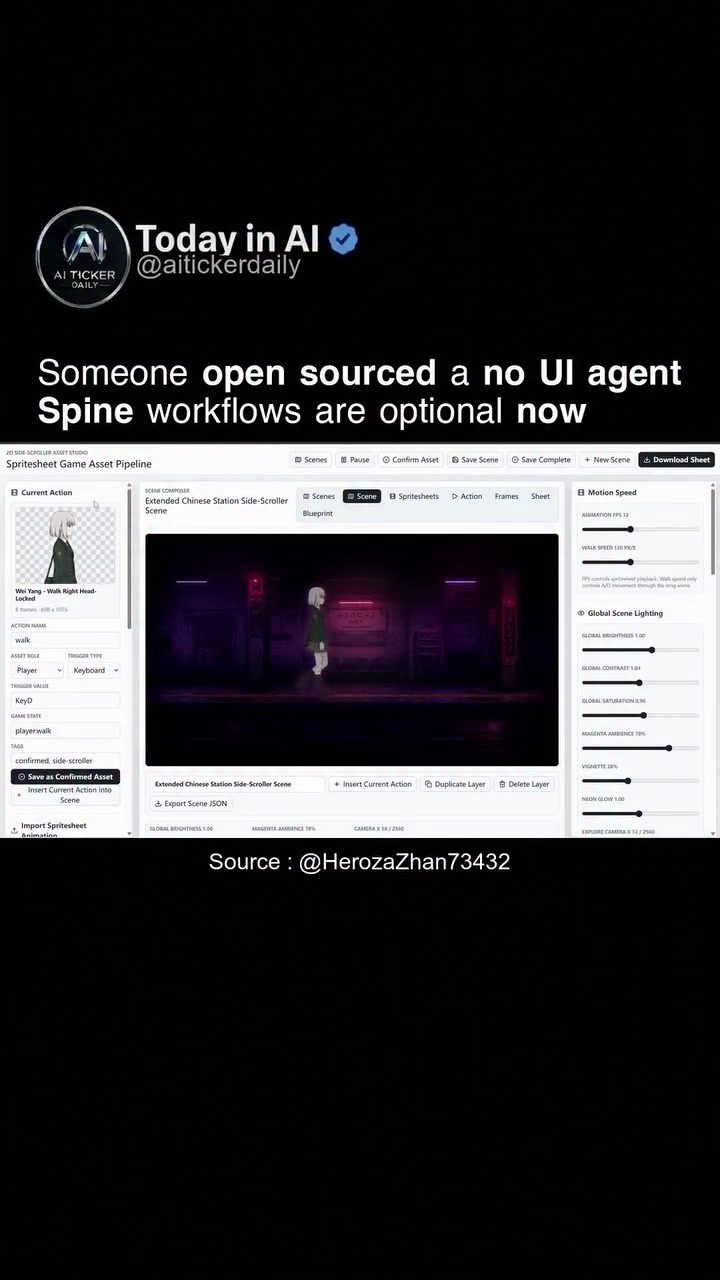
Gorest offers a live preview feature that allows developers to see how their animated sprites will look in a side-scrolling game scene. This real-time feedback loop is invaluable for making adjustments and ensuring the final product meets the desired aesthetic and functional standards.
Scene Building and Asset Management
Developers can build scenes directly within Gorest, tuning clip metadata and previewing movements. This capability facilitates a more cohesive development process, as developers can see their assets in context and make necessary adjustments on the fly. Once completed, scenes can be saved to a local asset library, making it easier to manage and reuse assets in future projects.
Gorest vs. Traditional Workflows
Simplified Pipeline
Gorest simplifies the game asset pipeline by eliminating the need for complex, manual workflows. Traditional methods often involve multiple steps, including creating individual frames, animating them, and then integrating them into the game engine. Gorest streamlines this process, allowing for more straightforward and quicker development.
Enhanced Efficiency
By removing the need for manual Spine workflows, Gorest enhances the efficiency of the game development process. Developers can focus more on the creative aspects of game design and less on the technical intricacies of asset creation. This efficiency can lead to faster development cycles and more innovative game designs.
Customization and Flexibility
Gorest offers a high degree of customization, allowing developers to tailor their game assets to their specific needs. Features such as global brightness, contrast, and saturation adjustments, as well as ambient lighting and special effects like neon glow, offer a rich palette of customization options. This flexibility ensures that developers can create visually stunning and unique game assets.
Practical Tips
Getting Started with Gorest
To get started with Gorest, follow these steps:
-
Download and Install Gorest: The software is open-sourced and MIT licensed, meaning it can be run locally on your machine. Visit the Gorest GitHub repository to download the software.
-
Upload a Reference Image: Once installed, upload a reference image that you want to use as the basis for your sprite sheets.
-
Prompt Codex: Use the provided interface to prompt Codex with your desired specifications. Codex will then generate the 2D sprite sheets based on your input.
-
Build and Preview Scenes: Utilize the scene-building tools to construct your game environment and preview how your animated sprites will look in context. Make adjustments as needed.
-
Save and Export: Once satisfied with your assets, save them to your local asset library for future use.
Optimizing Game Assets
To make the most of Gorest, consider the following tips for optimizing your game assets:
Utilize Global Adjustments
Take advantage of the global adjustments for brightness, contrast, and saturation to enhance the visual appeal of your sprites. These settings can help create a cohesive and visually striking game environment.
Experiment with Lighting and Effects
Play around with the ambient lighting and special effects, such as neon glow, to add depth and interest to your game assets. These features can significantly enhance the overall aesthetic of your game.
Integrate with Other Tools
While Gorest provides a comprehensive suite of tools, don't hesitate to integrate it with other game development software. This can help create a more seamless and efficient workflow, leveraging the strengths of multiple tools.
Important Takeaways
- Gorest simplifies the game asset pipeline by automating the generation of 2D sprite sheets.
- The software offers real-time previews and customization options, enhancing the development process.
- Developers can build and save scenes directly within Gorest, making it easier to manage assets.
- Gorest eliminates the need for manual Spine workflows, increasing efficiency and allowing for more creative freedom.
- The software is open-sourced and MIT licensed, making it accessible and versatile for various development needs.
Conclusion
Gorest represents a significant advancement in the field of game development software. By simplifying the asset creation process and offering powerful customization options, it empowers developers to create high-quality 2D animations more efficiently. Whether you're a seasoned developer or just starting out, incorporating Gorest into your toolkit can lead to more innovative and visually stunning game designs.
Questions readers ask
What is Gorest and how does it simplify 2D animation creation?
Gorest is an AI-assisted 2D animation agent designed to simplify the creation of game-ready 2D sprite sheets. It uses AI to generate multiple sprites from a single image, bypassing the need for extensive manual work in traditional 2D animation pipelines.
How does Gorest integrate with existing game development workflows?
Gorest can be integrated into existing game development workflows by generating 2D sprite sheets that are directly usable in game engines. This makes it a useful tool for developers looking to streamline their game asset creation process without overhauling their current setup.
What is the role of Codex in Gorest's functionality?
Codex is the AI model that powers Gorest's sprite generation capabilities. It enables Gorest to quickly and efficiently create a set of sprites from a single input image, making the process of 2D animation more accessible and efficient.
Can Gorest be used by developers without a background in 2D animation?
Yes, Gorest is designed to be user-friendly and does not require a background in 2D animation. Its no-UI, AI-assisted approach makes it accessible to developers of all skill levels, allowing them to create high-quality 2D sprite sheets with minimal effort.
Is Gorest open source, and if so, what benefits does this offer?
Yes, Gorest is open source, which means its source code is freely available for anyone to use, modify, and distribute. This offers benefits such as transparency, community support, and the ability to customize the tool to fit specific needs.
How does Gorest compare to traditional 2D animation methods?
Traditional 2D animation methods often involve manual creation of each sprite, which can be time-consuming. Gorest, on the other hand, automates much of this process, allowing for quicker generation of 2D sprite sheets and more efficient game asset management.
What are the potential time-saving benefits of using Gorest in game development?
By automating the creation of 2D sprite sheets, Gorest can significantly reduce the time spent on manual asset creation. This allows developers to focus more on other aspects of game development, such as gameplay mechanics and level design, ultimately speeding up the overall development process.
Related deep dives
Similar reads based on topic and creator.




Recent articles
Fresh deep dives from the latest Reels we unpacked.




Comments
Be the first to comment.