Exploring the Evil Crow RF V2A: A Smartphone-Controlled RF Device
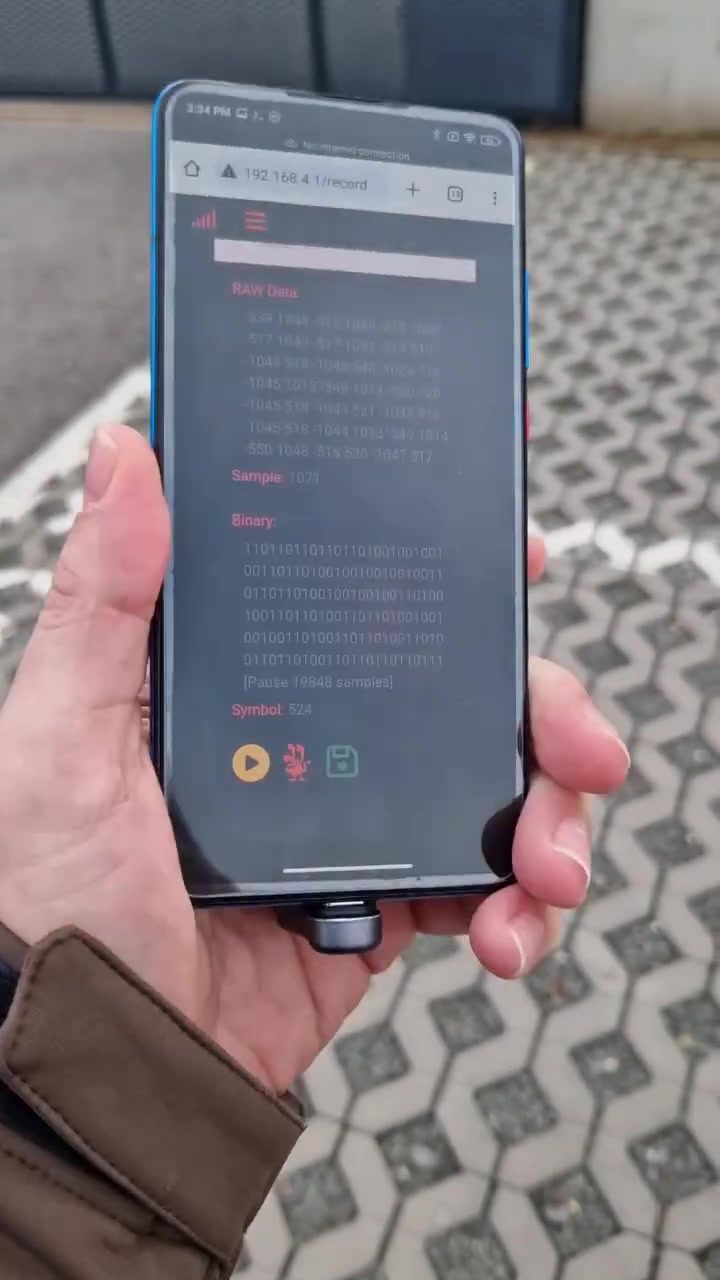
The Evil Crow RF V2A is a versatile, portable radio frequency (RF) device that can be operated using any smartphone. This device is notable for its compatibility with the Flipper Zero, a popular handheld multifunction tool, and its ability to replay Sub-GHz signals from unofficial firmware.
Why This Matters
The Evil Crow RF V2A opens up new possibilities for both hobbyists and professionals by merging the convenience of smartphones with the power of RF devices. Whether for testing, experimentation, or specific applications, this compact tool offers flexibility and ease of use.
Main Discussion
What is the Evil Crow RF V2A?
The Evil Crow RF V2A is a compact, portable RF device designed to be controlled via any smartphone. It features a microSD card slot, allowing users to store and manage data efficiently. The device is connected to the smartphone through its camera port, utilizing a small adapter.
Key Features
- Portability: Designed to be compact and easy to carry.
- Smartphone Compatibility: Operated via any smartphone, making it accessible to a wide range of users.
- Flipper Zero Compatibility: Fully compatible with the Flipper Zero, enhancing its functionality.
- Signal Replay: Capable of replaying Sub-GHz signals, which is useful for various applications, from testing to hacking.
- MicroSD Card Slot: Includes a microSD card slot for data storage and management.
- Unified Interface: Displays network settings and signal jamming parameters on the smartphone interface, simplifying user interaction.
Device Connection and Setup
Connecting the Evil Crow RF V2A to a smartphone is straightforward. A small device is plugged into the smartphone's camera port, which is then connected to a circuit board. This setup ensures a stable connection and allows for seamless operation. The process involves:
- Connecting the Adapter: Plug the small device into the smartphone's camera port.
- Inserting the MicroSD Card: Insert a microSD card into the slot on the circuit board.
- Powering On: Turn on the device and ensure it is recognized by the smartphone.
The Importance of the MicroSD Card Adapter
The microSD card adapter plays a crucial role in the functionality of the Evil Crow RF V2A. It allows for easy data transfer and storage, making the device more versatile. This adapter is inserted into a slot on the circuit board, ensuring secure and reliable data management.
Mobile Hacking Demonstrations
The Evil Crow RF V2A can be used for various hacking demonstrations. For instance, it displays a 'Jammer' application on a smartphone, showcasing network settings and signal jamming parameters. This interface is intuitive, allowing users to adjust settings such as bandwidth, data rate, and jammer mode.
Jammer Mode and Signal Jamming
The device offers multiple jammer modes, including single-frequency and multi-frequency jamming. These modes allow users to disrupt specific signals or a range of frequencies, making it a powerful tool for both testing and practical applications. The jammer interface displays key parameters such as:
- Jammer Frequency: The specific frequency being jammed.
- Jammer Power: The power level of the jammer, with options ranging from low to maximum.
- Bandwidth and Data Rate: Key settings that affect the effectiveness of the jamming signal.
Practical Tips
Using the Evil Crow RF V2A effectively requires some practical tips and best practices:
Ensuring Proper Connection
- Secure the Connection: Ensure the device is securely connected to the smartphone's camera port.
- Use a Reliable MicroSD Card: Opt for a high-quality microSD card to avoid data loss or corruption.
- Check Compatibility: Verify that your smartphone is compatible with the device before purchasing.
Optimizing Signal Jamming
- Adjust Frequency Settings: Fine-tune the jammer frequency to target specific signals.
- Monitor Power Levels: Keep an eye on the jammer power level to avoid interference with unintended signals.
- Use in Controlled Environments: Conduct tests in controlled environments to understand the device's full capabilities.
Important Takeaways
The Evil Crow RF V2A is a groundbreaking tool that combines portability, smartphone compatibility, and powerful RF capabilities. Its compatibility with the Flipper Zero and ability to replay Sub-GHz signals make it a versatile choice for a variety of applications. The inclusion of a microSD card slot enhances data management, while the intuitive interface simplifies user interaction.
Conclusion
The Evil Crow RF V2A is more than just a portable RF device; it's a tool that opens up new possibilities for experimentation and application. Whether you're a hobbyist or a professional, this device offers the flexibility and power needed for various tasks. By understanding its features, setup, and practical tips, users can fully utilize the capabilities of the Evil Crow RF V2A, making it an essential addition to any toolkit.
Questions readers ask
What makes the Evil Crow RF V2A a versatile RF device?
The Evil Crow RF V2A is considered versatile because of its portability, smartphone compatibility, and ability to replay Sub-GHz signals. It can be used for various applications, from testing to experimentation, and is compatible with the Flipper Zero, which expands its functionality.
How does the Evil Crow RF V2A interact with smartphones?
The Evil Crow RF V2A can be controlled directly through a smartphone, eliminating the need for a separate, dedicated device. This makes it highly convenient for users who wish to perform RF testing or experimentation on the go.
What is the significance of the Evil Crow RF V2A's compatibility with the Flipper Zero?
The compatibility with the Flipper Zero enhances the Evil Crow RF V2A's capabilities by allowing users to access a wider range of features and functionalities. This integration makes it a powerful tool for those interested in RF hacking and experimentation.
Can the Evil Crow RF V2A be used for RF frequency testing?
Yes, the Evil Crow RF V2A is well-suited for RF frequency testing due to its ability to replay Sub-GHz signals. This feature allows users to test and analyze various frequencies, making it a valuable tool for both hobbyists and professionals.
What is a microsd card adapter and how is it relevant to the Evil Crow RF V2A?
A microsd card adapter is a small device that allows the Evil Crow RF V2A to read data from a microsd card. This is relevant because it enables users to store and transfer data more efficiently, enhancing the device's overall usability and functionality.
Is the Evil Crow RF V2A suitable for beginners in RF hacking?
Yes, the Evil Crow RF V2A is user-friendly and can be a great tool for beginners in RF hacking. Its smartphone-controlled interface and compatibility with the Flipper Zero make it accessible and easy to use, even for those new to the field.
Can the Evil Crow RF V2A be used as a smartphone jammer?
The Evil Crow RF V2A is not designed to be used as a smartphone jammer. Its primary purpose is for RF testing, experimentation, and specific applications. It should be used responsibly and in accordance with local laws and regulations.
Related deep dives
Similar reads based on topic and creator.




Recent articles
Fresh deep dives from the latest Reels we unpacked.




Comments
Be the first to comment.