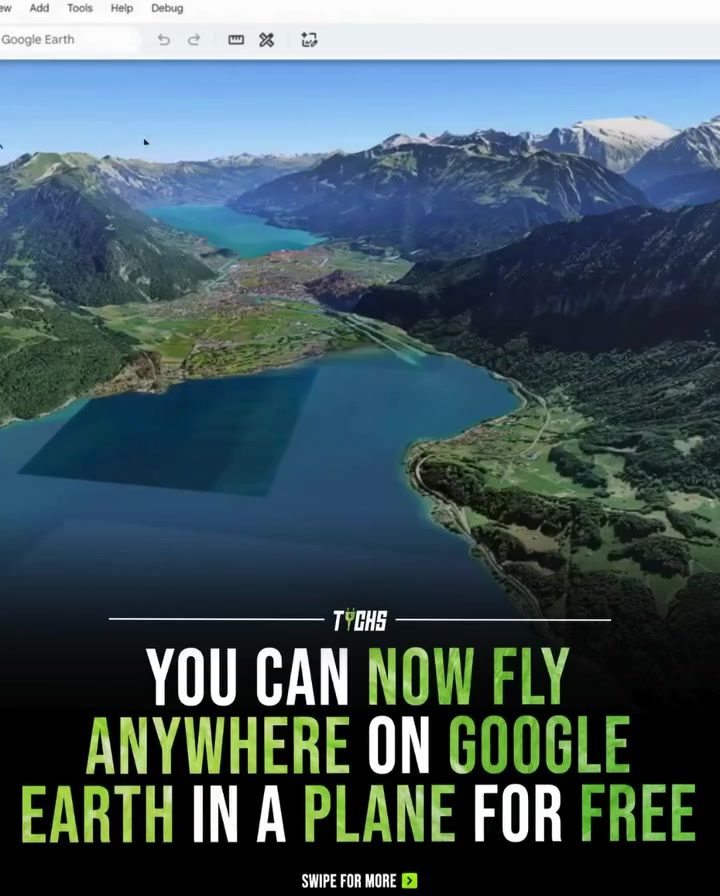
Google Earth’s New Flight Simulator Feature
Google Earth has introduced a captivating new feature for aviation and travel enthusiasts, allowing users to explore the world from a pilot's perspective. This innovative addition enables anyone with an internet connection to fly over various landscapes using a virtual plane, all within their web browser. The feature is free and integrated directly into Google Earth, making it accessible without the need for additional software downloads.
Context / Why this Matters
In the past, exploring the world through a virtual flight simulator required specialized software and hardware, creating a barrier for casual users. However, Google Earth's new flight simulator democratizes this experience, making it available to anyone with an internet connection. This feature not only caters to aviation enthusiasts but also offers a unique perspective for travelers, allowing them to virtually visit places they may not have the opportunity to see in person.
Main Discussion
The Flight Simulator Experience
The flight simulator in Google Earth is designed to be intuitive and user-friendly. Users can take off and explore real satellite imagery, 3D cities, mountains, coastlines, and landmarks across the globe. The controls are simple, making it easy for even those with no prior experience to navigate the virtual skies. Whether you want to fly over your hometown, explore famous landmarks, or simply see the world from a new angle, the feature provides an immersive global flight experience.
Aerial Views of Iconic Landmarks
One of the most exciting aspects of this feature is the ability to view iconic landmarks from an aerial perspective. Users can fly over the Grand Canyon, soar above the Eiffel Tower, or cruise along the coastline of the Amalfi Coast. The high-resolution satellite imagery and 3D models of cities ensure that the experience is as realistic as possible, allowing users to appreciate the beauty and grandeur of these locations in a way that is not possible from ground level.
Exploring Natural Wonders
The flight simulator also offers a unique way to explore natural wonders. Users can fly over the vast expanse of the Sahara Desert, the lush greenery of the Amazon rainforest, or the towering peaks of the Himalayas. The detailed satellite imagery allows for a closer look at these natural marvels, providing a sense of scale and awe that is hard to capture in any other way.
Virtual Travel Across Continents
With the flight simulator, users can virtually travel across continents in minutes. This feature is particularly useful for those who want to explore new places without the constraints of time, money, or physical limitations. Whether you’re planning a future trip or simply satisfying your wanderlust, the flight simulator offers a convenient and engaging way to experience the world.
Technical Aspects and Accessibility
Built-In Controls
The flight simulator is equipped with built-in controls that are easy to use. Users can control the speed, altitude, and direction of their virtual plane with simple keystrokes or mouse movements. This ensures that even those with no prior experience in flight simulation can enjoy the feature without a steep learning curve.
Browser-Based Access
One of the standout features of Google Earth's flight simulator is its accessibility. Since it is integrated directly into the Google Earth platform, users do not need to download any additional software. The feature is available through any web browser, making it accessible from virtually any device with an internet connection. This browser-based access ensures that users can enjoy the flight simulator from their desktop, laptop, or even mobile devices.
Practical Tips
To get the most out of the Google Earth flight simulator, consider the following tips:
Customizing Your Flight Path
Experiment with different flight paths to find the most interesting views. You can start by flying over familiar locations and then branch out to explore lesser-known areas. The ability to freely navigate the globe allows for a personalized and immersive experience.
Utilizing Different Viewing Modes
Take advantage of the different viewing modes available in Google Earth. For example, you can switch between 2D and 3D views to get a better understanding of the landscape. The 3D mode, in particular, provides a more realistic and immersive experience, allowing you to see the terrain from a pilot’s perspective.
Exploring with Friends and Family
Share the experience with friends and family by using the collaborative features of Google Earth. You can invite others to join your virtual flight, making it a fun and interactive activity for everyone involved. This feature is especially useful for educational purposes or for planning future travel destinations.
Important Takeaways
The new flight simulator feature in Google Earth offers a unique and immersive way to explore the world from a pilot's perspective. Whether you’re an aviation enthusiast, a travel lover, or simply curious about the world, this feature provides an engaging and accessible way to experience the globe.
Accessibility and Inclusivity
One of the key takeaways is the accessibility and inclusivity of the feature. By making the flight simulator available directly through the web browser, Google Earth ensures that anyone with an internet connection can enjoy the experience. This removes barriers to entry and makes it possible for a wide range of users to explore the world in a new and exciting way.
Realistic and Immersive Experience
The high-resolution satellite imagery and 3D models of cities and landscapes provide a realistic and immersive experience. Users can appreciate the beauty and grandeur of iconic landmarks and natural wonders from a unique aerial perspective, making it a valuable tool for both entertainment and education.
Conclusion
Google Earth's new flight simulator feature is a game-changer for aviation and travel enthusiasts. With its intuitive controls, high-resolution imagery, and browser-based accessibility, it offers a unique and engaging way to explore the world. Whether you’re planning a future trip, satisfying your wanderlust, or simply enjoying the beauty of the globe from a new angle, this feature provides an immersive experience that anyone can access.
Questions readers ask
How do I access the flight simulator in Google Earth?
To access the flight simulator, open Google Earth in your web browser. Once loaded, click on the airplane icon usually located in the right-hand menu. This will initiate the flight mode, allowing you to take control of the virtual plane and begin your exploration.
What kind of landscapes can I explore using the flight simulator?
The flight simulator offers a wide range of landscapes to explore, including mountains, forests, deserts, and coastal areas. You can fly over iconic landmarks, 3D cities, and even remote locations, all rendered using real satellite imagery.
Do I need any special equipment to use the flight simulator?
No special equipment is required. The flight simulator is designed to work seamlessly within your web browser. A computer with an internet connection and a standard keyboard or mouse is all you need to start your virtual flight adventure.
Can I fly over specific locations, or is it random?
You have full control over your flight path. You can search for specific locations, cities, or landmarks using the search bar within Google Earth. Once you've found your desired destination, you can take off and navigate to that spot using the virtual controls.
Is the flight simulator feature really free to use?
Yes, the flight simulator is completely free to use. Google Earth integrates this feature directly into its platform, so there are no additional costs or subscriptions required. All you need is an internet connection and access to Google Earth via your web browser.
Can I experience this with friends or family?
Currently, the flight simulator is designed for individual use within a single browser window. However, you can share your experiences with friends and family by taking screenshots or recording your flights and sharing them via social media or messaging platforms.
Related deep dives
Similar reads based on topic and creator.




Recent articles
Fresh deep dives from the latest Reels we unpacked.



Comments
Be the first to comment.