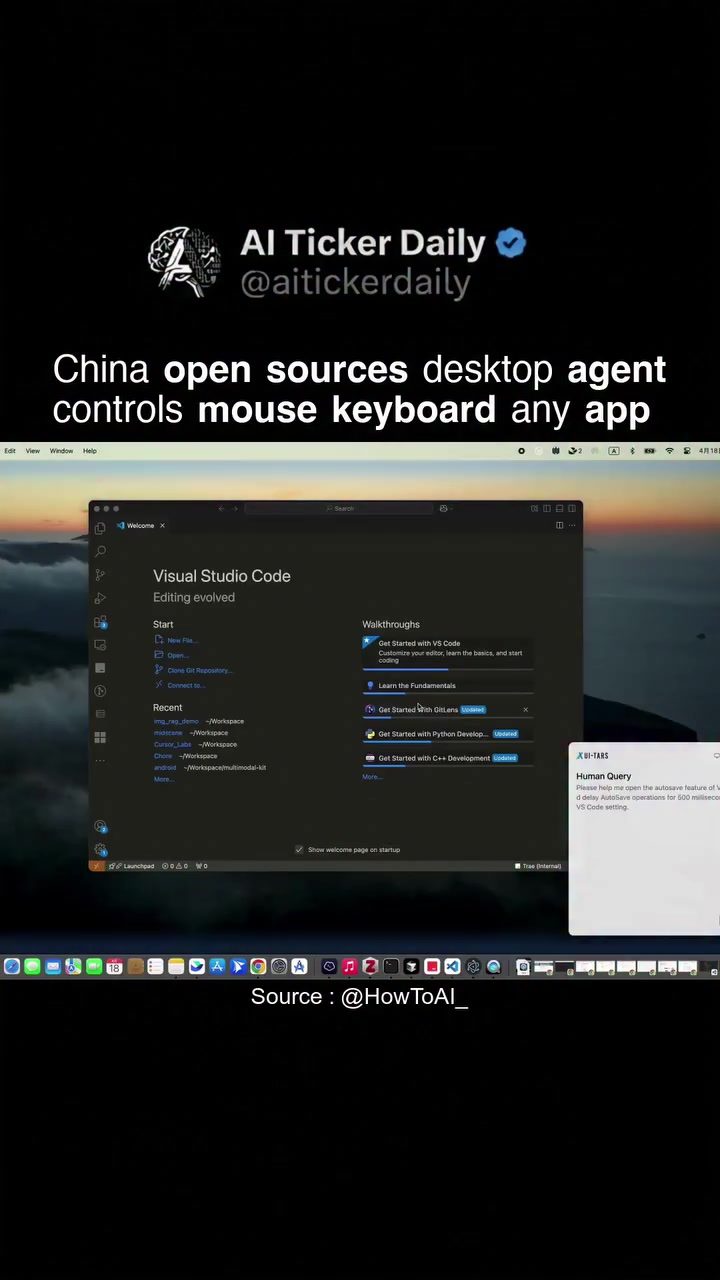
AI-Powered Desktop Agent: UI-TARS
UI-TARS is an open-source desktop agent that operates entirely on your local machine. It has the capability to see your screen, control your mouse and keyboard, and complete tasks in any application using natural language commands. Originating from China, this powerful tool has gained significant traction on GitHub, indicating a strong developer community and active user base.
Why This Matters
In an era where efficiency and automation are paramount, UI-TARS stands out as a versatile solution for enhancing productivity. Whether you're a professional looking to streamline your workflow or a developer interested in customizing your desktop environment, UI-TARS offers a range of features that can significantly improve your interaction with your computer.
Main Discussion
What is UI-TARS?
UI-TARS is an AI-powered desktop agent designed to automate and streamline various tasks on your computer. It can control your mouse and keyboard, allowing you to perform actions without manual input. This capability is particularly useful for repetitive tasks, such as data entry, navigating through applications, and executing complex workflows. The agent's ability to understand and respond to natural language commands makes it accessible to users of all skill levels.
How Does UI-TARS Work?
The operation of UI-TARS revolves around its core functionalities:
- Screen Visibility: UI-TARS can see your screen, enabling it to monitor and interact with your desktop environment.
- Mouse and Keyboard Control: The agent can drive your mouse and keyboard, executing actions as if a human user were performing them.
- Natural Language Commands: You can issue commands to UI-TARS using natural language, making it intuitive and user-friendly.
- Customizable Auto-Save Settings: This feature ensures that your work is saved automatically, minimizing the risk of data loss.
Key Features
Some of the standout features of UI-TARS include:
- Open-Source Nature: Being open-source, UI-TARS benefits from a collaborative development process. This means that the tool is continuously improved by a global community of developers, ensuring that it stays up-to-date with the latest technologies and user needs.
- Local Operation: UI-TARS runs fully locally, which means your data stays on your machine. This is a significant advantage for users who prioritize data privacy and security.
- Compatibility: The agent can control any application on your desktop, making it a versatile tool for a wide range of users, from developers to content creators to office professionals.
The Power of Natural Language
One of the most impressive aspects of UI-TARS is its ability to respond to natural language commands. This feature allows users to interact with the agent in a way that feels natural and intuitive. For example, you can say, "Open Chrome and search for the latest news," and UI-TARS will execute the command seamlessly. This capability not only enhances user experience but also makes the tool accessible to users who may not be technically savvy.
Practical Tips
Getting Started with UI-TARS
To get started with UI-TARS, follow these steps:
- Download the Tool: Visit the GitHub repository to download the latest version of UI-TARS.
- Installation: Follow the installation instructions provided in the GitHub repository. The process is straightforward and well-documented.
- Configuration: Once installed, you can configure UI-TARS to suit your needs. This includes setting up customizable auto-save settings and other preferences.
- Issuing Commands: Start issuing natural language commands to see UI-TARS in action. Experiment with different commands to understand its capabilities fully.
Customizing UI-TARS
While UI-TARS comes with a range of default settings, you can customize it to better fit your workflow. For instance, you can adjust the auto-save settings to ensure that your work is saved at regular intervals. Additionally, you can explore the open-source code to make more advanced customizations, such as adding new commands or integrating with other applications.
Integrating with Other Applications
UI-TARS can be integrated with various applications on your desktop. This means you can use it to automate tasks in your favorite productivity tools, such as email clients, project management software, and more. The key is to experiment with different commands and see how UI-TARS can enhance your workflow.
Important Takeaways
Enhancing Productivity
UI-TARS is a powerful tool for enhancing productivity. By automating repetitive tasks and allowing you to control your desktop environment with natural language commands, it frees up your time to focus on more important tasks.
Community and Support
As an open-source project, UI-TARS benefits from a vibrant community of developers and users. This community provides support, shares knowledge, and contributes to the ongoing development of the tool. If you encounter any issues or have questions, you can often find answers and solutions within the community.
Future Developments
The open-source nature of UI-TARS means that it is continually evolving. Future developments may include new features, improved performance, and greater compatibility with additional applications. Staying engaged with the community and keeping your tool up-to-date will ensure that you benefit from these advancements.
Conclusion
UI-TARS is a versatile and powerful desktop agent that offers a range of features to enhance productivity and streamline workflows. From controlling your mouse and keyboard to executing tasks using natural language commands, UI-TARS provides a comprehensive solution for automating your desktop environment. Its open-source nature and strong GitHub traction make it a reliable choice for users looking to leverage the power of AI for improved efficiency. Whether you're a developer, a professional, or a casual user, UI-TARS has something to offer.
Questions readers ask
What are the key features of UI-TARS?
UI-TARS offers several key features, including the ability to see and control your screen, execute tasks using natural language commands, and automate workflows. It operates entirely on your local machine, ensuring data privacy and security.
How does UI-TARS enhance productivity?
UI-TARS enhances productivity by automating repetitive tasks and streamlining workflows. It allows users to control their desktop environment using natural language, reducing the need for manual interventions and increasing efficiency.
Is UI-TARS available for everyone to use?
Yes, UI-TARS is open-source, which means it is freely available for anyone to use, modify, and distribute. This also means there is a strong community of developers and users contributing to its development and improvement.
What kind of tasks can UI-TARS automate?
UI-TARS can automate a wide range of tasks, including but not limited to, data entry, file management, and application control. It can operate in any application on your desktop, making it a versatile tool for various workflows.
Is UI-TARS safe to use on my local machine?
UI-TARS operates locally on your machine, which means it doesn't require sending your data to an external server. However, as with any software that controls your desktop, it's important to use it responsibly and ensure you understand its capabilities and limitations.
How can I get started with UI-TARS?
To get started with UI-TARS, you can visit its GitHub repository and follow the installation instructions provided. This will guide you through the setup process and help you begin using UI-TARS to automate your tasks.
Can I customize UI-TARS for my specific needs?
Yes, since UI-TARS is open-source, you can customize it to fit your specific needs. The active developer community also means you can find or contribute to plugins, scripts, and other resources tailored to different use cases.
Related deep dives
Similar reads based on topic and creator.




Recent articles
Fresh deep dives from the latest Reels we unpacked.




Comments
Be the first to comment.