Mixed Reality and the Meta Quest VR Headset
The Meta Quest VR headset, with its new mixed reality (MR) app, is pioneering a new way to interact with virtual environments. Unlike traditional virtual reality, which immerses users in entirely digital worlds, mixed reality seamlessly integrates virtual objects into the real world. This approach is not about escaping reality but enhancing it, making the room around you part of the interface.
Why This Matters
The shift towards mixed reality represents a significant evolution in spatial computing. With full-color passthrough, virtual objects can sit on your table, games can spread across your floor, and the headset starts to feel less like a VR gadget and more like an early version of everyday computing. This transformation is Meta's bet on the future of technology, aiming to make mixed reality feel casual, useful, and accessible for everyday use.
The Meta Quest MR App
Custom Virtual Experiences
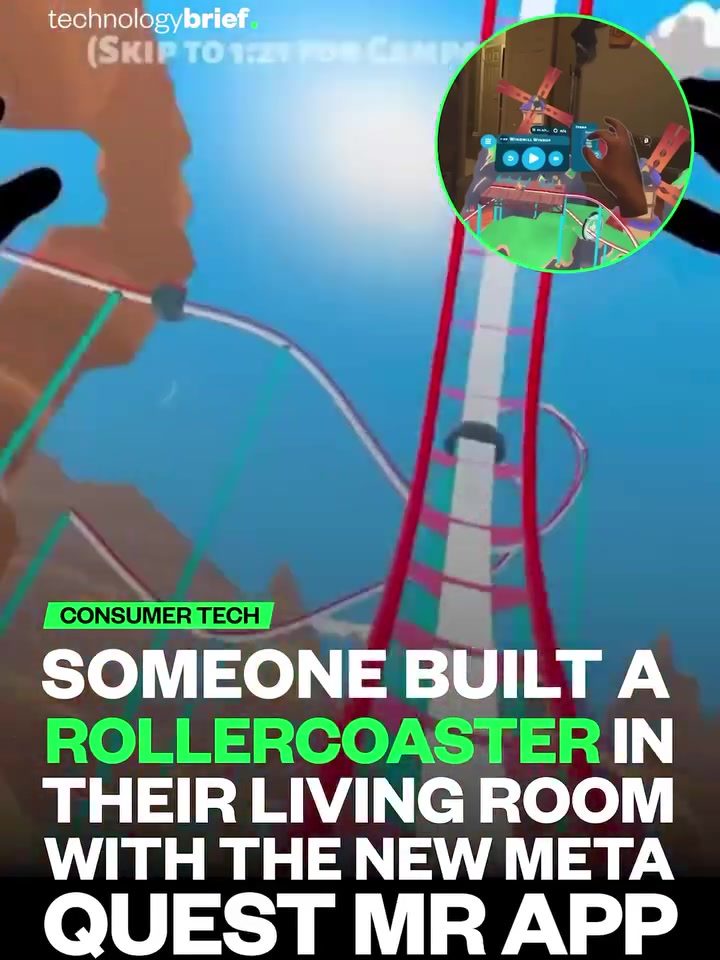
The Meta Quest MR app allows users to create and experience custom virtual environments. The demo showcased a user-built rollercoaster within a living room, highlighting the app's ability to turn any space into a playground. This feature is not just about entertainment; it opens up possibilities for education, work, and social interactions.
Immersive Capabilities
The immersive nature of virtual reality experiences is amplified with the Meta Quest MR app. The first-person view of the rollercoaster ride demonstrates how virtual reality can simulate real-world experiences. The simulated track winding through a virtual environment creates a sense of presence and immersion that traditional screens cannot match.
Practical Applications
Mixed reality is more than just a high-end demo for developers and early adopters. It has practical applications that can make daily life more engaging and efficient. For example, virtual objects can be used for interior design, allowing users to visualize how furniture will look in their living room before making a purchase. Games can spread across the floor, turning any space into a gaming arena.
Practical Tips for Using the Meta Quest MR App
-
Set Up Your Space: Ensure your living room or desired space is well-lit and free of clutter. This will enhance the passthrough experience, making virtual objects appear more realistic.
-
Experiment with Custom Creations: Spend time exploring the app's customization options. Create your own virtual environments and objects to fully experience the potential of mixed reality.
-
Adjust Settings for Comfort: Use the app's settings to adjust the brightness, contrast, and other visual settings to make the experience more comfortable and immersive.
-
Explore Different Applications: Beyond entertainment, explore how mixed reality can be used for productivity, education, and social interactions. The versatility of the Meta Quest MR app makes it a valuable tool for various purposes.
Important Takeaways
- Enhanced Reality: Mixed reality enhances the real world by overlaying digital elements, making it a practical and accessible technology.
- Customization: The Meta Quest MR app allows users to create and experience custom virtual environments, adding a personal touch to the experience.
- Immersive Experiences: The immersive capabilities of the app provide a sense of presence that traditional screens cannot match.
- Practical Applications: Beyond entertainment, mixed reality has practical applications that can make daily life more engaging and efficient.
Conclusion
The Meta Quest VR headset, with its new mixed reality app, is revolutionizing the way we interact with virtual environments. By turning the room around you into part of the interface, Meta is making spatial computing more accessible and practical. Whether for entertainment, productivity, or social interactions, the Meta Quest MR app offers a glimpse into the future of technology, where the digital and real worlds seamlessly blend.
Questions readers ask
What is the difference between virtual reality and mixed reality on the Meta Quest headset?
Virtual reality (VR) on the Meta Quest headset immerses users in entirely digital environments, often disconnecting them from the real world. In contrast, mixed reality (MR) integrates virtual objects and experiences, like a rollercoaster, into the user's physical space, enhancing and interacting with their real environment.
How does the new MR app enhance my living room experience with the Meta Quest VR headset?
The new MR app on the Meta Quest VR headset transforms your living room into an interactive playground by integrating a virtual rollercoaster and other virtual objects into your physical space. This creates a unique, immersive experience that blends digital adventures with your real environment.
What is full-color passthrough and how does it improve the VR experience?
Full-color passthrough is a feature that allows the Meta Quest VR headset to display the real world in color, enabling virtual objects to seamlessly blend with the physical environment. It makes the VR experience more immersive and realistic, as you can see and interact with your surroundings while enjoying VR content.
Can I use the VR headset for more than just gaming?
Absolutely. The Meta Quest VR headset, with its mixed reality capabilities, can enhance everyday activities and entertainment. From playing a VR rollercoaster that winds through your living room to using virtual objects as part of your daily routines, the possibilities extend beyond traditional gaming experiences.
Do I need any additional equipment to experience the mixed reality rollercoaster?
No, you do not need any additional equipment. The mixed reality rollercoaster experience is designed to work with the Meta Quest VR headset as is. Simply put on the headset, launch the MR app, and let the interactive adventure unfold in your living room.
How does the Meta Quest VR headset blend physical and digital worlds?
The Meta Quest VR headset uses advanced technologies, such as full-color passthrough, to overaly virtual objects and experiences onto the real world. This integration allows users to interact with digital content as if it were part of their physical surroundings, creating a seamless and immersive experience.
Related deep dives
Similar reads based on topic and creator.




Recent articles
Fresh deep dives from the latest Reels we unpacked.




Comments
Be the first to comment.