Introduction
FreeBuff is a groundbreaking, free, open-source coding tool designed to assist developers through AI-powered coding assistance. It offers a unique terminal-based interface that supports coding in plain English. If you're a developer looking for a more intuitive and efficient way of writing code, FreeBuff is worth exploring.
The Context of FreeBuff
AI coding assistants have revolutionized the way developers write, debug, and maintain code. They offer a range of features, including code completion, syntax highlighting, and error detection. However, these tools are often limited in their capabilities and can be expensive. FreeBuff aims to address these issues by offering a free, open-source, and multi-agent system that can handle different coding tasks.
FreeBuff's Key Features
Multi-Agent System
Unlike other AI coding assistants, FreeBuff uses a multi-agent system. This system allows different AI agents to handle different tasks, making it more efficient and effective in assisting with coding. This feature is particularly useful for developers who work on large projects with complex codebases.
Open-Source and Free
FreeBuff is built on CodeBuff, an open-source terminal-based AI coding assistant. This means that the code is available for anyone to use, modify, and distribute. The free ad-supported version, FreeBuff, does not require any credits or configuration, making it accessible to everyone.
Privacy Concerns
While FreeBuff is privacy-conscious, it's important to note that it still uses a cloud backend. This means that it collects minimal logs for debugging and may store chat session logs for improving the service. Developers should be cautious when using FreeBuff for highly confidential production code and should understand the risks involved.
Model Comparison
FreeBuff uses different models for different tasks, including Claude Opus 4.7, KimiK 2.6, and MiniMax M2.7. Claude Opus 4.7 is used in default and max modes, KimiK 2.6 in light mode, and sub-agents can use other models. This variety in models allows for a more flexible and efficient coding experience.
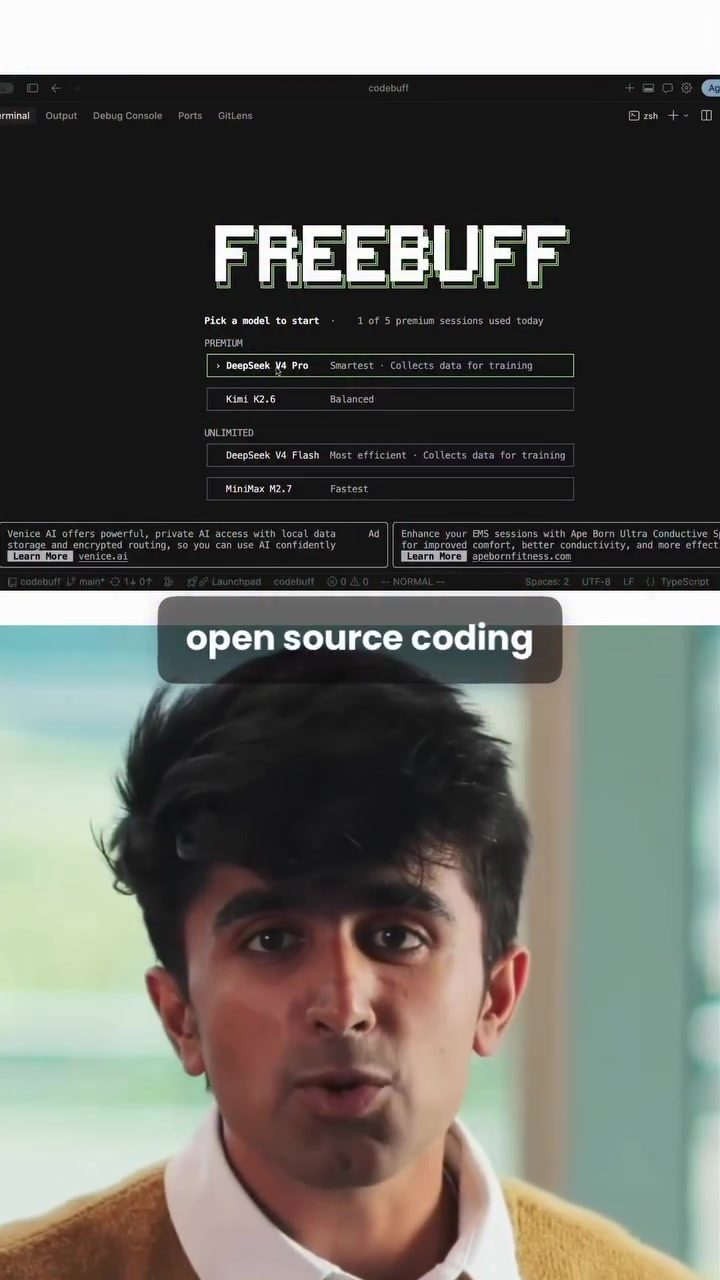
Deep Dive into Freebuff’s Model Offerings
DeepSeek V4 Pro
DeepSeek V4 Pro is a prominent model among the options available on Freebuff. Known as the "smartest" model, it excels in tasks requiring deep understanding and complex problem-solving. This makes it a go-to choice for developers needing robust and intelligent code generation.
MiniMax V2.7
MiniMax V2.7 is highlighted as the "fastest" model. Its speed makes it ideal for tasks that require quick turnaround times, such as rapid prototyping or quick code fixes. However, it might not be as efficient as other models in handling more complex tasks.
Kimi K2.6
Kimi K2.6 is described as a "balanced" model. This means it offers a good mix of speed and efficiency, making it a versatile choice for a variety of coding tasks. It's a reliable option when you need a model that performs well across different scenarios.
DeepSeek V4 Flash
DeepSeek V4 Flash is labeled as the "most efficient" model. It not only performs well but also collects data for training, which can enhance its future performance. The trade-off is that it might require more computational resources, making it less suitable for environments with limited resources.
Practical Tips for Using FreeBuff
Utilizing FreeBuff to its fullest potential involves understanding both the strengths and limitations of its multi-agent system. Here are some practical tips to help you get the most out of this innovative tool:
Getting Started
To begin using FreeBuff:
- Installation: Download and install FreeBuff from the official website.
- Open Project Folder: Navigate to your project directory in the terminal.
- Start Coding: Use plain English to instruct FreeBuff on what you want it to do. The tool can read your codebase, understand its structure, make changes, and even run terminal commands.
Leveraging Different Models
Take advantage of FreeBuff’s various models to suit different tasks:
- For Complex Tasks: Use DeepSeek V4 Pro for its deep understanding and problem-solving capabilities.
- Quick Tasks: Opt for MiniMax V2.7 for fast results.
- Balanced Needs: Choose Kimi K2.6 for a good mix of speed and efficiency.
- Efficiency: Use DeepSeek V4 Flash for tasks where efficiency is paramount, but be mindful of resource usage.
Privacy and Security
While FreeBuff is designed to be privacy-conscious, users should still be cautious:
- Understand Risks: Be aware that it uses a cloud backend and may store chat session logs.
- Avoid Confidential Code: Avoid running FreeBuff on highly confidential production code without a thorough understanding of the risks.
Important Takeaways
FreeBuff represents a significant advancement in AI-powered coding assistance. Its multi-agent system, open-source nature, and variety of models make it a valuable tool for developers. However, it's essential to be mindful of privacy concerns and the limitations of its cloud backend.
Conclusion
FreeBuff is a powerful, free, and open-source coding assistant that leverages a multi-agent system to provide efficient and effective coding assistance. Its variety of models and intuitive interface make it a valuable tool for developers. Whether you're new to AI coding assistants or an experienced developer, FreeBuff offers unique features that can enhance your coding experience.
Questions readers ask
What is FreeBuff and how does it differ from other coding assistants?
FreeBuff is a free, open-source AI coding assistant that operates through a terminal-based interface. Unlike many other coding assistants, FreeBuff allows developers to code in plain English, making it more accessible and user-friendly. It also leverages a multi-agent system to provide efficient and effective coding support.
How does the multi-agent system in FreeBuff enhance coding support?
The multi-agent system in FreeBuff enables the tool to handle a variety of coding tasks more effectively. By employing multiple agents, FreeBuff can offer specialized support for different coding scenarios, ensuring that developers receive the most relevant and accurate assistance for their specific needs.
Can FreeBuff be integrated with other coding tools and environments?
FreeBuff is designed to be used directly from the terminal, making it compatible with many existing coding environments. However, it does not currently support direct integration into other IDEs. Developers can use FreeBuff alongside their preferred coding tools for an enhanced coding experience.
What are the benefits of using an AI coding assistant like FreeBuff?
AI coding assistants like FreeBuff help streamline the coding process by automating repetitive tasks, suggesting code snippets, and identifying errors. FreeBuff's ability to understand and generate code in plain English makes it a versatile tool for developers of all skill levels.
Is FreeBuff compatible with multiple programming languages?
FreeBuff supports a range of coding tasks and models, which can be used for various programming languages. However, specific language support may depend on the models available within the tool. Developers should review the documentation to ensure FreeBuff meets their language requirements.
How can I get started with FreeBuff?
To get started with FreeBuff, developers need to install the tool on their local machines. The installation process involves downloading the necessary files and integrating them into the terminal environment. Detailed installation instructions are available on the official FreeBuff website.
Does FreeBuff offer deepseek coding capabilities?
FreeBuff includes a variety of AI coding models, some of which may support deepseek coding. These models enable developers to perform complex coding tasks with greater efficiency. For specific details on deepseek coding capabilities, developers should consult the FreeBuff documentation.
Related deep dives
Similar reads based on topic and creator.




Recent articles
Fresh deep dives from the latest Reels we unpacked.




Comments
Be the first to comment.