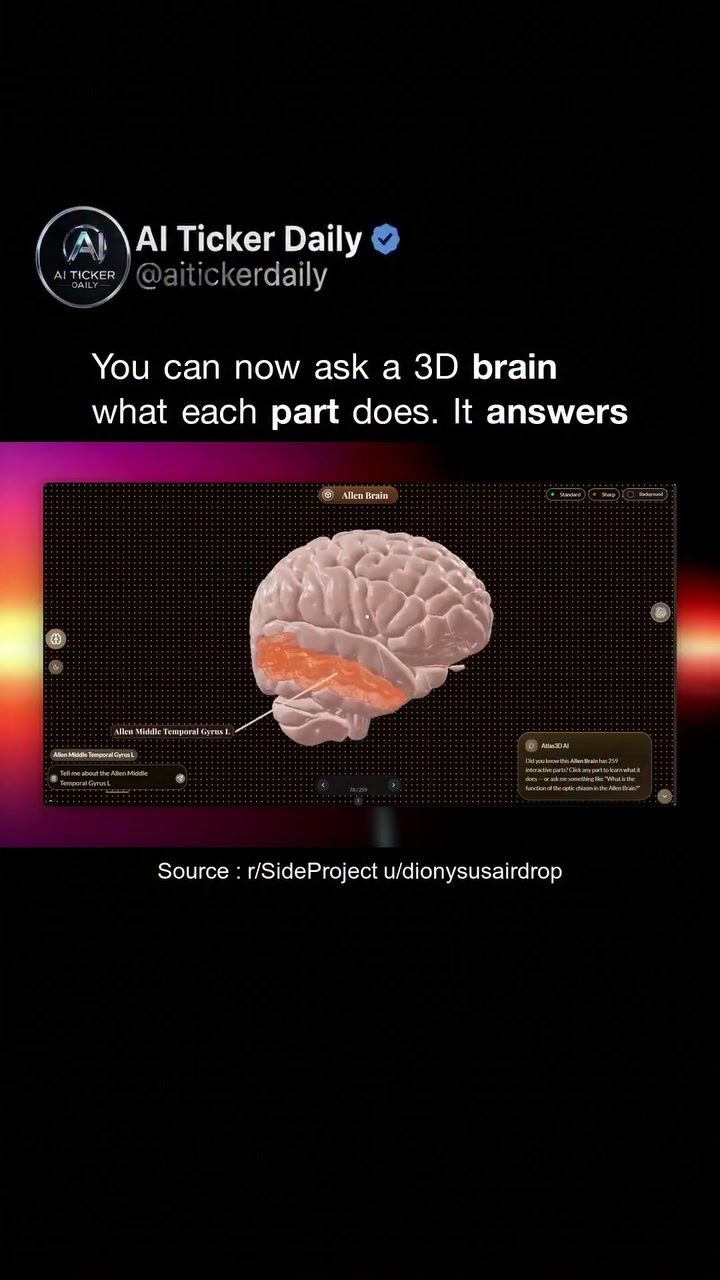
3D Brain Exploration with Interactive 3D Model Viewer
The interactive 3D model viewer revolutionizes the way we study complex structures like the human brain. This innovative tool transcends traditional learning methods, offering a hands-on, voice-controlled exploration of intricate anatomical regions and their functions. Whether you're studying the brain, an engine, or a molecule, this versatile application provides an immersive and interactive learning experience.
Context / Why this matters
In the realm of learning, visual aids have always played a crucial role. However, static diagrams and 2D images often fall short in conveying the depth and complexity of three-dimensional structures. Enter the 3D model viewer, which brings a new dimension to learning by allowing users to interact with detailed, rotatable 3D models. The voice-controlled feature adds an extra layer of accessibility and intuitiveness, making the learning process more interactive and engaging, especially for complex subjects like human anatomy.
Main discussion
The Power of Voice-Controlled Interaction
One of the standout features of this 3D model viewer is its voice-controlled interface. Instead of merely rotating a 3D model on the screen, users can ask specific questions about different parts of the brain. For instance, you can ask, "What does the cerebellum do?" and the model will highlight the cerebellum and provide a detailed explanation. This interactive approach not only makes learning more engaging but also more effective, as users can delve deeper into areas of interest with a simple voice command. This is particularly useful in educational scenarios, where teachers can integrate these interactive models into their lessons, fostering a more dynamic and engaging classroom experience.
Exploring the Brain Region by Region
The 3D model viewer breaks down complex structures like the brain into manageable pieces. When you ask about a specific region, the model disassembles itself, allowing users to explore different parts one by one. This feature is invaluable for learning detailed brain functions, as it provides a comprehensive understanding of each part and its role within the brain. Students can explore different regions at their own pace, enhancing their grasp of complex anatomical functions. This kind of detailed exploration is unparalleled in traditional learning methods, which often rely on static diagrams and textbooks.
Generating Interactive Quizzes
Once the exploration is complete, the 3D model viewer generates a quiz based on the regions you've explored. This feature not only reinforces learning but also provides a practical way to assess comprehension. For educators, this means dropping a 3D model into a lesson and having it teach itself. No more textbooks or flat diagrams—just an immersive, interactive learning experience that adapts to the user's curiosity and pace of learning.
Application Beyond the Brain
While the 3D model viewer is particularly impactful for exploring the brain, its applications extend far beyond human anatomy. Engineers can use it to study engine parts, chemists can explore molecule structures, and architects can delve into building designs. The versatility of this tool makes it a valuable resource across various fields, providing an interactive and intuitive way to understand complex structures.
Practical tips
- Voice Commands: Make the most of the voice-controlled feature by asking specific questions about the parts you're exploring. This will help you get precise and detailed information.
- Explore Piece by Piece: Take advantage of the model's ability to break down into parts. Explore each segment thoroughly before moving on to the next.
- Use Quizzes for Reinforcement: After exploring, use the generated quizzes to reinforce what you've learned. This will help solidify your understanding and identify areas that need further exploration.
- Integrate with Lessons: If you're a teacher, integrate these models into your lessons to create a more engaging and interactive learning environment. Let the models guide the students through the learning process.
Important takeaways
- Interactive Learning: The 3D model viewer offers an interactive and engaging way to learn complex structures, breaking down barriers of traditional static diagrams and textbooks.
- Voice-Controlled Interface: The voice-controlled feature makes the learning experience more intuitive and accessible, allowing users to ask specific questions and get detailed answers.
- Piece-by-Piece Exploration: The ability to explore different parts of the model individually enhances understanding and retention.
- Versatility: This tool is not limited to brain studies but can be used across various fields, making it a versatile educational resource.
Conclusion
The 3D model viewer transforms the way we approach learning complex structures. By combining voice-controlled interaction with detailed, interactive models, it offers an immersive and engaging learning experience. Whether you're a student exploring the brain, an engineer studying engine parts, or a teacher looking to enhance your lessons, this tool provides a new dimension to learning. Embrace this innovative approach to deepen your understanding and make learning more enjoyable.
Questions readers ask
How does the voice-controlled 3D brain model viewer enhance understanding of brain anatomy?
The voice-controlled 3D brain model viewer allows users to interact with detailed, rotatable 3D models of the brain, providing a more comprehensive understanding of its complex structures. By using voice commands to navigate and explore, users can gain deeper insights into brain anatomy compared to traditional 2D diagrams.
What are the benefits of using a 3D brain anatomy viewer?
A 3D brain anatomy viewer offers several benefits, such as immersive, hands-on exploration of the brain's structures, and the ability to rotate and zoom in on specific regions. This interactive approach makes it easier to grasp complex brain structures and their functions, enhancing the overall learning experience.
Can the 3D model viewer be used for structures other than the brain?
Yes, the 3D model viewer is a versatile tool that can be used for exploring various complex structures, not just the brain. You can use it to study engines, molecules, and other intricate 3D objects, making it a valuable resource for a wide range of subjects.
How does the voice-activated 3D model enhance the learning experience?
The voice-activated feature of the 3D model viewer allows for a more dynamic and engaging learning experience. Users can navigate the model hands-free, focusing more on understanding the structure and functionality of the brain without the distraction of manual controls.
What makes the 3D brain model viewer more effective than traditional diagrams?
Unlike static diagrams, the 3D brain model viewer offers a three-dimensional perspective that can be rotated and manipulated. This interactive approach provides a clearer understanding of the brain's spatial relationships and complexities, making it more effective for learning and exploration.
Related deep dives
Similar reads based on topic and creator.




Recent articles
Fresh deep dives from the latest Reels we unpacked.




Comments
Be the first to comment.