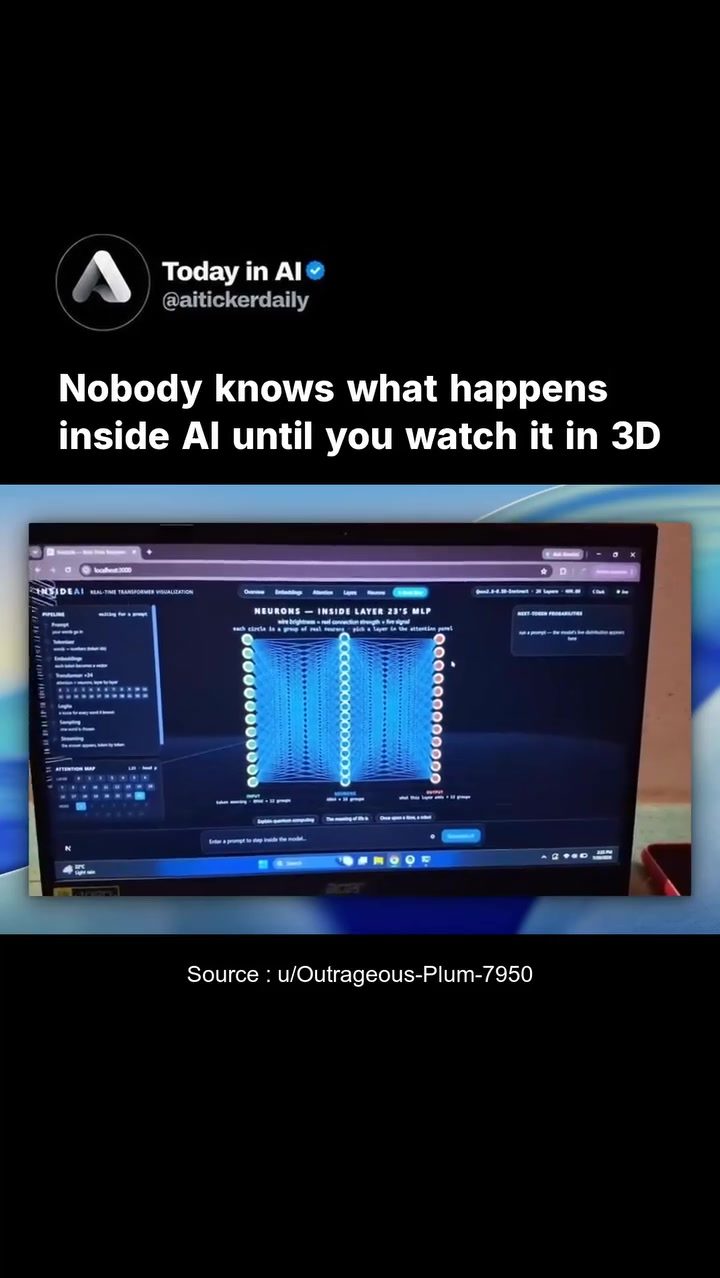
AI Visualization: Inside the Black Box of AI
Artificial Intelligence (AI) has become an integral part of our daily lives, powering everything from virtual assistants to content recommendations. However, the inner workings of AI models often remain a mystery, shrouded in complexity. Recently, a developer has changed the game with an innovative tool—InsideAI—that offers a real-time, interactive 3D visualization of AI processes. This tool provides unprecedented insights into what happens between inputting a prompt and receiving a response, making the complex world of AI more accessible and understandable.
Why This Matters
Understanding AI is crucial for several reasons. For developers, it means better optimization and troubleshooting. For users, it provides clarity on how AI systems make decisions, fostering trust and transparency. For researchers and enthusiasts, it offers a new way to explore and experiment with AI models. InsideAI transforms the abstract concept of AI into a tangible, visual experience, making it easier to grasp the dynamics of AI processing.
Main Discussion
The Puzzle of AI Processing
AI models, particularly those based on transformer networks, are complex systems involving layers of neurons and intricate connections. These networks process data through a series of steps, often hidden behind the scenes. InsideAI demystifies this process by visualizing the internal workings of a language model in real-time. This includes showing how attention weights fire, neuron activations light up, and token probabilities shift as data is processed.
The Role of 3D Visualization
One of the standout features of InsideAI is its 3D visualization capability. Traditional AI visualizations often rely on 2D representations or generic animations, which can be difficult to interpret. InsideAI enhances the user experience by providing a 3D view of the model's layers and neurons. This allows users to see the spatial relationships and interactions within the AI model more clearly, making the visualization not only more intuitive but also more engaging.
Real-Time Processing
InsideAI excels in real-time data processing, displaying the AI model's operations as they happen. This real-time feedback is invaluable for understanding how different inputs affect the model's outputs. By watching real attention weights fire, neuron activations light up, and token probabilities shift, users can gain a deeper understanding of the AI model's decision-making process. This transparency is a game-changer for anyone looking to optimize or troubleshoot AI models.
Transformer Networks and MLP Layers
A key focus of InsideAI is on transformer networks, a type of AI model known for its effectiveness in natural language processing tasks. InsideAI zooms in on specific layers within these networks, such as Layer 23’s MLP (Multi-Layer Perceptron). This detailed view allows users to see the inner workings of the model, including how groups of neurons in the attention pool process data. By visualizing these processes, InsideAI provides a clearer picture of how transformer networks operate.
Practical Tips
Getting Started with InsideAI
InsideAI is an open-source tool, which means it's freely available for anyone to use. To get started, you'll need a local environment where you can run the software. Here are some steps to help you begin:
- Install Dependencies: Make sure your system meets the necessary requirements and install any dependencies specified in the documentation.
- Clone the Repository: Download the InsideAI repository from the source.
- Run the Model: Follow the instructions to run a real language model locally.
- Explore the Visualization: Use the interactive 3D visualization to explore the AI model's processes.
Exploring the Visualization
Once you have InsideAI up and running, take some time to explore the visualization features. Here are a few tips:
- Zoom and Rotate: Use the 3D view to zoom in and rotate the model, getting a closer look at specific layers and neurons.
- Real-Time Feedback: Watch the real-time processing of data to see how inputs affect the model's outputs.
- Label Simplifications: Pay attention to the clear labels that simplify complex processes, making it easier to understand what's happening.
Customizing the Experience
InsideAI is designed to be customizable, allowing users to tailor the visualization to their needs. You can:
- Adjust Layers: Focus on different layers within the transformer network to see how they process data.
- Monitor Neurons: Keep an eye on specific neurons to understand their role in the AI model's decision-making process.
- Analyze Attention Weights: Track the attention weights to see which parts of the input data the model focuses on.
Important Takeaways
InsideAI represents a significant step forward in making AI more accessible and understandable. By providing a real-time, interactive 3D visualization of AI processes, it offers valuable insights into how AI models work. This tool is particularly useful for developers looking to optimize their models, researchers exploring new AI techniques, and anyone interested in understanding the inner workings of AI.
Conclusion
Understanding the internal workings of AI models has long been a challenge due to their complexity. InsideAI changes this by offering a detailed, interactive 3D visualization of AI processes. This tool provides a unique perspective on how AI models operate, making it easier to optimize, troubleshoot, and explore these systems. Whether you're a developer, researcher, or simply curious about AI, InsideAI offers a fascinating journey into the world of artificial intelligence.
Questions readers ask
What is the primary purpose of the InsideAI tool?
The InsideAI tool is designed to simplify and illuminate the complex processes within AI models. It provides a 3D visualization that allows users to see, in real-time, how inputs are transformed into outputs, making the often obscure AI processes more understandable and easier to dissect.
How does InsideAI contribute to better AI optimization?
By offering a clear, visual representation of AI models, InsideAI helps developers identify inefficiencies and bottlenecks. This insight allows for more targeted optimization, leading to improved performance and more efficient AI systems.
Can InsideAI be used to visualize any type of AI model?
While InsideAI is particularly effective for visualizing transformer models and their underlying layers, it can be adapted and used for a variety of AI models. Its primary function is to make the inner workings of AI models more transparent, regardless of the specific architecture.
What are the key benefits of using a 3D visualization tool for AI?
A 3D visualization tool like InsideAI provides a more intuitive and interactive way to explore AI models. It helps users understand the spatial relationships between different model components, such as neurons and layers, and how data flows through these components, offering a comprehensive view of the AI process.
How does InsideAI make AI more accessible to users and developers?
InsideAI demystifies AI by providing a user-friendly, interactive interface. It breaks down the complex processes of AI into visual components, allowing users and developers to grasp the fundamentals of AI models and their operations without needing to delve deeply into technical details.
What specific AI components can be visualized with InsideAI?
InsideAI can visualize various components of AI models, including individual layers, neurons, and attention mechanisms. This detailed visualization helps users understand how different parts of the model contribute to the final output, providing a holistic view of the AI process from input to output.
How does InsideAI enhance the transparency of AI systems?
InsideAI enhances AI transparency by making the internal processes of AI models visible. It allows users to track the flow of data through the model, see how different inputs are processed, and understand the decisions made by the AI. This transparency is crucial for building trust and ensuring the reliability of AI systems.
Related deep dives
Similar reads based on topic and creator.




Recent articles
Fresh deep dives from the latest Reels we unpacked.




Comments
Be the first to comment.