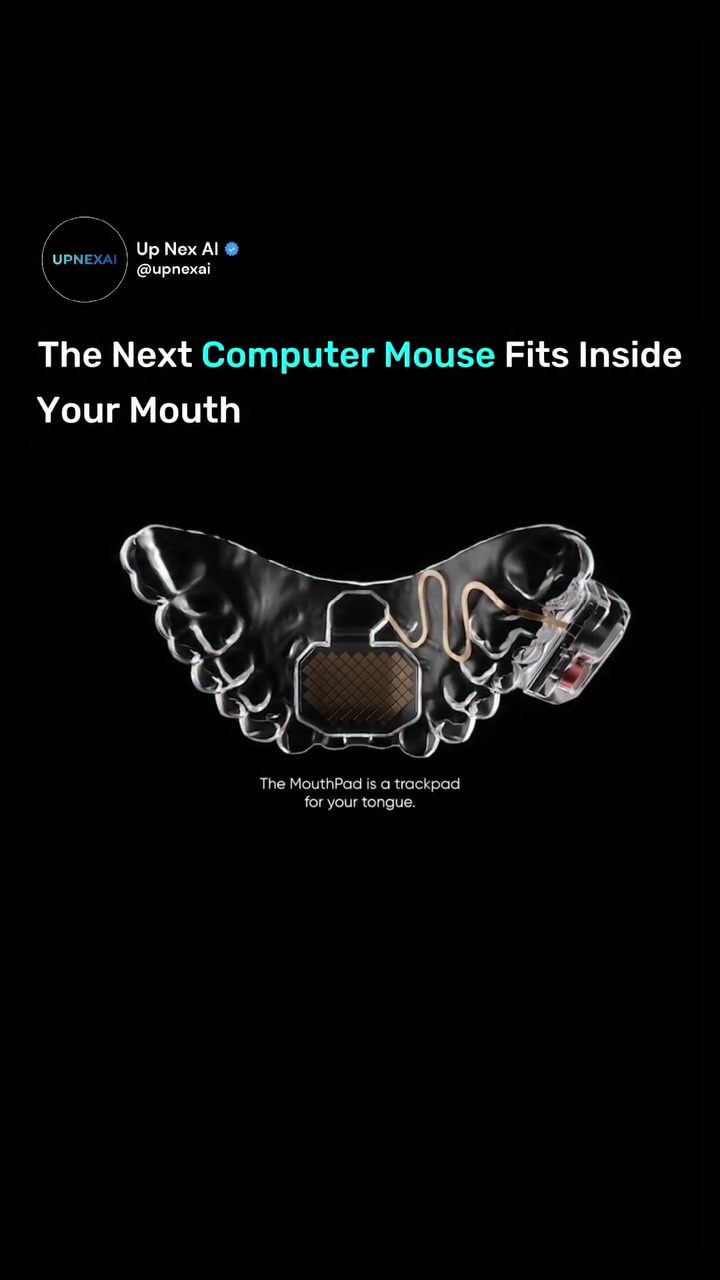
The MouthPad: A Revolutionary Hands-Free Computer Controller
The MouthPad, a groundbreaking wearable technology, transforms the tongue into a hands-free computer controller. Designed by Augmental, this innovative device fits like a custom dental retainer on the roof of the mouth, allowing users to control smartphones, tablets, and computers using tongue movements. This makes it a game-changer for people with limited hand or arm mobility, offering a discreet, non-invasive alternative to traditional assistive technology.
Why This Matters
In today's tech-savvy world, innovation often revolves around making devices more portable and interactive. The MouthPad stands out as a revolutionary solution for those who need hands-free control over their digital devices. Its design and functionality open up new possibilities for accessibility, productivity, and gaming.
Main Discussion
The Design and Functionality
The MouthPad is designed to be worn discreetly inside the mouth, similar to a custom dental retainer. It integrates seamlessly with the user's palate, making it an unobtrusive addition to daily life. The device is controlled using the tongue, allowing for precise movements and interactions with digital interfaces. This feature is particularly beneficial for individuals with mobility impairments, as it provides a hands-free way to navigate and control various devices.
How It Works
The core functionality of the MouthPad relies on the user's tongue movements. By moving the tongue across the trackpad, users can perform various actions such as clicking, scrolling, and selecting options on their devices. The device supports customizable gestures and keyboard shortcuts, allowing users to personalize their interactions based on their needs.
Connectivity and Compatibility
The MouthPad is equipped with Bluetooth connectivity, enabling it to support multiple devices simultaneously. This makes it highly versatile, as users can control smartphones, tablets, and computers without the hassle of switching devices. The Bluetooth functionality ensures a stable and reliable connection, making it a dependable tool for everyday use.
Battery Life and Performance
One of the standout features of the MouthPad is its impressive battery life. The device delivers over 7 hours of continuous use on a single charge, ensuring that users can rely on it for extended periods. This is particularly useful for productivity tasks, gaming, and other activities that require prolonged device usage.
Optional Features
In addition to tongue-controlled interactions, the MouthPad offers optional head tracking and sip gestures. These features provide additional ways to perform commands and actions, enhancing the overall user experience. Sip gestures, for example, can be used for clicking, scrolling, and other commands, making the device even more versatile.
Practical Tips
- Getting Started: When first using the MouthPad, take the time to familiarize yourself with the device and its features. Practice using different tongue movements to get a feel for how the device responds.
- Customizing Gestures: Make use of the customizable gestures and keyboard shortcuts to tailor the device to your specific needs. This can significantly enhance your productivity and ease of use.
- Maintenance: Keep the device clean and well-maintained to ensure optimal performance. Regular cleaning can help prevent any buildup that might affect its functionality.
- Battery Management: Make the most of the device's long battery life by ensuring it is fully charged before extended use. This will help you avoid any interruptions in your workflow.
Important Takeaways
- Hands-Free Control: The MouthPad offers a unique hands-free control method, making it ideal for individuals with mobility impairments.
- Versatility: With Bluetooth connectivity and support for multiple devices, the MouthPad is highly versatile and can be used for a variety of tasks.
- Customization: The ability to customize gestures and keyboard shortcuts allows users to tailor the device to their specific needs.
- Accessibility: The MouthPad's design makes it a discreet and non-invasive alternative to traditional assistive technology, improving accessibility for a wide range of users.
- Productivity and Gaming: The device's long battery life and customizable features make it a valuable tool for productivity, gaming, and everyday computing.
Conclusion
The MouthPad is more than just a gadget; it's a transformative tool that opens up new possibilities for hands-free computer control. Its innovative design, customizable features, and long battery life make it a valuable addition to the tech landscape. Whether you're looking to improve productivity, enhance gaming experiences, or find a more accessible way to interact with digital devices, the MouthPad is a cutting-edge solution that delivers on all fronts.
Questions readers ask
How does the MouthPad enable hands-free computing?
The MouthPad is a wearable controller that fits on the roof of the mouth. It uses tongue movements to control digital devices, providing a truly hands-free computing experience. Users can navigate devices, type, and execute commands without needing to touch a screen or keyboard.
Who can benefit from using the MouthPad?
Anyone seeking hands-free computing can benefit from the MouthPad, but it is particularly useful for individuals with mobility impairments. It offers a discreet and non-invasive way to control digital devices, enhancing accessibility and productivity.
Can the MouthPad be used with multiple devices?
Yes, the MouthPad can be used with smartphones, tablets, and computers. It connects via Bluetooth, allowing users to control multiple devices seamlessly with tongue movements tailored to specific actions and gestures.
What types of controls are available with the MouthPad?
The MouthPad offers a range of controls, including a hands-free trackpad, keyboard shortcuts, and custom tongue control gestures. Users can navigate menus, type, and perform various tasks without lifting a finger.
How does the MouthPad improve productivity?
For users who wish to multitask or streamline their workflows, the hands-free nature of the MouthPad allows for continuous device interaction, reducing the need to switch between input methods. This can significantly speed up tasks and improve overall efficiency.
Is the MouthPad comfortable to wear?
The MouthPad is designed to fit comfortably on the roof of the mouth, resembling a custom dental retainer. Its discreet design ensures that users can wear it for extended periods without discomfort, making it a practical solution for daily use.
Can I customize the MouthPad's controls to suit my needs?
Yes, the MouthPad offers customizable controls. Users can program specific tongue movements to perform various tasks, such as typing, navigating menus, or executing shortcuts. This personalization allows for a tailored and efficient user experience.
Related deep dives
Similar reads based on topic and creator.




Recent articles
Fresh deep dives from the latest Reels we unpacked.




Comments
Be the first to comment.