Video Generation Software: Creating Expressive Talking Avatars
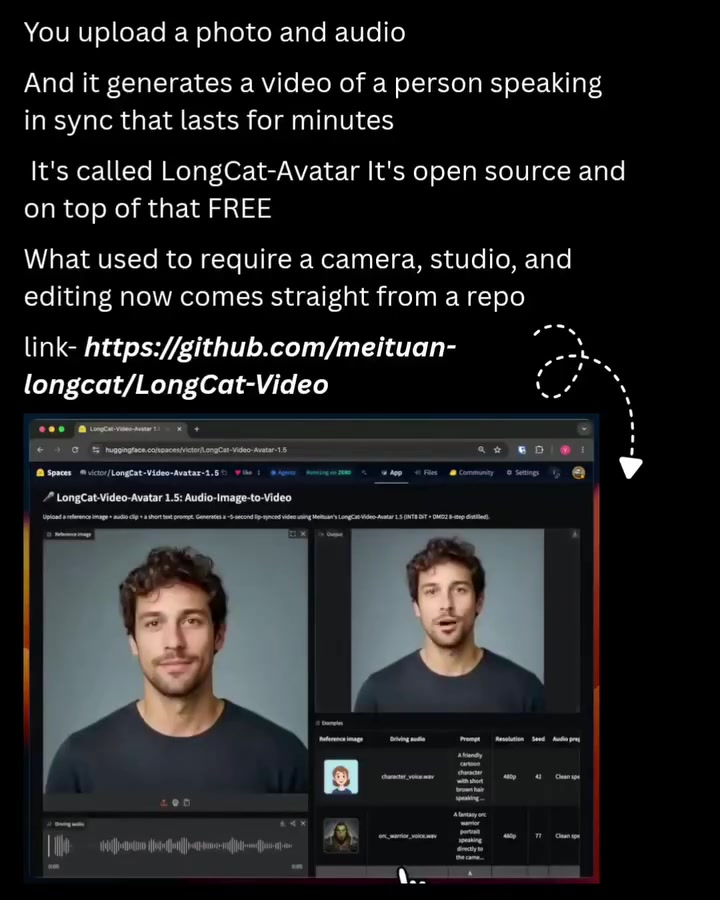
LongCat-Video-Avatar is a software tool that allows users to generate expressive talking avatar videos using just a single image and an audio clip. This innovative software syncs the avatar's movements with the audio, creating a lifelike and engaging video experience.
Why This Matters
The ability to generate talking avatar videos from simple inputs has significant implications for various applications. From creating personalized video content to enhancing virtual presentations, this software opens up new avenues for communication and entertainment. Moreover, the open-source nature of LongCat-Video-Avatar makes it accessible to a wide range of users, from hobbyists to professionals.
Main Discussion
How It Works
LongCat-Video-Avatar operates on the principle of syncing facial movements and expressions with an audio input. By using a reference image of a person, the software generates a video where the avatar speaks in sync with the provided audio clip. This process eliminates the need for a camera, studio, or extensive editing.
User Interface
The software features a user-friendly interface. Users can upload a reference image and an audio clip through designated fields labeled "Reference Image" and "Driving Audio." Additional settings such as resolution can be adjusted to suit the user's needs. Once the inputs are ready, users can preview the audio and generate the video by clicking the "Send" button.
Input Requirements
To create a talking avatar video, LongCat-Video-Avatar requires two main inputs:
- Reference Image: A clear, high-resolution image of the person whose avatar will speak in the video. This image serves as the visual basis for the avatar.
- Audio Clip: An audio file that contains the dialogue or speech that the avatar will deliver. The software syncs the avatar's mouth movements and facial expressions with the audio input.
Open-Source and Accessibility
One of the standout features of LongCat-Video-Avatar is its open-source nature. Being open-source means that the software's code is freely available on GitHub, allowing users to modify, improve, and distribute it. This accessibility fosters a community of developers and enthusiasts who can contribute to its enhancement and expansion.
Practical Tips
Choosing the Right Image
To achieve the best results, select a high-quality image with a clear view of the face. The image should be well-lit and have minimal background distractions. This ensures that the avatar's facial expressions are accurately represented and the generated video looks natural.
Preparing the Audio Clip
The quality of the audio clip is crucial for generating a convincing talking avatar video. Use a high-quality microphone and record in a quiet environment to minimize background noise. Clear and articulate speech will result in more realistic lip-syncing and overall better video quality.
Customizing the Resolution
Adjusting the resolution settings can impact the final output. Higher resolutions will provide sharper and more detailed videos, but they may also require more processing power. Experiment with different resolutions to find the optimal balance between quality and performance for your needs.
Preview and Refine
Before generating the final video, utilize the audio preview feature to ensure that the audio clip and reference image are correctly synchronized. This step allows you to make any necessary adjustments before committing to the full video generation process.
Important Takeaways
- LongCat-Video-Avatar is a versatile tool for generating expressive talking avatar videos from a single image and an audio clip.
- The software's user-friendly interface makes it accessible for both beginners and experienced users.
- High-quality inputs, including clear images and crisp audio, are essential for achieving the best results.
- Open-source nature allows for community contributions and continuous improvements.
- The software eliminates the need for a camera, studio, or extensive editing, making video creation more efficient and cost-effective.
Conclusion
LongCat-Video-Avatar represents a significant advancement in video generation technology. By allowing users to create expressive talking avatar videos from simple inputs, it opens up new possibilities for content creation and communication. The software's open-source availability on GitHub further enhances its appeal, making it a valuable tool for a wide range of applications. Whether you're a content creator, educator, or enthusiast, LongCat-Video-Avatar offers a powerful and accessible way to generate engaging and lifelike videos.
Questions readers ask
What is LongCat Video Avatar software and how does it work?
LongCat Video Avatar is a software tool designed to generate talking avatar videos. It uses a single image and an audio clip to create an animated avatar that mimics the audio input, syncing lip movements and facial expressions to match the voice, resulting in a lifelike video.
What are the primary uses for talking avatar videos created with LongCat Video Avatar?
Talking avatar videos can be used for a variety of purposes, including personalized video content, virtual presentations, and enhancing online tutorials. They can also be utilized in marketing campaigns, customer support, and entertainment to provide an engaging and interactive experience.
Do I need any special skills or equipment to create avatar videos with LongCat Video Avatar?
No special skills or equipment are required. LongCat Video Avatar is designed to be user-friendly, allowing anyone to create talking avatar videos. You only need a single image for the avatar and an audio clip to generate the video.
Can LongCat Video Avatar sync the avatar's movements with any type of audio?
Yes, LongCat Video Avatar is designed to sync the avatar's movements with a wide range of audio inputs. Whether it's a speech, a song, or any other form of audio, the software will analyze the audio and match the avatar's lip movements and facial expressions accordingly.
What file formats does LongCat Video Avatar support for images and audio?
For images, LongCat Video Avatar typically supports common formats such as JPEG, PNG, and BMP. For audio, it generally supports formats like MP3, WAV, and OGG. However, it's best to check the software's documentation for the most up-to-date information on supported formats.
Is LongCat Video Avatar open-source, and if so, what does that mean for users?
Yes, LongCat Video Avatar is open-source, which means its source code is freely available to the public. This allows users to modify, distribute, and even contribute to the software's development. It also ensures that the software remains accessible and can be improved by a community of users and developers.
How can I enhance the quality of my talking avatar videos created with LongCat Video Avatar?
To enhance the quality of your talking avatar videos, consider using high-resolution images for the avatar and clear, high-quality audio clips. Additionally, you can experiment with different settings within the software to fine-tune the avatar's movements and expressions to better match the audio input.
Related deep dives
Similar reads based on topic and creator.




Recent articles
Fresh deep dives from the latest Reels we unpacked.




Comments
Be the first to comment.