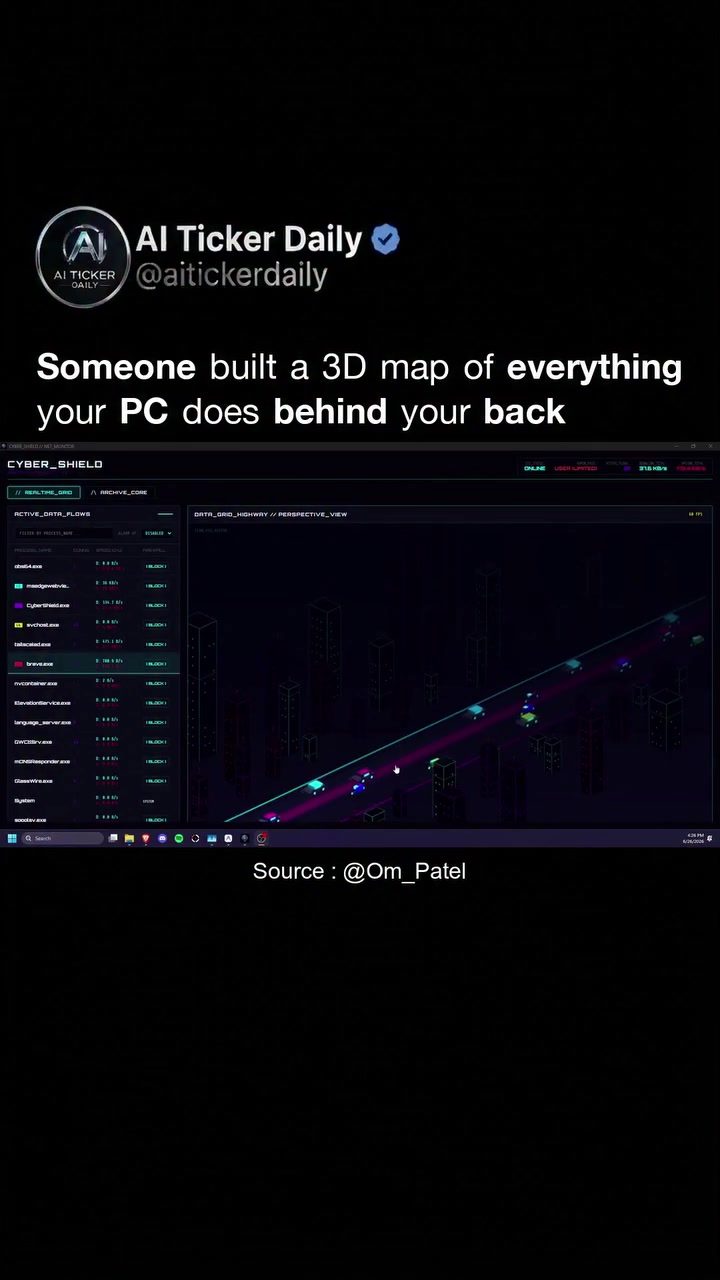
3D PC Monitoring Tool
Understanding what your PC does behind the scenes is a challenge for most users. With constant internet connections, apps, services, and trackers sending and receiving data, it's easy to lose track of the digital activity happening in the background. CyberShield is a software tool that aims to tackle this issue by providing a 3D visualization of your PC's data flows.
Context / Why this matters
Data flows and processes occurring on a PC often remain invisible to the user. This can be dangerous if malicious software or unauthorized data exchanges go undetected. CyberShield transforms this invisible traffic into a visible, dynamic map, allowing you to monitor and manage your PC's activity in real time. This not only enhances your cybersecurity but also gives you a deeper understanding of your PC's performance and operations.
Main discussion
Real-Time Visualization
CyberShield renders your PC's connections as a 3D cityscape. Every active link is depicted as a car driving down a data highway, making it easy to visualize data flows in real time. This 3D map is more than just an aesthetic representation; it provides a comprehensive overview of your PC's activity, allowing you to monitor your system with ease.
Detailed Insights
Clicking on any process within the 3D map offers a full port inspector. This detailed view includes the remote IP, resolved hostname, and other critical information. This level of detail helps you identify and understand the sources of data exchanges, including those that may be unauthorized or malicious.
Security Features
One of the standout features of CyberShield is its ability to block unwanted connections. With a single click, you can block processes phoning home without your consent, using a kernel-level firewall. This ensures that your PC's security is maintained at a high level, preventing unauthorized data exchanges and potential security breaches.
Open Source and Free
CyberShield is not only powerful but also accessible. It's open source and free, making it a cost-effective solution for anyone looking to enhance their PC's security and performance. Built as an alternative to GlassWire, CyberShield offers all the essential features without any additional costs.
Use Cases
The practical applications of CyberShield are vast. Whether you're a casual user looking to monitor your PC's activity or a professional needing to secure sensitive data, CyberShield provides a robust solution. It's also a valuable tool for developers and IT professionals who need to diagnose and troubleshoot network issues.
Practical tips
- Understanding Data Flows: Use the 3D visualization to get a clear picture of what your PC is doing. Identify any unusual data flows that may indicate unauthorized activity.
- Monitoring Network Traffic: Regularly check the data highway for any suspicious cars (data connections). Use the detailed port inspector to investigate any concerns.
- Blocking Unauthorized Connections: Use the kernel-level firewall to block any unauthorized data exchanges. This ensures that your PC remains secure from potential threats.
- Setup and Customization: Install CyberShield and explore its settings to customize your monitoring preferences. The open-source nature of the software allows for further customization and integration with other tools.
Important takeaways
- Enhanced Visibility: CyberShield provides a unique 3D visualization of your PC's data flows, making it easier to monitor and manage your system's activity.
- Comprehensive Insights: With detailed port inspection, you can get a clear view of every active connection, helping you identify and block unauthorized data exchanges.
- Robust Security: The tool's kernel-level firewall ensures that your PC remains secure by blocking unwanted connections with a single click.
- Cost-Effective Solution: Being open source and free, CyberShield offers a cost-effective way to enhance your PC's security and performance.
Conclusion
CyberShield is a powerful tool for anyone looking to gain a deeper understanding of their PC's activity and enhance its security. Its 3D visualization, detailed insights, and robust security features make it a valuable addition to any user's toolkit. By transforming invisible traffic into a visible, interactive map, CyberShield empowers users to take control of their PC's activity and ensure their digital safety.
Questions readers ask
What makes CyberShield different from other cybersecurity tools?
CyberShield stands out by offering a 3D visualization of your PC's data flows. This unique feature transforms complex data exchanges into an easy-to-understand, dynamic map, unlike traditional tools that rely on text-based logs or static reports.
Can CyberShield help improve my PC's performance?
Yes, by providing real-time data monitoring, CyberShield allows you to identify processes or applications that may be consuming excessive resources. This insight can help you manage and optimize your PC's performance for better overall efficiency.
How does CyberShield enhance cybersecurity?
CyberShield enhances cybersecurity by making invisible data flows visible. This allows users to detect any unauthorized or malicious data exchanges in real time, enabling swift action to prevent potential security breaches or data leaks.
Is CyberShield suitable for users without technical expertise?
Yes, the 3D visualization feature of CyberShield makes it accessible for users without extensive technical knowledge. The dynamic map provides an intuitive way to understand and monitor PC activity, making it a user-friendly tool for enhancing PC data security.
What types of data flows can I monitor with CyberShield?
CyberShield allows you to monitor a wide range of data flows, including internet traffic, app communications, service interactions, and tracker activities. This comprehensive view helps you stay informed about all digital activities happening on your PC.
Can CyberShield be used on multiple devices?
CyberShield's compatibility details are not specified in the excerpt. However, most cybersecurity tools are designed to work across multiple devices. Check the official CyberShield documentation or website for specific details on supported platforms and licenses.
Related deep dives
Similar reads based on topic and creator.




Recent articles
Fresh deep dives from the latest Reels we unpacked.




Comments
Be the first to comment.