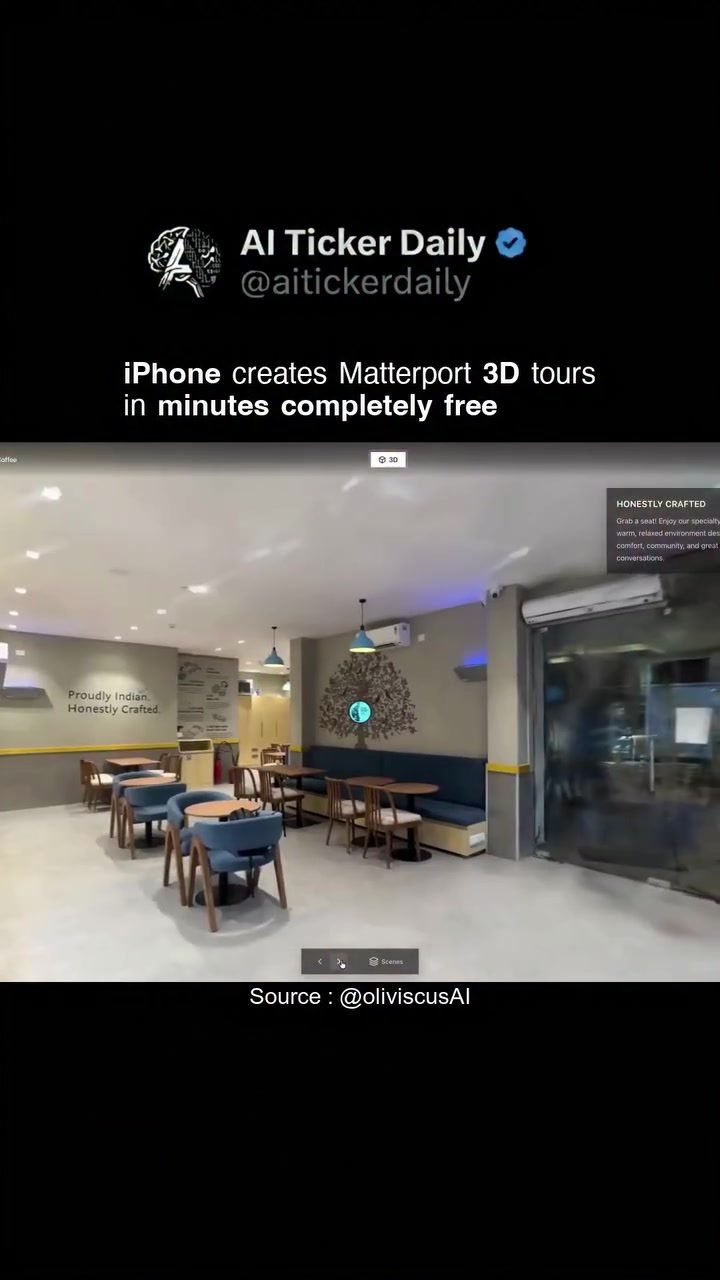
Creating Matterport-Quality 3D Tours with an iPhone
Creating 3D tours of spaces has become increasingly accessible, and one of the most impressive tools for this purpose is the Spatial Lens app from Real Horizons. This app allows users to transform any space into an interactive 3D tour with just an iPhone, achieving Matterport-level quality in mere minutes. This demonstrates how the combination of modern smartphone technology and innovative software can revolutionize the way we capture and explore environments.
The Power of Spatial Lens with an iPhone
The Spatial Lens app, developed by Real Horizons, leverages the capabilities of the iPhone to create high-quality 3D tours. The process is straightforward: users walk through the space while the app scans the environment, converting it into a fully interactive 3D model. This technology is particularly valuable for real estate, interior design, and tourism industries, where immersive virtual experiences can enhance the customer experience and streamline operations.
Ease of Use
One of the standout features of the Spatial Lens app is its user-friendliness. The app guides users through the scanning process, ensuring that every detail is captured accurately. The interface is intuitive, making it accessible even to those without prior experience in 3D modeling. This ease of use is a significant advantage for professionals who need to create 3D tours quickly and efficiently.
Speed and Efficiency
The app's ability to create 3D tours in minutes is a game-changer. Traditional methods of 3D scanning often involve specialized equipment and time-consuming processes. However, with Spatial Lens, users can complete a high-quality scan in just a few minutes, making it an ideal tool for time-sensitive projects.
Cost-Effectiveness
Another compelling aspect of the Spatial Lens app is its cost. The app is available for free on the App Store, eliminating the need for expensive hardware or software. This makes it an accessible option for both individuals and small businesses looking to incorporate 3D tours into their operations without breaking the bank.
High-Quality Output
The 3D tours created with Spatial Lens match the quality of those produced by Matterport, a leading provider of 3D capture technology. This level of quality ensures that the virtual experience is as immersive and detailed as possible, providing a true-to-life representation of the space.
Practical Tips for Creating 3D Tours
Preparation
Before starting the scan, it's essential to ensure that the space is well-lit and free of clutter. Good lighting helps the app capture details more accurately, while a clutter-free environment makes the 3D model easier to navigate.
Walking Path
Plan your walking path carefully. Move at a steady pace and cover all areas of the space. Overlapping scans can help create a seamless 3D model, so consider scanning each part of the space from multiple angles.
Post-Processing
Once the scan is complete, use the post-processing tools within the app to refine the 3D model. This may involve adjusting lighting, removing any artifacts, or enhancing details to achieve the best possible quality.
Sharing and Embedding
After completing the 3D tour, you can share it easily with clients, friends, or colleagues. The app provides options to embed the tour on a website or share it directly via social media, making it convenient to showcase your work.
Integrations
Consider integrating the 3D tours with other platforms and tools. For real estate professionals, this could mean embedding the tours on property listing websites. For interior designers, integrating the tours with client portfolios or project presentations can enhance the visual impact and engagement.
Important Takeaways
Creating 3D tours with an iPhone and the Spatial Lens app offers a range of benefits, from ease of use and speed to cost-effectiveness and high-quality output. This technology is not just a tool for professionals; it can also be a valuable asset for individuals looking to capture and share their spaces in an immersive way.
For real estate agents, the ability to create 3D tours quickly and easily can revolutionize property marketing. Potential buyers can explore properties from the comfort of their own homes, enhancing the buying experience and increasing the likelihood of a successful sale.
In the field of interior design, 3D tours allow clients to visualize designs and make informed decisions before any physical changes are made. This can save time, reduce costs, and ensure that the final product meets the client's expectations.
Tourism and hospitality industries can also benefit from 3D tours by offering virtual experiences of hotels, resorts, and attractions. This can attract more visitors and enhance the overall guest experience.
Conclusion
With the Spatial Lens app from Real Horizons, anyone can turn their iPhone into a powerful 3D scanning tool. This app offers a combination of ease, speed, and quality that makes it an invaluable resource for a wide range of applications. Whether you're a real estate professional, an interior designer, or simply someone who wants to capture and share their space in an immersive way, the Spatial Lens app provides a simple and effective solution. Embrace this technology to enhance your projects and create memorable, high-quality 3D tours.
Questions readers ask
Do I need any special equipment to create 3D tours with the Spatial Lens app?
No, you only need an iPhone. The Spatial Lens app utilizes your iPhone's built-in camera and sensors to capture high-quality 3D tours. No additional hardware is required.
How long does it take to create a 3D tour using the Spatial Lens app?
The Spatial Lens app is designed for quick capture. You can create a 3D tour of a space in just a few minutes by simply walking through the area while the app scans the environment.
Can I use the 3D tours created with Spatial Lens for commercial purposes?
Yes, the 3D tours created with Spatial Lens can be used for various commercial purposes, such as real estate listings, interior design showcases, and tourism promotions. The app is user-friendly and the process is quick.
Is the Spatial Lens app really free to use?
Yes, the Spatial Lens app is free to download and use. There are no hidden costs for capturing and creating 3D tours. However, there may be optional in-app purchases for additional features.
Can I share the 3D tours I create with others?
Yes, you can easily share the 3D tours you create with the Spatial Lens app. The app allows you to export and share your tours via a link, making it convenient for real estate agents, interior designers, and tourism professionals.
What makes the 3D tours created with Spatial Lens stand out?
The 3D tours created with Spatial Lens stand out due to their high-quality and interactive nature. The app leverages the capabilities of the iPhone to achieve a level of quality similar to professional 3D tour services like Matterport, all with a quick and free solution.
Related deep dives
Similar reads based on topic and creator.




Recent articles
Fresh deep dives from the latest Reels we unpacked.


Comments
Be the first to comment.