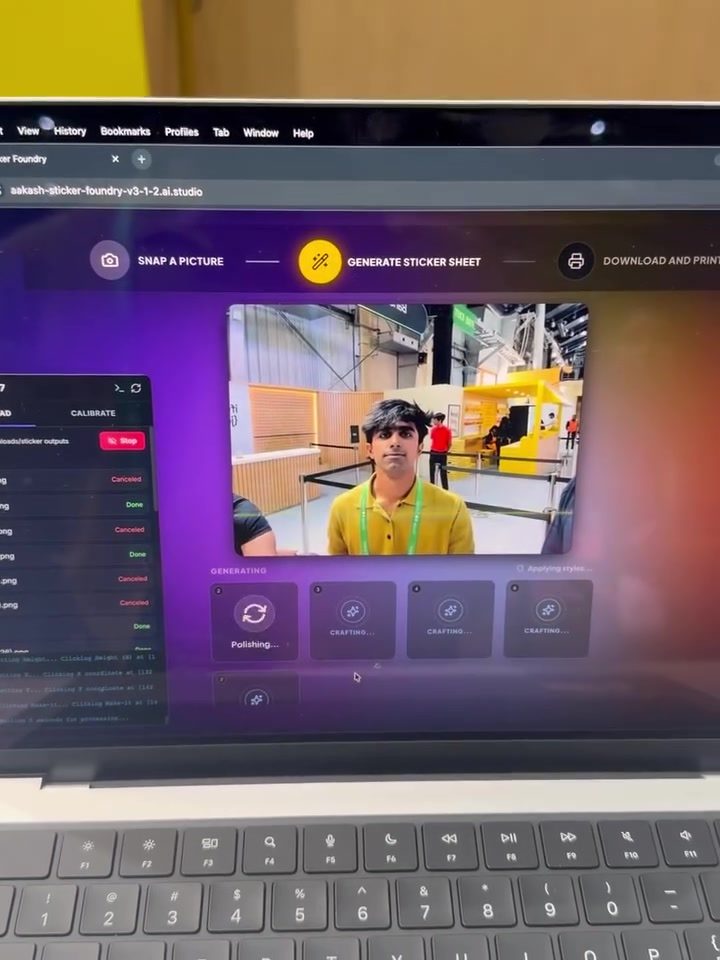
Sticker Sheet Generator
Creating personalized stickers has become a fun and creative way to express oneself, and sticker sheet generators make this process easier than ever. These digital tools allow users to transform their photos into custom sticker sheets, perfect for sharing on social media, using in craft projects, or sending as personalized gifts.
Why This Matters
In the digital age, personalization is key. Whether you're looking to add a unique touch to your digital communications or create physical keepsakes, sticker sheet generators offer a versatile and user-friendly solution. They enable users to turn their favorite photos into a collection of stickers, ready to be used in various creative projects.
How Sticker Sheet Generators Work
Selecting Your Photos
The first step in creating a sticker sheet is selecting the photos you want to include. Most sticker sheet generators allow you to upload multiple images, giving you the flexibility to create a diverse and interesting set of stickers. The key is to choose high-quality images that will look good when printed or shared digitally.
Generating the Sticker Sheet
Once your photos are selected, the generator will process them and arrange them into a sticker sheet format. This process often includes options for adjusting the layout, size, and spacing of the stickers. Some generators even offer the ability to preview the sticker sheet before finalizing it, ensuring that you're happy with the arrangement.
Customizing Your Sticker Sheet
Customization is a significant advantage of using a sticker sheet generator. Many applications provide options to add text, change backgrounds, and even apply filters to your stickers. This level of customization allows you to create a sticker sheet that truly reflects your personal style or the theme of your project.
Previewing and Adjusting
After the initial generation, most applications offer a preview feature. This allows you to see how your sticker sheet will look with the selected images and any customizations you've made. If you're not satisfied with the result, you can usually retake pictures, adjust the selection, or generate more options until you achieve the desired outcome.
Finalizing Your Sticker Sheet
Once you're happy with your sticker sheet, the final step is to download or share it. Most generators offer options to save the sheet as a digital file, which you can then print or share online. Some applications even provide direct integration with social media platforms, making it easy to share your creations with friends and followers.
Practical Tips
-
Choose High-Quality Images: To ensure your stickers look sharp and vibrant, start with high-resolution photos. Blurry or low-quality images will result in stickers that are less appealing.
-
Experiment with Layouts: Don’t be afraid to try different layouts and arrangements. Some sticker sheet generators offer various templates and layouts, so take advantage of these options to find the one that best suits your needs.
-
Add Personal Touches: Personalizing your sticker sheet with text, filters, and backgrounds can make it uniquely yours. Consider adding a special message or using filters that complement the theme of your project.
-
Preview and Adjust: Always take the time to preview your sticker sheet before finalizing it. This step ensures that you catch any issues early and can make adjustments as needed.
-
Save and Share: Once you’re happy with your sticker sheet, save it in a format that works best for your intended use. Whether you’re printing it or sharing it digitally, having a high-quality file ensures the best results.
Important Takeaways
Sticker sheet generators are powerful tools that make it easy to turn your favorite photos into personalized stickers. By following the steps and tips outlined above, you can create sticker sheets that are not only visually appealing but also uniquely yours. Whether you’re using them for digital communication, craft projects, or as gifts, the possibilities are endless.
Conclusion
Creating sticker sheets is a fun and rewarding activity that allows you to add a personal touch to your projects. With the help of sticker sheet generators, the process is straightforward and customizable, offering a range of options to make your stickers stand out. From selecting high-quality images to personalizing your sheet, every step is designed to help you create something truly unique. So, embrace the creativity and start generating your own sticker sheets today.
Questions readers ask
What is a sticker sheet generator and how does it help in creating personalized stickers?
A sticker sheet generator is an online tool or app that allows users to convert their photos into custom sticker sheets. It simplifies the process by offering various templates and design options, enabling users to create personalized stickers for digital sharing or physical craft projects.
Can I use a sticker sheet generator to create stickers from any photo?
Yes, most sticker sheet generators allow you to upload any photo from your device. However, the quality of the output may depend on the resolution and clarity of the original photo. High-resolution images typically yield the best results.
Are there sticker sheet generators available for mobile devices?
Yes, there are several sticker sheet generator apps available for both iOS and Android devices. These apps often provide similar functionality to their web-based counterparts, allowing you to create custom stickers on the go.
How do I design my sticker sheet using a sticker sheet generator?
Designing a sticker sheet usually involves selecting a template, uploading your photos, and arranging them within the template. Many generators offer additional features like filters, borders, and text options to enhance your sticker sheet design.
Can I share my custom sticker sheets directly from the generator?
Yes, most sticker sheet generators provide options to share your creations directly to social media platforms or via email. Some even allow you to download the sticker sheet as an image file for use in other digital projects.
What are some popular sticker sheet generators available online?
There are numerous sticker sheet generators available online, such as Canva, Sticker Mule, and StickerYou. Each platform offers unique features and design options, so it's worth exploring a few to find the one that best suits your needs.
Can I create physical copies of my custom sticker sheets?
Yes, many sticker sheet generators offer printing services, allowing you to order physical copies of your custom sticker sheets. This is a great option if you want to use your stickers for craft projects or send them as personalized gifts.
Related deep dives
Similar reads based on topic and creator.




Recent articles
Fresh deep dives from the latest Reels we unpacked.




Comments
Be the first to comment.