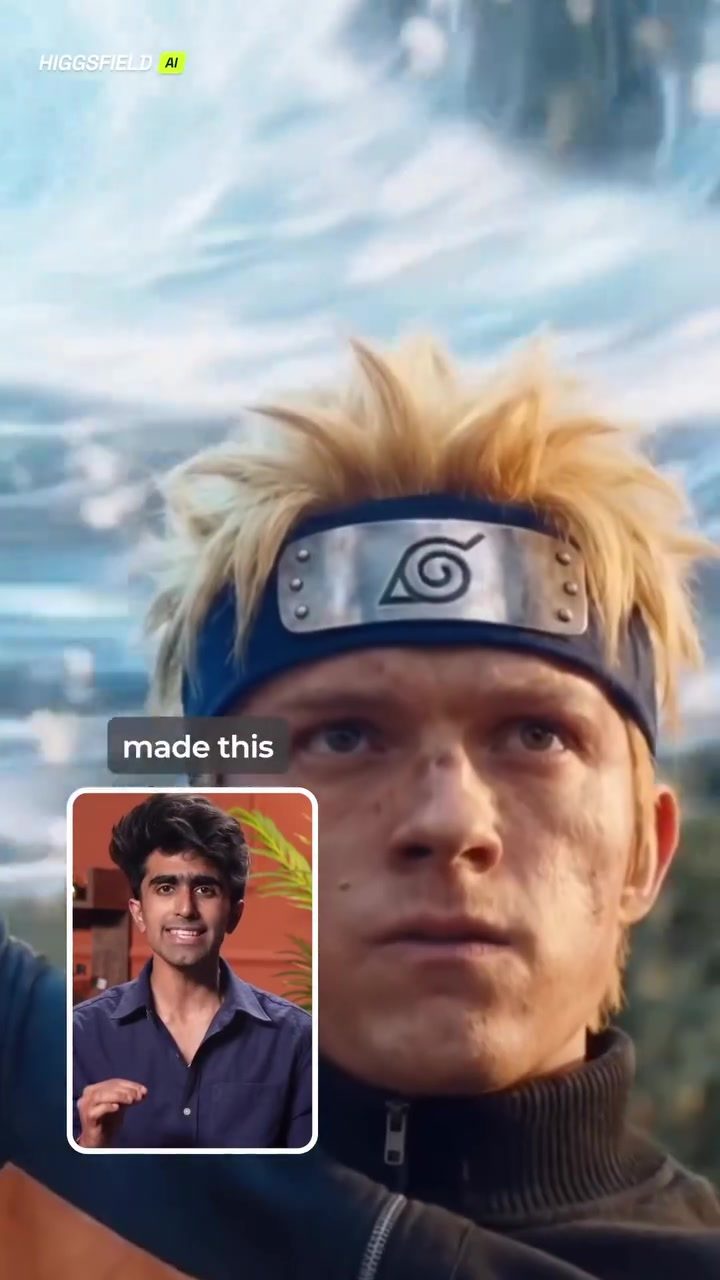
Anime Transformation
Creating an AI-driven anime transformation film involves several key steps, from planning shots to editing the final sequence. This process leverages advanced tools and techniques to achieve a cinematic feel, and it's easier than you might think. Let's dive into the details of creating an anime transformation film.
Context / Why This Matters
The allure of anime transformation sequences, as seen in popular series like Naruto, has captivated audiences for years. These sequences are often high-energy, visually stunning, and pivotal to the narrative. With the advent of AI tools, creators can now bring this level of artistry to their own projects without needing extensive animation skills or a large budget. The ability to generate cinematic-quality transformations opens up new creative possibilities for filmmakers and artists alike.
Main Discussion
Planning Your Shots
The first step in creating an anime transformation film is planning your shots. This involves breaking down the scene into cinematic shots using your favorite anime characters. Tools like ChatGPT or Gemini can be incredibly helpful here. By asking these AI assistants to divide the scene into shots, you can get a structured plan that ensures a cohesive and engaging narrative flow.
For example, you might ask ChatGPT to create a sequence of shots for a Naruto-inspired transformation. This could include close-ups, wide shots, and pan-outs that highlight the character's actions and the surrounding environment. Once you have your shots planned, you can move on to the next step.
Generating Images with Higgsfield
After planning your shots, head over to Higgsfield's new cinematic studio. This tool is designed to be user-friendly, making it one of the easiest tools for AI filmmakers. The interface allows you to switch between image and video modes, giving you the flexibility to create both static frames and dynamic sequences.
To generate your images, click on image mode and paste your first shot prompt. Choose the camera setup that best fits your vision. Higher-quality lenses and real cinema cameras, like the Arri Alexa with a 24mm focal lens, can help achieve wide, cinematic frames that are perfect for anime style. Set the output to 4K for high-resolution images, and you're ready to move to the next scene.
Converting Images to Videos
Once all your images are generated, it's time to convert them into videos. Switch to video mode in Higgsfield, and select your image as the start frame. Choose the camera movement you want and add a simple motion prompt. This process allows you to bring your static images to life with dynamic movements, enhancing the cinematic feel of your transformation sequence.
For consistency, follow the same process for every scene. This ensures a seamless flow between shots, creating a cohesive and polished final product.
Editing Your Sequence
After generating all your clips, the final step is to edit them together. Use a video editing software to align the shots and stitch them into a full-fledged cinematic sequence. This is where you can add any additional visual effects, sound design, or transitions to enhance the overall quality of your film.
Practical Tips
Utilizing ChatGPT for Shot Division
When using ChatGPT or Gemini for shot division, be as specific as possible in your prompts. Include details about the characters, the environment, and the desired camera angles. The more detailed your prompt, the more accurate and visually appealing your generated shots will be.
Experiment with Camera Settings
Don't be afraid to experiment with different camera setups and lenses in Higgsfield. The tool allows you to select from a variety of real cinema cameras and lenses, giving you the freedom to achieve the exact look and feel you want for your anime transformation sequence.
Maintaining Consistency
Consistency is key when generating scenes and converting them into videos. Follow the same process for each shot to ensure a seamless flow between scenes. This attention to detail will result in a polished and professional-looking final product.
Important Takeaways
Creating an anime transformation film using AI tools like Higgsfield and ChatGPT is a rewarding and accessible process. By breaking down the scene into cinematic shots, generating high-quality images, and converting them into videos, you can achieve a cinematic feel that rivals professional productions.
Creative Freedom
With Higgsfield's current offer of 67% off and unlimited generations, you have the creative freedom to build an entire AI film without worrying about limitations. This allows you to experiment, iterate, and perfect your vision to the highest standards.
Consistency and Quality
Maintaining consistency in your shot division and conversion processes is crucial for a polished final product. By using tools like ChatGPT for detailed shot planning and Higgsfield for high-quality image and video generation, you can achieve a cinematic sequence that truly stands out.
Conclusion
Creating an anime transformation sequence has never been more accessible. With advanced AI tools and a structured approach, anyone can bring their creative vision to life. By planning your shots, generating high-quality images and videos, and editing them into a cohesive sequence, you can create a cinematic experience that captures the essence of anime transformations. Whether you're a seasoned filmmaker or just starting out, the tools and techniques outlined in this article provide a solid foundation for achieving your cinematic goals.
Questions readers ask
What are some popular AI tools for creating anime transformation films?
There are several AI tools available to help with this process. AI tools like Runway ML, DeepArt, and DALL-E 2 can generate unique anime-inspired images, while AI video creation tools like Lumen5 or InVideo can help create animation sequences.
Can I create a Naruto-like transformation scene without extensive animation expertise?
Yes, you can create a Naruto-like transformation scene using AI tools that simplify the animation process. By using AI video assistant tools to plan and generate shots, you can achieve a professional look without needing extensive expertise.
How can AI help in planning the shots for an anime transformation film?
AI video assistant tools can help in planning shots by suggesting camera angles, movements, and scene composition. These tools can also help generate storyboards and script breakdowns, making the pre-production process more efficient.
What are the basic steps to create an AI-driven anime transformation video?
The basic steps include planning your shots with AI assistance, generating images or scenes using AI tools, editing the sequences, and finally, rendering and exporting the video for a polished finish.
How can I achieve a cinematic look in my anime transformation video?
To achieve a cinematic look, you can use AI tools that offer features like dynamic lighting, depth of field, and color grading. Planning your shots with AI can also help ensure that each frame has the desired cinematic feel.
What are some tips for creating high-quality anime transformation scenes?
When creating high-quality anime transformation scenes, focus on the key moments of the transformation, use dynamic camera movements, and incorporate visual effects. Make sure to use high-resolution images, and leverage AI tools to enhance the overall quality of the animation.
Related deep dives
Similar reads based on topic and creator.



Recent articles
Fresh deep dives from the latest Reels we unpacked.




Comments
Be the first to comment.