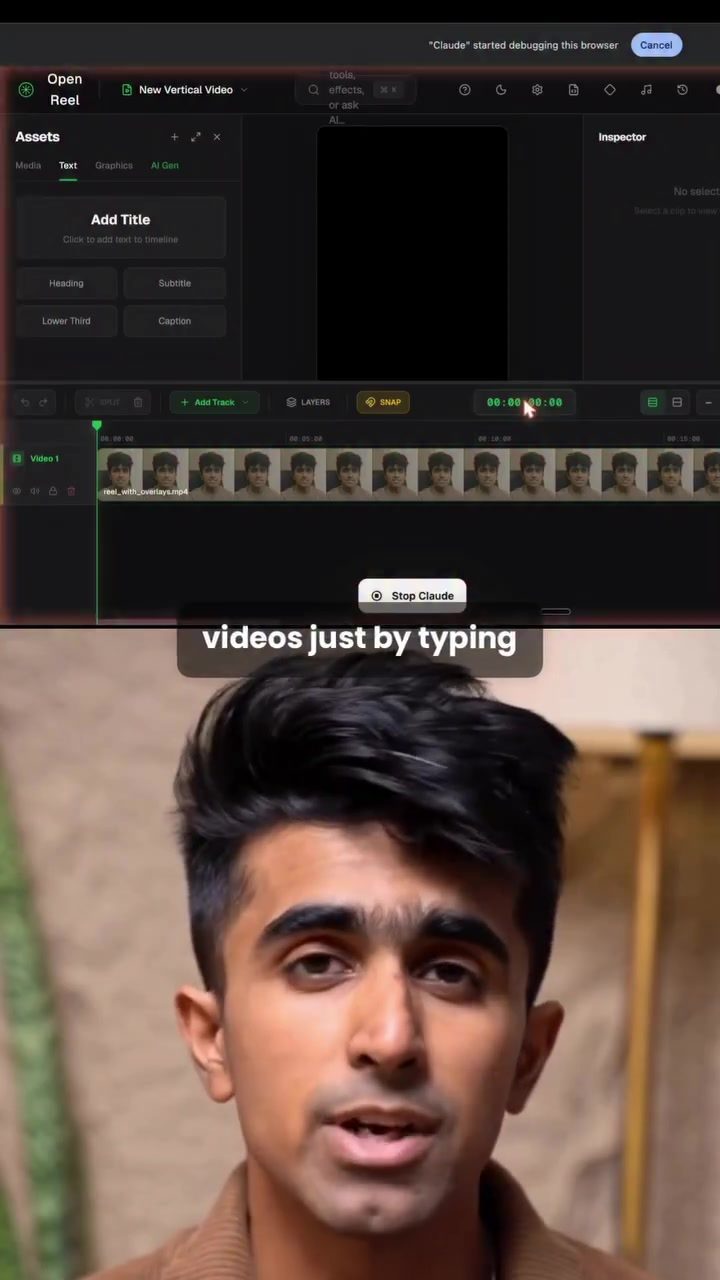
Claude AI and the Future of Prompt-Based Video Editing
Video editing is evolving rapidly, and Claude AI is leading the charge with its innovative approach to video editing. This powerful tool can now edit videos using simple text prompts, making the process more accessible and efficient. This shift towards prompt-based editing is a game-changer for content creators, providing a new way to produce high-quality videos with minimal effort.
Context: Why This Matters
Video editing has traditionally been a time-consuming process, requiring specialized skills and software. With the rise of AI, however, this landscape is changing. AI-powered video editing tools like Claude are streamlining workflows, allowing creators to focus more on the creative aspects of their projects.
Understanding Claude’s Video Editing Capabilities
Claude AI can now edit videos by interpreting plain English instructions. This capability significantly simplifies the editing process, as users can tell Claude exactly what kind of edit they want, provide the video, and supply a script. Claude then understands the flow and executes the edits accordingly.
Setting Up Claude for Video Editing
To get started with Claude's video editing features, you need to follow a few key steps:
- Access the GitHub Repository: Begin by going to the relevant GitHub repo and copying the link.
- Convert to MCP Link: Head over to gitmcp and paste the GitHub repo link. This will convert the repo into an MCP link.
- Add Custom Connector in Claude: Open Claude, navigate to the connectors section, and click on "add custom connector." Paste the MCP link here. Claude officially supports custom connectors through remote MCP, making the integration seamless.
- Connect to the Video Editing Repo: Once the MCP link is added, Claude is now connected to the video editing repository.
Enhancing Editing with the Higgs Field Connector
For a more advanced editing experience, you can use the Higgs Field Connector. This connector is particularly useful because Claude cannot listen to the video directly. Instead, you need to provide a transcript with timestamps. Here’s how you can leverage this connector:
- Provide Transcript and Script: Give Claude the transcript along with the timestamp so it can understand the script.
- Break Video into Scenes: Ask Claude to break the video into scenes and generate the required images or b-rolls using the Higgs Field Connector.
- Download Generated Media: Once the images and b-rolls are generated, download them and add them back into the same chat or a new Claude chat.
- Create Full Edit Plan: Finally, instruct Claude to create the full edit plan and apply the edits based on the script. Claude will understand the instructions and execute the edits precisely.
Practical Tips
To make the most out of Claude's video editing capabilities, consider the following tips:
- Be Specific with Prompts: The more detailed your prompts, the better Claude can understand and execute your edits. Provide clear instructions on what you want to achieve.
- Use Transcripts for Accuracy: When using the Higgs Field Connector, ensure that your transcripts are accurate and include timestamps. This will help Claude generate the correct images and b-rolls.
- Experiment with Different Scenes: Break your video into various segments and experiment with different edits to see what works best. Claude’s ability to understand the flow will help you create a cohesive final product.
- Leverage Custom Connectors: Utilize custom connectors to enhance Claude’s capabilities. These connectors can help you add specific features and functionalities to your editing process.
Important Takeaways
- Ease of Use: Prompt-based video editing with Claude simplifies the editing process, making it accessible to a wider range of users.
- Time-Saving: By understanding the flow and executing edits based on plain English instructions, Claude saves time and effort.
- Customization: With custom connectors and the Higgs Field Connector, you can tailor Claude’s capabilities to fit your specific needs.
- Consistency: Claude’s ability to understand and follow scripts ensures that your edits are consistent and aligned with your vision.
Conclusion
The introduction of prompt-based video editing with Claude is a significant step forward in the world of video production. By allowing users to edit videos through simple text prompts, Claude makes the editing process more intuitive and efficient. As this technology continues to evolve, it will undoubtedly transform the way content is created and edited, opening up new possibilities for creators.
Questions readers ask
What are prompt-based commands in video editing?
Prompt-based commands in video editing allow users to make edits using simple, plain English instructions. For instance, instead of navigating complex menus, you can type 'add transition between clips 5 and 6' or 'change the background music to something more upbeat.' Claude AI interprets these commands to perform the desired edits.
How does Claude AI make video editing more accessible?
Claude AI makes video editing more accessible by eliminating the need for extensive technical knowledge or experience. Its prompt-based system allows beginners to start creating and editing videos quickly, focusing on their creative vision rather than the intricacies of the software.
What are the benefits of using AI-powered video editors like Claude AI?
AI-powered video editors like Claude AI offer several benefits, including increased efficiency, time savings, and reduced complexity. They automate many tedious tasks, allowing users to produce high-quality videos more swiftly. Additionally, these tools help users learn and experiment with new editing techniques without a steep learning curve.
Can Claude AI handle complex video editing tasks?
While Claude AI excels at simplifying basic to intermediate editing tasks, its capabilities for complex edits are continually evolving. Users can explore advanced features by checking Claude AI's GitHub repository or following tutorials to push the boundaries of what's possible with prompt-based video editing.
How do I get started with Claude AI for video editing?
To get started with Claude AI, you can begin by exploring its features and tutorials available on its official platforms. These resources will guide you through the basics of prompt-based editing, helping you understand how to use plain English commands to edit your videos effectively.
Can Claude AI integrate with other video editing software?
As of now, specific details on Claude AI's integration with other video editing software are not provided. However, AI tools often offer some level of compatibility or export options that allow users to work seamlessly with other editing platforms. Checking the latest updates or contacting support can provide more information.
How does Claude AI enhance the creative process in video editing?
Claude AI enhances the creative process by allowing users to focus more on the creative aspects of video production. With automation handling the technical details, creators can experiment with new ideas, effects, and transitions more freely, leading to more innovative and engaging content.
Related deep dives
Similar reads based on topic and creator.




Recent articles
Fresh deep dives from the latest Reels we unpacked.




Comments
Be the first to comment.