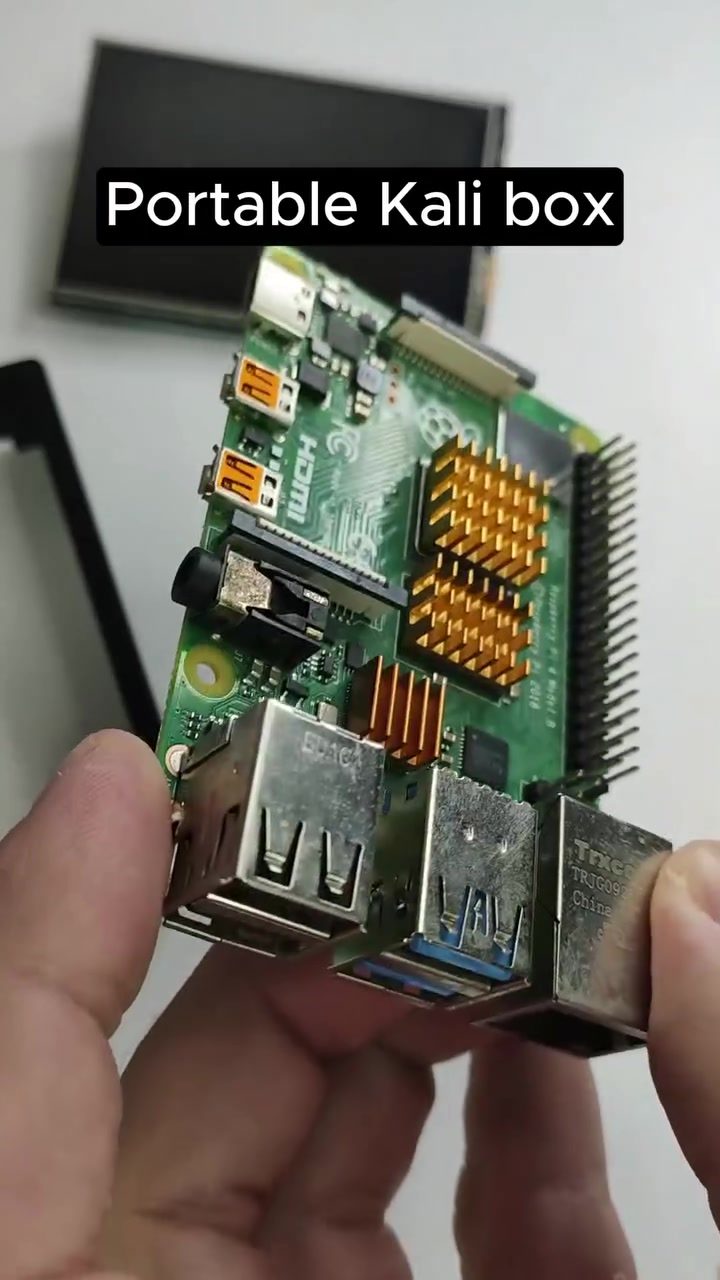
Building a Portable Kali Linux Box with Raspberry Pi and Touchscreen
A portable Kali Linux box built with a Raspberry Pi and touchscreen is a powerful tool for cybersecurity professionals, ethical hackers, and anyone interested in network security. This compact device allows you to carry a full-featured Linux environment with you, enabling on-the-go penetration testing, network analysis, and more. Let's dive into the components, setup process, and practical applications of this versatile setup.
Why This Matters
In an increasingly digital world, the ability to test and secure networks is crucial. A portable Kali Linux box offers several advantages:
- Mobility: Carry your security tools wherever you go.
- Convenience: Quickly set up and tear down your testing environment.
- Cost-Effective: Uses affordable components like the Raspberry Pi.
- Versatility: Suitable for a wide range of cybersecurity tasks.
Main Discussion
Components Needed
To build your portable Kali Linux box, you'll need the following components:
- Raspberry Pi 4 Model B: The brain of the operation, providing ample processing power for security tasks.
- MicroSD Card: For storing the Kali Linux operating system. A 32GB or 64GB card is recommended.
- Touchscreen Display: A small, portable screen to interact with your Kali Linux environment.
- Power Bank: To ensure your device stays powered on the go.
- USB Keyboard and Mouse: For navigation and input (optional if your touchscreen supports it).
- Enclosure: A compact case to house all the components securely.
Setting Up the Raspberry Pi
-
Prepare the MicroSD Card: Download the Kali Linux Raspberry Pi image from the official Kali Linux website. Use a tool like Balena Etcher to flash the image onto your MicroSD card.
-
Insert the MicroSD Card: Place the prepared MicroSD card into your Raspberry Pi.
-
Connect the Display: Attach the touchscreen display to the Raspberry Pi via HDMI or USB, depending on the display model.
-
Power On: Connect the power bank to the Raspberry Pi and turn it on. The display should show the Kali Linux boot screen.
-
Initial Setup: Follow the on-screen instructions to complete the initial setup, including configuring your network settings and creating a user account.
Installing Essential Tools
Once your Raspberry Pi is up and running, you'll want to install some essential tools for penetration testing and network analysis. Some popular tools include:
- Nmap: For network scanning and discovery.
- Wireshark: For packet analysis.
- Metasploit: For developing and executing exploit code.
- Aircrack-ng: For wireless network auditing.
You can install these tools via the Kali Linux package manager or through the built-in Kali Linux tool menu.
Practical Tips
Optimizing Performance
To get the most out of your portable Kali Linux box, consider the following tips:
- Choose a Reliable MicroSD Card: Opt for a high-speed, high-capacity card to ensure smooth performance.
- Use a High-Quality Power Bank: Ensure your power bank has enough capacity and output to keep your Raspberry Pi running for extended periods.
- Customize Your Enclosure: Modify your enclosure to fit all components snugly, ensuring easy access to ports and controls.
Portable Security
Given the nature of penetration testing, it's essential to consider the security of your portable Kali Linux box:
- Physical Security: Keep your device secure to prevent unauthorized access.
- Encryption: Encrypt your MicroSD card to protect your data.
- Network Security: Be aware of the networks you connect to and use VPNs when necessary.
Important Takeaways
Building a portable Kali Linux box with a Raspberry Pi and touchscreen is a rewarding project that enhances your cybersecurity toolkit. Key takeaways include:
- Versatility: This setup can be used for a wide range of security tasks, from network scanning to exploit development.
- Portability: Carry your testing environment wherever you go, making on-site assessments and quick checks a breeze.
- Customization: Tailor your setup with additional tools and configurations to suit your specific needs.
Conclusion
A portable Kali Linux box built with a Raspberry Pi and touchscreen is an invaluable tool for anyone in the cybersecurity field. Whether you're a professional penetration tester or an enthusiast, this compact and powerful device offers unmatched convenience and functionality. By following the setup and optimization tips outlined, you can create a reliable and efficient portable security solution that will serve you well in various scenarios.
Questions readers ask
What are the benefits of using a Raspberry Pi for a portable Kali Linux device?
A Raspberry Pi offers a compact and powerful platform for running Kali Linux. It provides mobility, allowing you to perform penetration testing and network analysis anywhere. Additionally, it's energy-efficient and can be easily integrated with a touchscreen for a portable, all-in-one device.
Can I use any Raspberry Pi model for this project?
While most Raspberry Pi models can run Kali Linux, the Raspberry Pi 4 is recommended for better performance and compatibility. It has more processing power and supports more RAM and wider connectivity, making it ideal for running Kali Linux tools efficiently.
What kind of touchscreen should I use with my Raspberry Pi for a portable Kali Linux device?
For a seamless experience, choose a touchscreen that is compatible with the Raspberry Pi's hardware specifications. The official Raspberry Pi 7-inch touchscreen is a popular choice, but there are also third-party options available. Ensure the touchscreen supports the necessary GPIO pins for proper functionality.
What are some practical applications for a portable Kali Linux box?
A portable Kali Linux box can be used for a variety of applications, including on-the-go penetration testing, network analysis, and wireless testing. It's also useful for ethical hacking activities, such as vulnerability assessments and security audits, making it a versatile tool for cybersecurity professionals and hobbyists alike.
Can I install other Linux distributions on the Raspberry Pi alongside Kali Linux?
While it is possible to install multiple operating systems on a Raspberry Pi, it is generally not recommended due to the limited storage and processing power. However, you can use a USB drive or external storage to install and run other Linux distributions without interfering with your Kali Linux setup.
How can I ensure the security of my portable Kali Linux device when traveling?
To safeguard your portable Kali Linux device, use encryption to protect sensitive data. Additionally, ensure that your device is password-protected and consider using a VPN to secure your internet connection. Always keep your device with you and avoid leaving it unattended in public places to minimize the risk of theft or tampering.
What are some essential tools and utilities included in Kali Linux for cybersecurity professionals?
Kali Linux comes pre-installed with a wide range of tools for cybersecurity professionals. Some essential tools include Nmap for network scanning, Metasploit for penetration testing, Wireshark for network analysis, and Burp Suite for web application security testing. These tools are designed to help you identify and mitigate security vulnerabilities effectively.
Related deep dives
Similar reads based on topic and creator.




Recent articles
Fresh deep dives from the latest Reels we unpacked.




Comments
Be the first to comment.