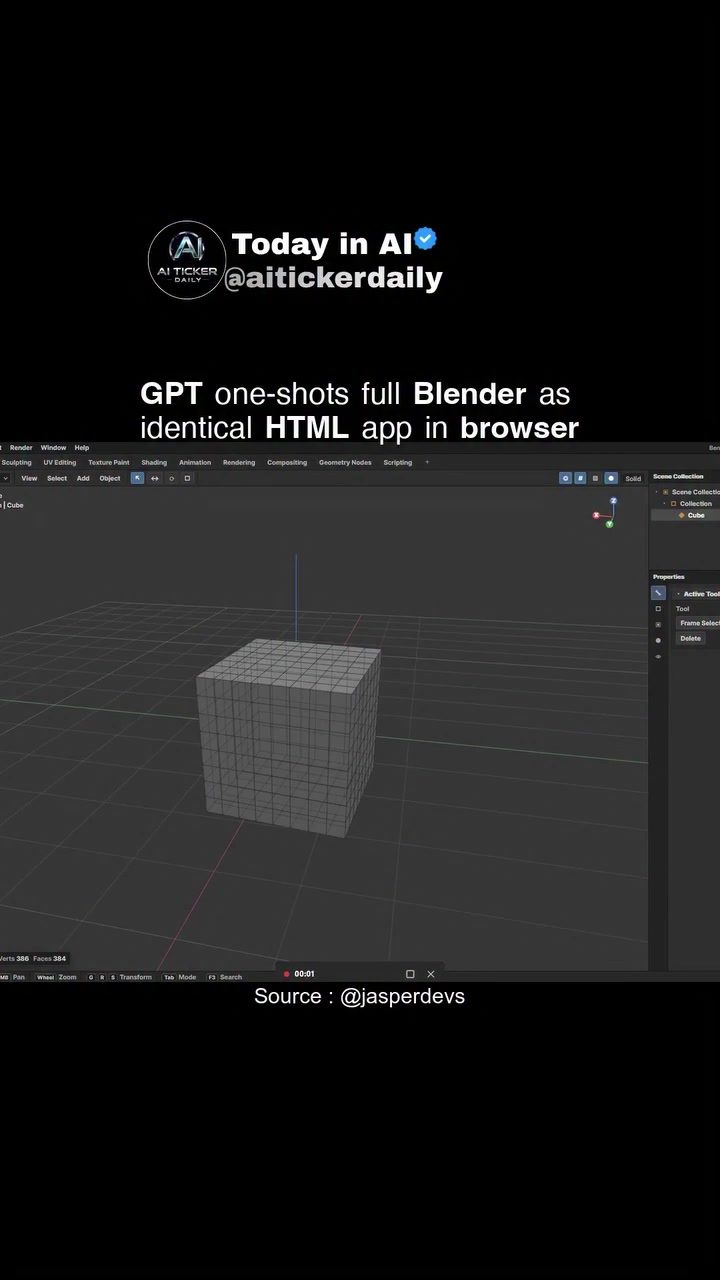
Blender 3D Modeling in the Browser: The Emerging Potential of AI and GPT
Blender, the powerful open-source 3D modeling software, has long been the go-to tool for artists and designers worldwide. However, the idea of bringing Blender's robust functionality directly into a web browser using AI and GPT opens up new exciting possibilities. This article explores the concept of recreating Blender-style 3D tooling as a browser-based HTML application, highlighting the potential benefits and current realities.
Context / Why this matters
The ability to create and manipulate 3D models directly in a web browser brings several advantages. It democratizes access to advanced 3D modeling tools, making them available to a broader audience without the need for high-end hardware or complex software installations. This shift could revolutionize fields like game development, virtual reality, and even education, where quick and accessible 3D modeling is invaluable.
Main Discussion
The Potential of AI and GPT
The demo showcases how GPT 5.5 can be used to replicate Blender's interface and tooling in a browser-based HTML application, dubbed "Bender." This project aims to match the real Blender interface closely, offering a seamless experience for users familiar with the software. While the claims about parity and performance should be verified, the idea of having a full-fledged 3D modeling tool directly in the browser is intriguing.
The Role of GPT in 3D Modeling
GPT, or Generative Pre-trained Transformer, is a type of AI model known for its ability to understand and generate human-like text. However, its application in 3D modeling extends beyond text, leveraging its understanding of patterns and structures to replicate complex interfaces and tools. By training GPT on Blender's interface and toolset, developers can create a browser-based application that mimics the original software, providing users with a familiar and powerful 3D modeling environment.
The Advantages of a Browser-Based 3D Modeling Tool
A browser-based 3D modeling tool offers several advantages over traditional desktop software:
-
Accessibility: With a browser-based tool, users can access 3D modeling capabilities from any device with an internet connection, making it easier to work on projects from different locations.
-
Collaboration: Real-time collaboration becomes more accessible, allowing teams to work together on 3D projects without the need for complex file-sharing systems or version control.
-
Cost-Effective: Browser-based tools often eliminate the need for costly software licenses, making 3D modeling more affordable for beginners and professionals alike.
-
Platform Independence: Users are not tied to a specific operating system, as the tool can be accessed from any modern web browser.
The Current State of the Technology
While the demo showcases the potential of GPT in creating a Blender-like application, it's essential to treat the claims about parity and performance as demo-level until you try the build yourself. The current state of the technology is promising, but there are still challenges to overcome, such as:
-
Performance: Browser-based applications may not yet match the performance of desktop software, especially for complex 3D modeling tasks.
-
Feature Parity: While the demo aims to replicate Blender's interface closely, it may not yet cover all the features and tools available in the desktop version.
Practical Tips
For those interested in exploring the potential of AI and GPT in 3D modeling, here are some practical tips to get started:
Learn the Basics of Blender
Before diving into a browser-based 3D modeling tool, it's helpful to have a solid understanding of Blender. Familiarize yourself with its interface, tools, and workflows. This foundational knowledge will make it easier to transition to a browser-based application.
Experiment with GPT
Explore the capabilities of GPT and its potential applications in 3D modeling. Experiment with different models and training data to see how they can be used to create and manipulate 3D objects.
Join the Community
Engage with the community of developers and enthusiasts working on browser-based 3D modeling tools. Share your experiences, ask questions, and collaborate on projects to advance the technology together.
Stay Updated
Stay informed about the latest developments in AI and 3D modeling technologies. Follow blogs, forums, and social media channels to keep up with the latest trends and innovations in this rapidly evolving field.
Important Takeaways
The Future of 3D Modeling
The potential of AI and GPT in creating a browser-based 3D modeling tool is vast. As the technology continues to advance, we can expect to see more powerful and accessible tools emerge, democratizing 3D modeling for a broader audience. The concept of "Bender" represents a significant step in this direction, offering a glimpse into the future of 3D modeling.
The Role of AI in Creative Tools
AI's role in creative tools is expanding, from generating art and music to now 3D modeling. Leveraging AI's capabilities can lead to innovative and efficient workflows, opening new possibilities for artists, designers, and developers. By integrating AI into 3D modeling tools, we can expect to see more intuitive, accessible, and powerful applications in the future.
Conclusion
The potential of using GPT to recreate Blender-style 3D tooling in a browser-based HTML application is both exciting and promising. While the current state of the technology is still in its early stages, the possibilities are vast. From increased accessibility and collaboration to cost-effective and platform-independent solutions, a browser-based 3D modeling tool could revolutionize the field.
As we move forward, it's essential to stay informed about the latest developments and innovations in AI and 3D modeling. By experimenting, learning, and collaborating with the community, we can help shape the future of 3D modeling and unlock new creative possibilities.
Questions readers ask
What is Blender in the browser?
Blender in the browser refers to an innovative approach that brings the robust 3D modeling tools of Blender directly into a web browser. This is achieved through the integration of AI and GPT, allowing users to access advanced design tools without needing high-end hardware.
How does AI and GPT enhance 3D modeling in a web browser?
AI and GPT enhance 3D modeling in a web browser by providing intelligent tools and functionalities that can assist users in creating and manipulating 3D models. These technologies can automate complex tasks, offer real-time suggestions, and improve the overall user experience.
What are the benefits of using a web-based 3D modeling tool like Blender in the browser?
Using a web-based 3D modeling tool like Blender in the browser makes advanced 3D design accessible to a broader audience. It eliminates the need for high-end hardware and complex software installations, allowing users to create and edit 3D models from any device with an internet connection.
Is Blender in the browser as powerful as the desktop version?
While Blender in the browser aims to provide a similar range of tools and functionalities as the desktop version, the current implementation may not yet match the full power and performance of the desktop application. However, it is expected to evolve and improve over time, thanks to ongoing advancements in AI and GPT.
What kind of hardware do I need to use Blender in the browser?
One of the key advantages of Blender in the browser is that it requires minimal hardware. Since the processing is done in the cloud, you can use it on a wide range of devices, including laptops, tablets, and even some smartphones, as long as they have a reliable internet connection and a modern web browser.
Can I use Blender in the browser for professional projects?
While Blender in the browser is a promising tool for both beginners and professionals, its suitability for professional projects depends on the specific needs and requirements of the project. For complex or large-scale projects, the desktop version of Blender may still be the preferred choice, but for simpler tasks or quick prototypes, the browser-based version can be a convenient option.
Related deep dives
Similar reads based on topic and creator.




Recent articles
Fresh deep dives from the latest Reels we unpacked.




Comments
Be the first to comment.