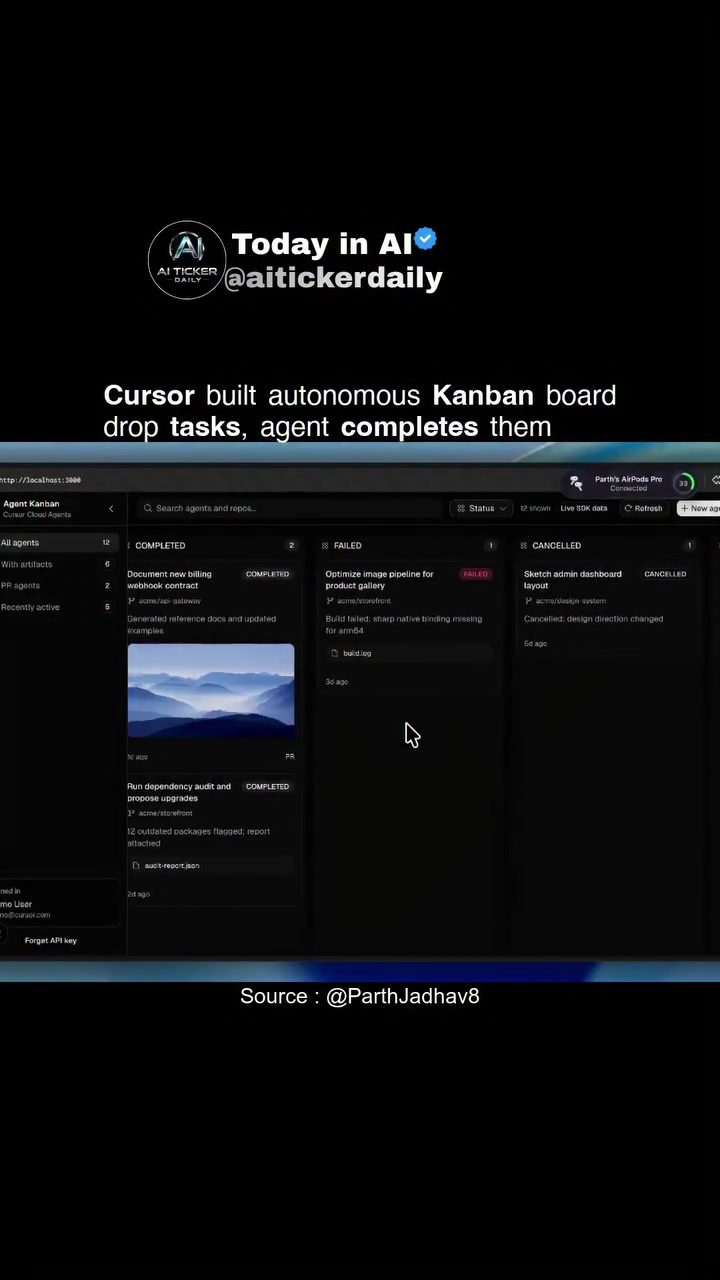
Kanban Board Automation: Streamlining Task Management
Kanban boards have long been a staple in project management, offering a visual and intuitive way to manage tasks and workflows. Recent advancements in automation and AI have enhanced the capabilities of these boards, making them more efficient and effective. One notable example of this progress is the development of an automated Kanban board by Aiticker Daily, which allows users to drop in tasks and have an AI agent complete them automatically.
Context: Why This Matters
Automating task management is crucial for teams and individuals aiming to increase productivity and efficiency. The ability to drop tasks into a Kanban board and have them automatically managed by an AI agent can save significant time and reduce the risk of human error. This automation can handle a variety of task statuses, including 'Completed', 'Failed', 'Cancelled', and 'Expired', ensuring that every task is tracked and managed appropriately.
Main Discussion
The Evolution of Kanban Boards
Traditional Kanban boards rely on manual updates, which can be time-consuming and prone to errors. With the integration of AI, these boards have evolved to offer automated task management. This evolution is driven by the need for more efficient workflows, especially in fast-paced environments where tasks can change rapidly.
How Automated Kanban Boards Work
Automated Kanban boards use AI agents to manage tasks. These agents can:
- Pick Up Tasks: Automatically assign tasks to the appropriate columns (e.g., 'To Do', 'In Progress', 'Completed').
- Update Status: Change the status of tasks based on their progress or completion.
- Handle Exceptions: Flag tasks that fail, expire, or are cancelled, allowing for quicker resolution.
Benefits of Automated Task Management
Automating task management with Kanban boards offers several benefits:
- Increased Efficiency: Automated systems can handle tasks faster and more accurately than manual updates.
- Reduced Error Rates: AI agents can minimize errors by following predefined rules and logic.
- Real-Time Tracking: Automated boards provide real-time updates, ensuring that team members always have the most current information.
- Improved Focus: By offloading task management to an AI, team members can focus on more critical aspects of their work.
Key Features of Automated Kanban Boards
Several key features make these automated boards particularly useful:
- Automatic Task Assignment: Tasks are automatically assigned to the appropriate columns, reducing the need for manual input.
- Status Updates: Task statuses are updated in real-time, providing a clear view of the workflow.
- Exception Handling: Automated boards can handle exceptions, such as failed or expired tasks, ensuring that issues are addressed promptly.
- Integration with Other Tools: Many automated Kanban boards can integrate with other productivity tools, making it easier to manage tasks and workflows across multiple platforms.
Practical Tips
To make the most of automated Kanban boards, consider the following tips:
- Define Clear Workflows: Establish clear workflows and task statuses to ensure that the AI agent can manage tasks effectively.
- Regularly Review Tasks: While automation can handle many tasks, it's important to regularly review and update tasks to ensure accuracy.
- Integrate with Other Tools: Use the integration features to connect your automated Kanban board with other productivity tools, enhancing overall efficiency.
- Monitor Performance: Keep an eye on the performance of the AI agent to ensure it's working as expected. Make adjustments as needed to improve efficiency.
Important Takeaways
- Automated Kanban boards can significantly enhance productivity and efficiency by managing tasks automatically.
- Key features include automatic task assignment, real-time status updates, and exception handling.
- Integrating with other productivity tools can further enhance the benefits of automated Kanban boards.
- Regular review and monitoring are essential to ensure the system works correctly and efficiently.
Conclusion
Automated Kanban boards represent a significant advancement in project management, offering increased efficiency, reduced error rates, and real-time tracking. By leveraging AI agents to manage tasks, teams can focus on more critical aspects of their work, leading to better overall productivity. With the ability to handle various task statuses and integrate with other tools, automated Kanban boards are a valuable addition to any project management toolkit.
Questions readers ask
How does an AI-driven Kanban board improve task management?
An AI-driven Kanban board improves task management by automating updates to task statuses, assigning tasks based on predefined rules or AI insights, and handling exceptions that may arise during the workflow. This automation reduces manual input and minimizes human error, leading to a more streamlined and efficient process.
What are the benefits of using an AI kanban board for teams?
AI Kanban boards offer several benefits for teams, including increased productivity through automated task updates and assignments, better visibility into workflows, and reduced time spent on manual task management. Additionally, AI can help identify bottlenecks and optimize workflows, ensuring smoother project execution.
Can an AI kanban board software handle exceptions automatically?
Yes, advanced AI kanban board software can handle exceptions automatically. By leveraging AI, these tools can detect anomalies or disruptions in the workflow, such as delayed tasks or resource unavailability, and take corrective actions or notify relevant team members to ensure that the project stays on track.
How does AI integration enhance a traditional Kanban board?
AI integration enhances traditional Kanban boards by adding automation capabilities to the basic visual task management system. This includes automatically updating task statuses, suggesting task assignments, and even completing tasks, which helps teams stay organized and reduces the likelihood of tasks falling through the cracks.
What kind of tasks can be automated using an AI kanban board?
An AI Kanban board can automate a variety of tasks, from simple repetitive tasks to more complex workflows. This includes updating task statuses, assigning tasks to team members, sending notifications, and even generating reports. The level of automation depends on the specific capabilities of the AI and the customization of the Kanban board.
How does AI enhance productivity in an automated kanban workflow?
AI enhances productivity in an automated Kanban workflow by automating routine tasks, allowing team members to focus on more strategic activities. This includes real-time updates, intelligent task assignments, and predictive analytics to foresee potential issues before they become problems, keeping the workflow smooth and efficient.
What should I consider when choosing AI kanban board software?
When choosing AI Kanban board software, consider the specific needs of your team and the types of tasks you manage. Look for software that offers robust AI capabilities, including automated task updates, intelligent task assignments, and exception handling. Additionally, consider the ease of use, integration with other tools, and customization options to ensure it fits seamlessly into your workflow.
Related deep dives
Similar reads based on topic and creator.




Recent articles
Fresh deep dives from the latest Reels we unpacked.




Comments
Be the first to comment.