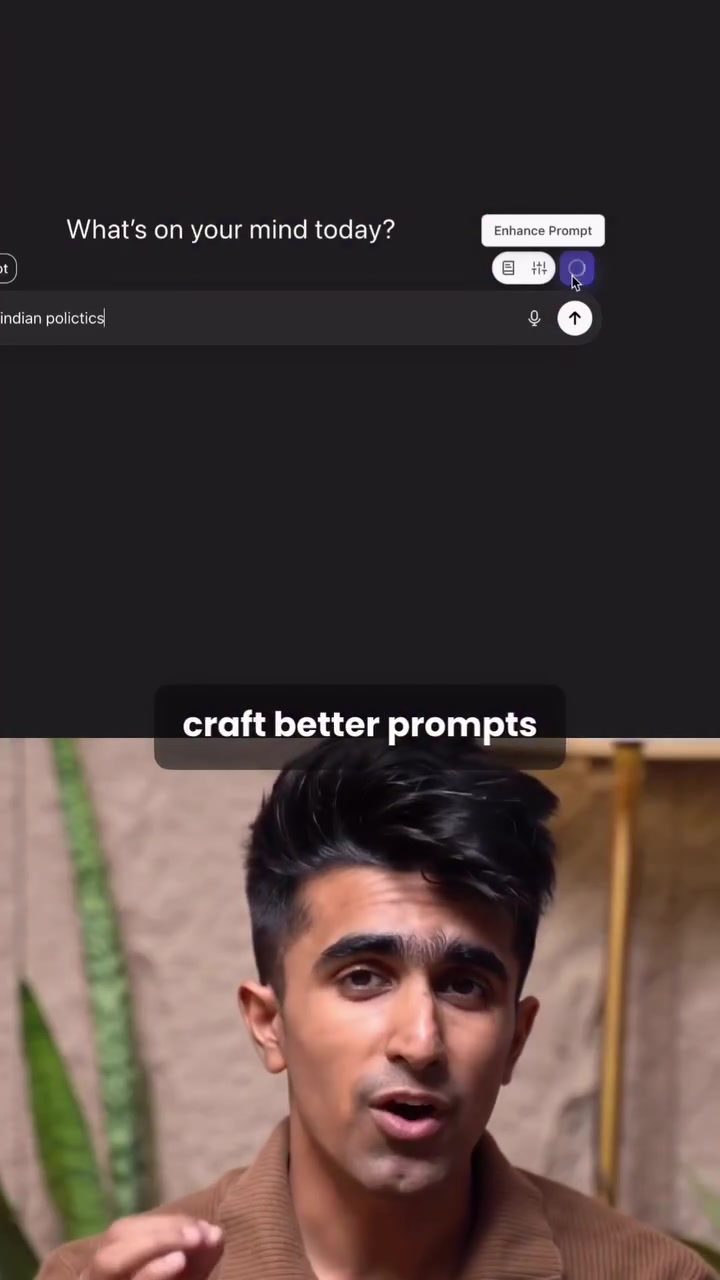
AI Prompt Helper: Crafting Better Prompts for AI Models
Crafting effective prompts for AI models like ChatGPT and Claude can significantly enhance the quality of the responses you receive. AI Prompt Helper is a tool designed to streamline this process, making it easier to create structured and well-written prompts with just a single click. This mobile app is particularly useful for users who frequently interact with large language models (LLMs) and want to improve the clarity and context of their prompts.
Why This Matters
Prompt engineering is a critical aspect of leveraging AI models effectively. A well-crafted prompt can guide the AI to provide more accurate, relevant, and comprehensive responses. By using AI Prompt Helper, users can save time and effort, ensuring that their prompts are optimized for the best possible outcomes. This tool is especially beneficial for professionals, researchers, and enthusiasts who rely on AI-generated content for various applications, from drafting detailed reports to generating creative content.
Main Discussion
Installation and Setup
Getting started with AI Prompt Helper is straightforward. The tool is available as a Chrome extension, making it accessible for users who prefer working within their web browser environment. To install it, follow these steps:
- Head to the Link: Visit the official website or the designated link provided by AI Prompt Helper.
- Add to Chrome: Click the "Add to Chrome" button.
- Confirmation: Follow any additional prompts to complete the installation.
Once installed, every time you open an LLM interface like ChatGPT or Claude, you’ll see a purple icon next to the prompt bar. This icon serves as a quick shortcut to enhance your prompts, transforming a simple, unstructured input into a well-organized, contextually rich request.
How It Works
The core functionality of AI Prompt Helper lies in its ability to automatically convert a basic prompt into a structured, detailed one. Here’s how it works:
- Input Your Prompt: Type your initial prompt into the AI interface.
- Activate the Enhancer: Click the purple icon next to the prompt bar. The app will take your basic input and refine it into a more detailed and structured format.
- Review the Enhanced Prompt: The tool will automatically populate the prompt field with a refined version that includes all necessary context and structure.
For instance, if your initial prompt is "Provide a detailed overview of Indian politics," the enhanced version might include sections like "Historical context," "Major political parties," and "Electoral system." This detailed structuring ensures that the AI model can provide a comprehensive response, covering all key areas you are interested in.
Ensuring Strong Context
While AI Prompt Helper significantly improves the quality of your prompts, it’s essential to remember that the effectiveness of the responses still relies heavily on the context you provide. Some key points to consider:
- Clear and Specific: Ensure your initial prompt is clear and specific. Vague prompts can lead to less relevant or less comprehensive responses, even with the enhancement tool.
- Relevant Details: Include any relevant details or background information that might affect the AI’s response. This context helps the model understand the nuances and deliver more accurate and meaningful outputs.
Practical Tips
Getting the Most Out of AI Prompt Helper
- Experiment with Different Prompts: Try using the tool with various types of prompts to see how it enhances each one. This experimentation will help you understand its strengths and limitations.
- Iterate and Refine: Don’t hesitate to refine your prompts further based on the enhanced version. Sometimes, the initial enhancement might need a bit of manual tweaking to meet your specific needs.
- Consult the Documentation: If you encounter any issues or have specific questions, refer to the official documentation or support resources provided by the tool.
Example Use Cases
- Academic Research: Researchers can use AI Prompt Helper to craft detailed and structured prompts for generating literature reviews, summaries of research papers, or even drafting research proposals.
- Content Creation: Writers and content creators can leverage the tool to generate outlines, draft articles, and even brainstorm ideas for new content.
- Professional Reports: Professionals can enhance their prompts to generate comprehensive reports, market analyses, or strategic plans.
Enhancing Prompts for Specific Applications
Political Analysis
For those interested in political analysis, AI Prompt Helper can be particularly useful. For example, a prompt like "Provide a detailed overview of Indian politics, covering the following key areas: Historical context, Major political parties, and Electoral system" can be enhanced to include sections like:
- Historical Context: A brief summary of the evolution of the political landscape in India since independence.
- Major Political Parties: A description of the main political parties, their ideologies, and leadership.
- Electoral System: An explanation of how the electoral system works in India.
Important Takeaways
- Efficiency: AI Prompt Helper significantly reduces the time and effort required to craft effective prompts.
- Context Matters: The tool enhances prompts but still relies on clear and specific inputs from the user.
- Versatility: The application is versatile and can be used across various domains, from academic research to content creation and professional reporting.
Conclusion
AI Prompt Helper is a valuable tool for anyone looking to optimize their interactions with AI models like ChatGPT and Claude. By providing a streamlined way to create structured and contextually rich prompts, it ensures that users get the most out of these powerful language models. Whether you’re a researcher, content creator, or professional, incorporating AI Prompt Helper into your workflow can lead to more efficient and effective use of AI-generated content.
Questions readers ask
How does AI Prompt Helper enhance the quality of AI responses?
AI Prompt Helper improves AI responses by transforming simple, unstructured inputs into well-structured, contextually rich prompts. This helps AI models like ChatGPT and Claude to understand the user's intent better, resulting in more accurate and relevant responses.
What are the benefits of using AI Prompt Helper for frequent AI users?
For users who frequently interact with large language models, AI Prompt Helper saves time and effort by simplifying the prompt creation process. It ensures that prompts are clear and contextually appropriate, leading to better AI interactions.
Can AI Prompt Helper be used with both ChatGPT and Claude?
Yes, AI Prompt Helper is designed to work with both ChatGPT and Claude, as well as other AI models. It optimizes prompts for a wide range of AI systems, making it a versatile tool for users of various AI platforms.
How does the AI Prompt Helper mobile app and Chrome extension work?
The AI Prompt Helper mobile app and Chrome extension provide an easy-to-use interface where users can input their basic prompts. The tool then processes these inputs and generates well-organized, contextually enriched prompts that can be used directly with AI models.
What specific improvements can I expect from using AI Prompt Helper?
Users can expect their prompts to be more structured, clearer, and contextually appropriate. This leads to more accurate, relevant, and comprehensive responses from AI models, enhancing the overall user experience.
Is AI Prompt Helper useful for beginners in prompt engineering?
Absolutely. AI Prompt Helper is particularly useful for beginners as it guides them to create effective prompts without needing extensive knowledge of prompt engineering. The tool handles the complexities, allowing users to focus on their queries.
How can AI Prompt Helper help in improving AI prompt structure?
AI Prompt Helper improves AI prompt structure by breaking down basic prompts into well-organized components. It ensures that all necessary context and details are included, making the prompts more effective and easier for AI models to interpret.
Related deep dives
Similar reads based on topic and creator.




Recent articles
Fresh deep dives from the latest Reels we unpacked.




Comments
Be the first to comment.