Google Analytics 4: The Comprehensive Guide for Data-Driven Success
Google Analytics 4 is a powerful tool for businesses and professionals to understand and optimize their online presence. Mastering this platform can significantly impact your business and career growth. Here, we'll delve into the essential reports and features within Google Analytics 4, and explore the benefits of a comprehensive workshop for mastering this tool.
Context: Online Measurement Success
Google Analytics 4 offers a suite of advanced features designed to give you a detailed view of user interactions, traffic sources, and conversion paths. Leveraging these insights can help you make informed decisions to improve your website's performance, enhance user engagement, and drive more conversions.
Diving into Google Analytics 4 Reports
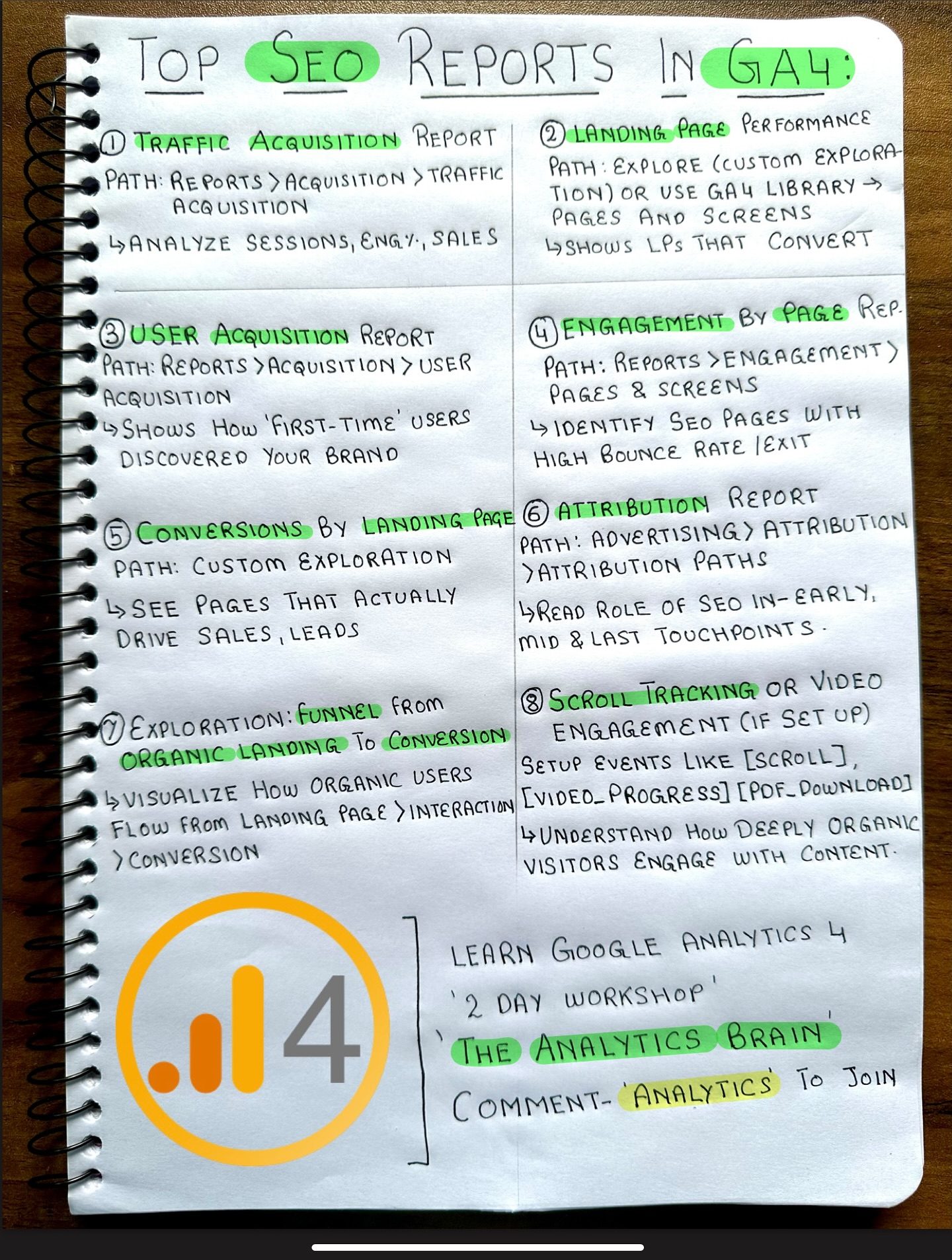
Traffic Acquisition Report
The Traffic Acquisition Report is a crucial resource for understanding where your website visitors are coming from. Here, you can identify the sources of your traffic, whether it's through organic search, direct visits, referrals, social media, or paid advertising. This report is accessible through the path: Reports > Acquisition > Traffic Acquisition. By analyzing this data, you can optimize your marketing strategies to focus on the most effective channels.
Landing Page Performance
Landing page performance is critical for understanding how well your pages are converting visitors into customers or leads. In Google Analytics 4, the Landing Page Performance report is available under Path: Explore > Explore Library -> Pages and Screens. This report helps you identify which pages are performing well and which need improvement. By focusing on pages that drive the most conversions, you can enhance your overall user experience and boost your conversion rates.
User Acquisition Report
The User Acquisition Report provides insights into how first-time users discover your brand. This report can be found under Path: Reports > Acquisition > User Acquisition. It shows the acquisition channels that are bringing in new users, helping you tailor your marketing efforts to attract and retain new visitors.
Conversions by Landing Page
Understanding the performance of your landing pages in terms of conversions is essential for optimizing your marketing efforts. The Conversions by Landing Page report, found under Path: Advertising > Attribution Paths, helps you see which landing pages are most effective in driving sales, leads, and other key actions. This insight allows you to refine your landing pages to better meet your conversion goals.
Organic Funnel from Exploration to Conversion
The Organic Funnel Report, available under Path: Custom Exploration, is designed to visualize how organic users flow from landing page interaction to conversion. This report helps you understand the journey of organic visitors and identify areas of improvement in your conversion funnel.
Scroll Tracking and Video Engagement
Scroll Tracking and Video Engagement are advanced features that offer deeper insights into user interactions. By setting these up, you can see how users engage with your content, whether they scroll through your pages or watch videos. This information can help you create more engaging content and improve user experience.
Practical Tips for Leveraging Google Analytics 4
Benefits of a 2-Day Comprehensive Workshop
A 2-day workshop on Google Analytics 4 can be a game-changer for professionals looking to master this tool. Here are some key benefits:
- Hands-On Learning: Workshops offer practical, hands-on learning experiences that go beyond reading tutorials. You get to work with real data and scenarios, making the learning process more effective.
- AI Integration: Learn how to use AI to set up workflows and improve interpretation. This can significantly enhance your ability to analyze data and derive actionable insights.
- Workshop Environment: Collaborate with like-minded professionals, share experiences, and gain new perspectives. This can be invaluable for networking and gaining fresh insights.
- From Basic to Advanced: Workshops often cover a wide range of topics, from basic to advanced. This ensures that you build a strong foundation and then move on to advanced techniques and strategies.
Setting Up and Using AI Workflows
AI can greatly enhance your data analysis capabilities. By setting up AI workflows, you can automate repetitive tasks, identify patterns, and make data-driven decisions more efficiently. Taking a workshop that covers AI integration can help you leverage these advanced features to their fullest potential.
Important Takeaways
- Understand Your Traffic Sources: Knowing where your traffic comes from is the first step in optimizing your marketing efforts. Use the Traffic Acquisition Report to identify your most effective channels.
- Optimize Landing Pages: Focus on pages that drive conversions and improve their performance. Use the Landing Page Performance report to guide your efforts.
- Enhance User Acquisition: Understand how new users find your brand and tailor your strategies to attract more visitors.
- Master Conversion Funnels: Visualize the journey of organic users and identify areas for improvement in your conversion funnel.
- Leverage Advanced Features: Use Scroll Tracking and Video Engagement to gain deeper insights into user interactions and enhance your content strategy.
Conclusion
Google Analytics 4 is a robust tool that can significantly impact your business and career growth. By mastering key reports and features, you can gain valuable insights into user behavior, traffic sources, and conversion paths. A comprehensive 2-day workshop can provide the hands-on learning and advanced techniques needed to leverage this tool to its fullest. Make measurement your best friend, and watch your business thrive.
Questions readers ask
What is the Traffic Acquisition report in Google Analytics 4 and why is it important?
The Traffic Acquisition report in Google Analytics 4 provides insights into how users are finding your website. It is crucial for understanding the effectiveness of your marketing channels, such as organic search, social media, and paid advertising. By analyzing this report, you can identify which channels are driving the most valuable traffic and allocate your resources accordingly to optimize your online presence.
How can the Landing Page Performance report help improve my website?
The Landing Page Performance report in Google Analytics 4 shows you which pages are the most and least effective at engaging visitors. By examining metrics like bounce rate, average session duration, and conversion rates, you can pinpoint areas for improvement. This report can guide you in optimizing your content and user experience, leading to better engagement and higher conversion rates.
What insights can the User Acquisition report provide for my business?
The User Acquisition report in Google Analytics 4 offers detailed information about how new users are discovering your website. It breaks down user acquisition by source, medium, and campaign, allowing you to see which marketing efforts are bringing in the most new visitors. This information is vital for refining your marketing strategies and attracting a larger audience to your site.
How can Google Analytics 4 workshops benefit my understanding of the platform?
Google Analytics 4 workshops provide hands-on learning experiences that can significantly enhance your understanding of the platform. These workshops often cover key reports, advanced features, and best practices for leveraging data. By participating in a workshop, you can gain practical skills and insights to make more informed decisions and improve your website's performance.
What are some effective ways to use first-party data in Google Analytics 4?
First-party data in Google Analytics 4 can be used to create more personalized and relevant user experiences. By leveraging data from your own website and applications, you can gain deeper insights into user behavior and preferences. This data can be used to segment your audience, tailor marketing messages, and optimize your website for better user engagement and higher conversion rates.
How can I optimize my website for organic traffic using Google Analytics 4?
To optimize your website for organic traffic using Google Analytics 4, focus on analyzing the organic traffic sources within your reports. Identify which keywords and landing pages are driving the most organic traffic and conversions. Use this data to improve your SEO strategies, enhance your content, and make your website more search-friendly. This approach will help you attract more visitors naturally and improve your online visibility.
What resources are available for learning how to use Google Analytics 4?
There are numerous resources available for learning how to use Google Analytics 4 effectively. You can find comprehensive tutorials and video guides that cover a range of topics from basic navigation to advanced analytics. Additionally, Google Analytics 4 offers official documentation, and there are community forums where you can ask questions and share insights. These resources can help you become proficient in using the platform to drive data-driven success.
Recent articles
Fresh deep dives from the latest Reels we unpacked.




Comments
Be the first to comment.