Instagram Competitor Analysis Using Software Tools
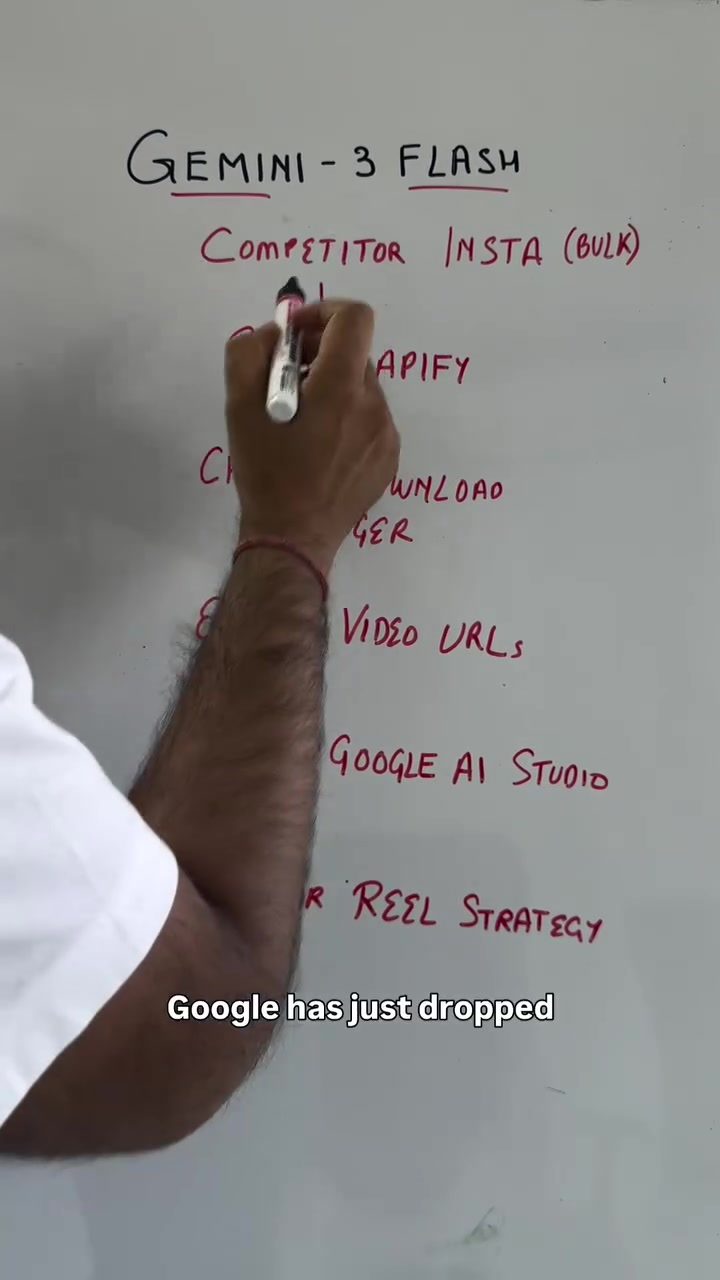
Understanding your competitors' strategies is crucial for staying ahead in the social media marketing game. With the right tools, you can quickly gather and analyze your competitors' Instagram data, allowing you to refine your own strategies. This process, once time-consuming, can now be streamlined using software tools like Gemini 3 Flash. Here's a step-by-step guide to help you get started.
Why This Matters
In today's competitive digital landscape, having a clear understanding of what your competitors are doing on Instagram can give you a significant edge. By analyzing their strategies, you can identify what works and what doesn't, allowing you to tailor your own approach more effectively. This is particularly important for new businesses looking to make a mark in a crowded market.
Steps to Scrape and Analyze Competitor Instagram Data
Step 1: Gather Competitor URLs
The first step in analyzing your competitors' strategies is to gather their Instagram URLs. You can copy multiple URLs to get a comprehensive view of different strategies. This initial step sets the foundation for your data collection process.
Step 2: Use Apify for Data Scraping
Once you have your competitor URLs, the next step is to use Apify to scrape the data. Apify is a powerful tool that allows you to extract various types of data from Instagram, including posts, comments, and reels. To get started:
- Go to apify.com and search for "Instagram scraper."
- Enter your competitors' URLs into the scraper.
- Select the types of data you want to scrape (e.g., posts, comments, reels, etc.).
- Choose the date range for the data you want to collect.
- Click on "Save and Start" to initiate the scraping process.
Step 3: Download and Manage Data with Chrono Download Manager
After scraping the data, you need to download it in a manageable format. For this, you can use the Chrono Download Manager, a free Chrome extension. Here’s how:
- Download and install the Chrono Download Manager from the Chrome Web Store.
- Open the extension and click on the plus button.
- Paste all the Instagram URLs you obtained from the CSV file into the extension.
- Click on "Start" to begin the download process.
Step 4: Upload Data to Google Drive
Once you have the data in a CSV format, the next step is to upload it to Google Drive. This will make it easier to manage and analyze the data. Follow these steps:
- Create a new folder in your Google Drive.
- Upload the CSV file containing the scraped data to this folder.
Step 5: Analyze Data with Google AI Studio
With your data uploaded to Google Drive, you can now use Google AI Studio to analyze it. Google AI Studio is a free tool that allows you to break down the data into actionable insights. Here’s how to do it:
- Go to Google AI Studio and click on the plus icon.
- Select "Drive" and choose the folder containing your competitors' data.
- Use the appropriate prompts to analyze the data. For example, you can break down the data into visual trends, pacing speed, audio trends, and estimated production costs.
Practical Tips for Effective Competitor Analysis
Customize Your Analysis
While it's tempting to simply copy your competitors' strategies, it's more effective to customize your analysis based on your unique strengths and weaknesses. Look for patterns and trends in their strategies and adapt them to fit your brand's vision and USP.
Focus on Key Metrics
When analyzing your competitors' data, focus on key metrics that matter most to your business. This could include engagement rates, post frequency, types of content that perform best, and audience demographics.
Use the Insights Wisely
The insights gained from this analysis should inform your content strategy. Use the data to create more engaging content, optimize your posting schedule, and improve your overall social media presence.
Important Takeaways
Competitor analysis is a powerful tool in social media marketing. By using software tools like Gemini 3 Flash, Apify, and Google AI Studio, you can streamline the process and gain valuable insights. Remember to adapt the insights to your unique brand identity and avoid simply copying your competitors' strategies. This approach will help you stand out and make a real impact in your market.
Conclusion
In the fast-paced world of social media, staying ahead of the competition requires a deep understanding of their strategies. By following the steps outlined above, you can efficiently gather and analyze your competitors' Instagram data. Use these insights to refine your own strategies, create more engaging content, and ultimately, achieve your marketing goals. This approach not only saves time but also provides a clear roadmap for success in a competitive digital landscape.
Questions readers ask
What is Gemini 3 Flash and how can it help with Instagram competitor analysis?
Gemini 3 Flash is a powerful tool designed to streamline the process of analyzing competitors' Instagram strategies. It allows users to gather and understand key data points, such as the number of posts, comments, and reels, providing insights that can help refine your own marketing approach. With Gemini 3 Flash, you can quickly identify trends and tactics that are working for your competitors, giving you a competitive edge in the Instagram landscape
How do I get started with using Gemini 3 Flash for competitor analysis on Instagram?
To begin using Gemini 3 Flash, you'll first need to download and install the software. Once set up, you can input the usernames of the competitors you want to analyze. The tool will then automatically gather data from their Instagram profiles, including posts, reels, and engagement metrics. Follow the on-screen instructions or use a tutorial to navigate the software effectively.
What specific competitor Instagram insights can I gain from using Gemini 3 Flash?
Gemini 3 Flash provides a comprehensive analysis of your competitors' Instagram activities. You can gain insights into the frequency and types of posts they share, the engagement levels on their posts and reels, and the overall performance of their content. This information can help you understand what resonates with their audience and how you can adapt your own strategy to compete effectively.
Can Gemini 3 Flash help me improve my own Instagram marketing strategy?
Yes, by using Gemini 3 Flash to analyze your competitors' strategies, you can identify effective tactics and trends that you can incorporate into your own Instagram marketing strategy. For example, if you notice that a competitor's reels are performing exceptionally well, you can experiment with creating more reels to see if it boosts your engagement.
Is Gemini 3 Flash suitable for beginners who want to conduct competitor Instagram analysis?
Yes, Gemini 3 Flash is designed to be user-friendly, making it suitable for beginners. The tool offers a straightforward interface and often includes tutorials to guide users through the analysis process. Even if you're new to competitor analysis, Gemini 3 Flash can help you quickly gather and interpret valuable data to inform your marketing decisions.
How frequently should I use Gemini 3 Flash to analyze my competitors on Instagram?
The frequency of using Gemini 3 Flash depends on how dynamic your industry is and how often your competitors update their strategies. For a general approach, conducting a thorough analysis once a month can provide valuable insights. However, if your competitors frequently change their strategies, you might want to use the tool more often to stay ahead and adapt your own approach accordingly.
Can Gemini 3 Flash provide real-time data on competitor Instagram activities?
Gemini 3 Flash provides up-to-date data based on the information available at the time of analysis. However, it does not offer real-time updates. To get the most current insights, you should run the analysis periodically. This ensures that you are working with the latest data and can make informed decisions based on your competitors' recent activities.
Recent articles
Fresh deep dives from the latest Reels we unpacked.




Comments
Be the first to comment.