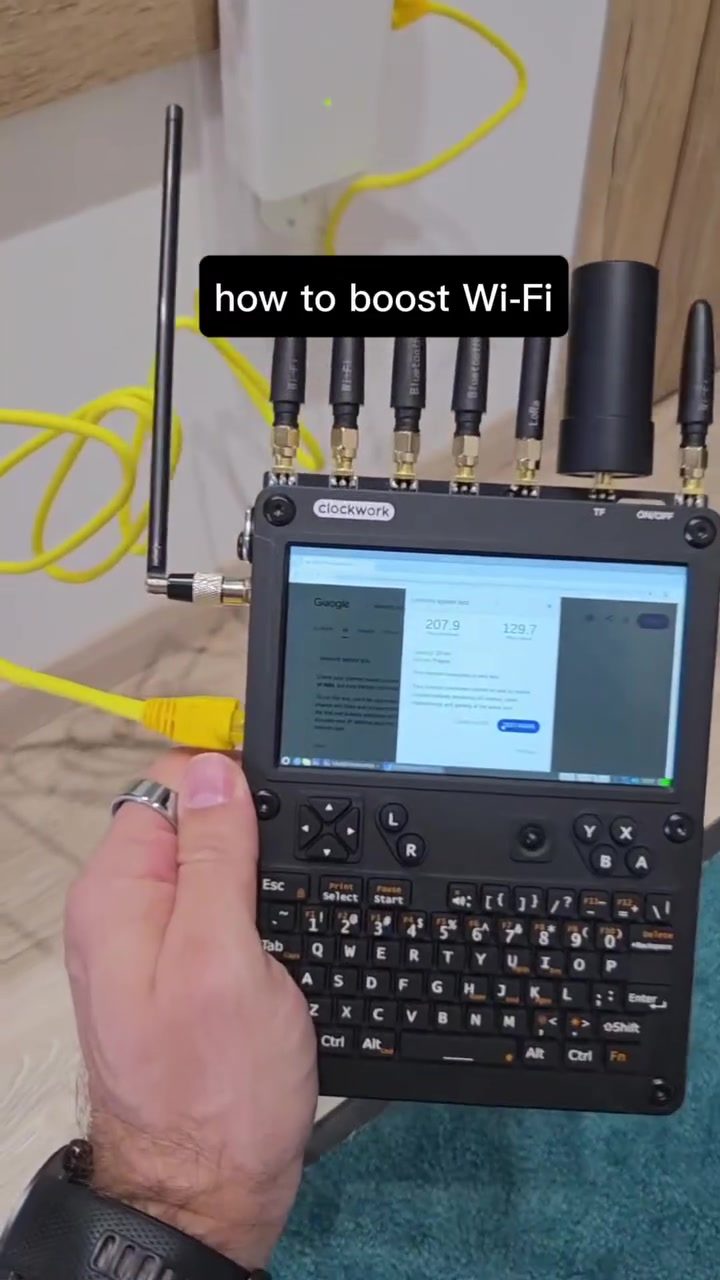
Boosting Wi-Fi: Turning Dead Zones into Fast Lanes
Boosting Wi-Fi signal strength is a common challenge for many households and businesses. Dead zones—areas with weak or no Wi-Fi signal—can be frustrating, but with the right tools and techniques, these spots can be transformed into fast, reliable connections. By using advanced devices and proper configuration, it is possible to significantly improve Wi-Fi performance, enhancing speed, coverage, and overall user satisfaction.
Why Boosting Wi-Fi Matters
In an increasingly connected world, a strong and reliable Wi-Fi signal is essential for seamless online experiences. Whether for work, entertainment, or communication, a robust Wi-Fi network ensures that devices can maintain high-speed connections without interruptions. Boosting Wi-Fi, therefore, directly impacts productivity, entertainment quality, and overall digital well-being.
Dead zones can be particularly problematic in larger homes or offices. Multiple floors, thick walls, and other obstacles can significantly weaken Wi-Fi signals. By addressing these issues, users can ensure that every corner of their space has reliable connectivity, enhancing both convenience and efficiency.
Key Devices and Methods for Boosting Wi-Fi
1. Network Analyzers
Network analyzers, such as the Clockwork, are crucial tools for diagnosing and improving Wi-Fi performance. These devices can assess signal strength, identify dead zones, and provide insights into network performance. By connecting a network analyzer to the router, users can gain a comprehensive understanding of their network's strengths and weaknesses. Clockwork’s analyzer is particularly effective, enabling precision in identifying problem areas.
2. Wi-Fi Extenders
Wi-Fi extenders, also known as repeaters, amplify and relay the existing Wi-Fi signal to extend its range. These devices are especially useful in large homes or offices with multiple floors. By placing an extender in strategic locations, users can eliminate dead zones and ensure consistent coverage throughout the space. The Mercusys extender, for example, can significantly enhance signal strength. What sets these extenders apart is their ability to turn low-signal areas into high-speed zones.
3. External Antennas
External antennas can dramatically boost Wi-Fi range and signal strength. Many modern routers and extenders come equipped with detachable antennas, which can be replaced with more powerful, high-gain antennas. These antennas capture and transmit signals more effectively, ensuring that the Wi-Fi network reaches every corner of the space.
4. Router Placement and Configuration
Strategic placement of the router can greatly impact Wi-Fi performance. Placing the router in a central location and elevating it off the ground can improve signal distribution. Additionally, configuring the router's settings to optimize for the environment can enhance performance. This includes selecting the appropriate Wi-Fi bands (2.4 GHz or 5 GHz) and adjusting the channel settings to avoid interference.
5. Mesh Networks
Mesh networks consist of multiple nodes that work together to create a seamless Wi-Fi network. Each node acts as a router, extending the signal and ensuring consistent coverage throughout the space. Mesh systems are particularly useful in large homes or offices, as they provide robust and reliable connectivity without the need for multiple extenders. One of the advantages of mesh networks is their ease of setup and management, making them a popular choice for many users.
Practical Tips for Boosting Wi-Fi
-
Assess Your Network: Begin by assessing your current network performance. Use a network analyzer to identify dead zones and areas with weak signals. This can provide a baseline for improvement.
-
Place Extenders Strategically: Position Wi-Fi extenders in areas where the signal is weakest. Ensure that each extender is within range of the main router or another extender to maintain a strong connection.
-
Upgrade Your Router: Invest in a high-performance router with advanced features such as multiple antennas, dual-band support, and mesh capabilities. A modern router can significantly enhance Wi-Fi performance.
-
Optimize Router Settings: Configure your router for optimal performance. Adjust settings such as channel selection, bandwidth allocation, and security protocols to ensure the best possible performance.
-
Consider Mesh Networks: For large homes or offices, consider setting up a mesh network. These systems provide seamless coverage and are easy to manage.
-
Use High-Gain Antennas: Replace the stock antennas on your router and extenders with high-gain antennas. These antennas can capture and transmit signals more effectively, improving overall performance.
Important Takeaways
Boosting Wi-Fi performance involves a combination of the right tools and strategic planning. By using devices like network analyzers, Wi-Fi extenders, and high-gain antennas, users can transform dead zones into fast lanes. Additionally, proper placement and configuration of the router, along with the use of mesh networks, can ensure consistent and reliable coverage.
Conclusion
Transforming dead zones into high-speed Wi-Fi areas is achievable with the right approach and tools. By utilizing network analyzers, extenders, and advanced antennas, users can significantly enhance their Wi-Fi performance. Whether it’s for work, entertainment, or communication, a strong and reliable Wi-Fi signal is essential for modern digital life. With strategic planning and the right devices, anyone can boost their Wi-Fi and enjoy seamless connectivity across their entire space.
Questions readers ask
What are Wi-Fi dead zones and why do they occur?
Wi-Fi dead zones are areas within your Wi-Fi network's range where the signal is weak or non-existent. These can occur due to obstacles like walls, floors, or interference from other electronic devices. Dead zones are often found in larger homes or offices, or in areas far from the router.
How do Wi-Fi extenders help improve signal strength?
Wi-Fi extenders, also known as repeaters, capture the existing Wi-Fi signal from your router and rebroadcast it to expand the network's reach. This helps to eliminate dead zones by strengthening the signal in areas where it was previously weak or unavailable.
What is a Wi-Fi network analyzer and how can it help?
A Wi-Fi network analyzer is a tool that assesses your network's performance, identifying issues like dead zones, interference, and signal strength. By using an analyzer, you can pinpoint problem areas and make informed decisions about where to place extenders or other signal-boosting devices.
What factors should I consider when choosing a Wi-Fi extender?
When selecting a Wi-Fi extender, consider the range and speed capabilities, compatibility with your router, and additional features like Ethernet ports or USB connections. Reading reviews and comparing specifications can help you choose the best extender for your needs.
Can I use multiple Wi-Fi extenders to cover a large area?
Yes, using multiple Wi-Fi extenders can help cover larger areas, especially in multi-story homes or large offices. However, it's important to position them strategically to avoid interference and ensure seamless connectivity. Placing them too close together or in poor locations can reduce overall performance.
How can I maximize the performance of my Wi-Fi extender?
To maximize your Wi-Fi extender's performance, place it in a location where it can still detect a strong signal from your router, but also close to the dead zone you want to cover. Avoid placing it in areas with heavy interference, and consider using Ethernet backhaul if your extender supports it for better performance.
What should I do if my Wi-Fi extender isn’t improving my signal strength?
If your Wi-Fi extender isn’t improving your signal strength, consider repositioning it or checking for interference from other devices. Ensure it is compatible with your router and firmware is up-to-date. If issues persist, consult the manufacturer’s support or consider upgrading to a more powerful model.
Recent articles
Fresh deep dives from the latest Reels we unpacked.




Comments
Be the first to comment.