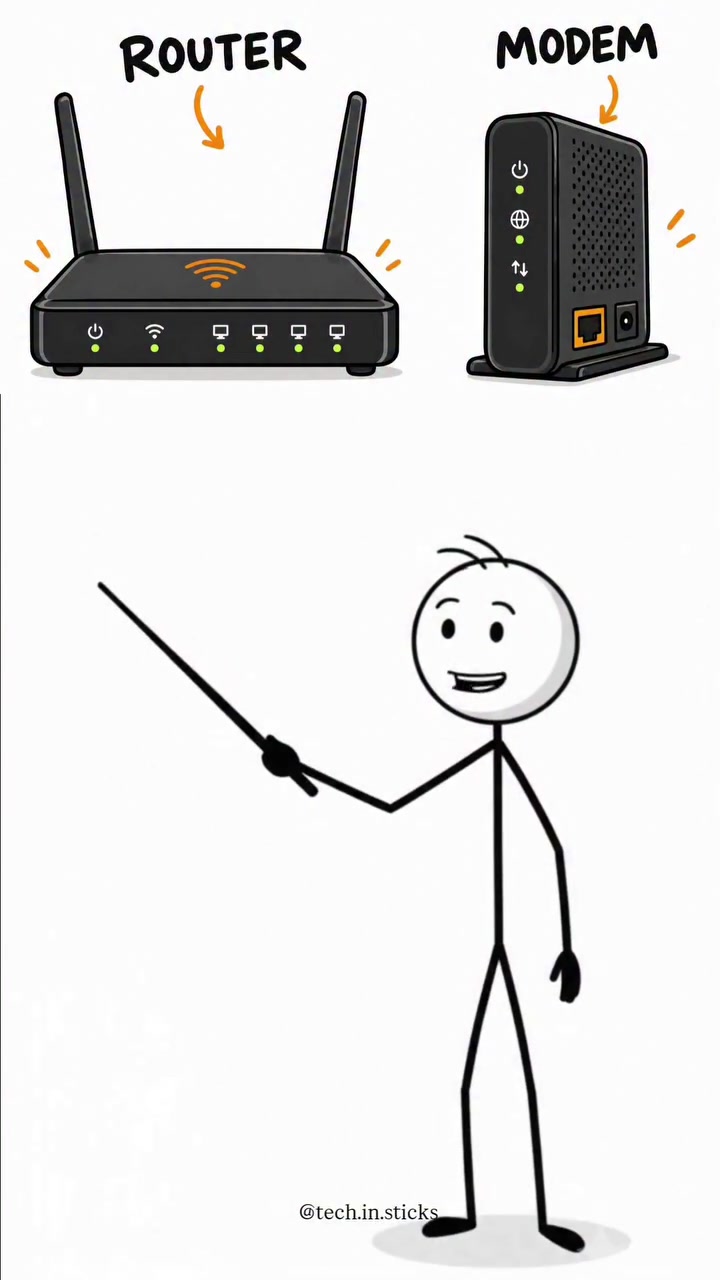
Inside the Network: The Modem and Router Distinction
Two devices sit on your shelf, crucial for internet use. They look similar, but their tasks are distinct. Recognizing the difference between a modem and router might not win you networking fame, but it ensures a successful home network. They handle different roles in delivering your internet connection. Networking is not new. That said, shifting to from having a 4G router to upgrading to a supercharged broadband modem can be confusing. The modern home internet setup is complex. To keep things simple, online tech videos have grown in popularity, and so has the debate between them, both in the living room and online. Whether navigating traditional or fiber, the ability to understand decoder, router, and modem will help after installation.
What It Is: Modem and Router's Distinct Domain
People often hear or think about "high-speed internet" and "Wi-Fi," but how do you get that? A modem is the essential device that brings the internet into your house, and it connects to your internet service provider. Think of it as a gateway. Your modem translates the information between your local network and your internet service provider, converting the signals from your internet connection into a usable format in the home network. Without it, the router wouldn’t be able to communicate with the internet. Your modem is unique to you, as it is provided by your internet service provider. It helps you get online. A router, on the other hand, takes the internet connection from the modem and distributes it to devices like laptops, smartphones, smart TVs, and gaming consoles. It creates a local network for multiple devices in your home to connect and share resources. The router then connects your devices to the internet through Wi-Fi or Ethernet. The modem and router work together but serve different functions. The modem is the translator, ensuring that data from your internet provider is usable within your home. The router is the distributor, managing which devices receive that data and how it is delivered.
Home Networks Evolving with Technology
Home networks have evolved significantly, driven by the need for faster, more reliable connections. The demand for streaming, gaming, and smart home devices has surged. As more devices join the network, the complexity of managing these connections increases. The router's role as a traffic controller becomes crucial, directing data to the right devices efficiently. This setup enables seamless multitasking, where multiple users can stream, game, and browse without interruptions. As households adopt more smart devices, the need for robust home networks grows. The modem and router are the backbone of this infrastructure, ensuring that all devices stay connected and functional. This evolution underscores the importance of understanding these devices and their roles in maintaining a reliable home network.
Inside the Network: The Modem and Router's Distinct Domains
The Modem: Your Gateway to the Internet
The modem, short for modulator-demodulator, is the device that connects your home to the internet. It converts the signals from your internet service provider into a format that your devices can use. This conversion is crucial as it allows your modem to act as a gateway, enabling your home network to access the internet. Without a modem, your router would have no way of receiving internet data, rendering it useless for online activities. However, it's important to note that the modem doesn't create a home network. That is the router's job. It's important to know your modem and modem type. All modems aren't alike. A cable modem connects to a cable internet service provider, while a DSL modem connects to a Digital Subscriber Line provider. Fiber modems are used for fiber-optic connections. Each type has specific functions to connect with the exact internet service provider. Understand your modem before upgrading to a new one.
The Router: Traffic Cop of Data Packets
The router, on the other hand, is a device that connects directly to the modem. The router sends data packets to the devices that request them. It establishes a local network, allowing multiple devices to connect to the internet simultaneously. The router acts as a traffic controller, directing data to the right devices through WiFi or Ethernet. This means that without a router, you'd be limited to connecting one device to the internet at a time, which is impractical for most households.
The Power of Combination Devices
In essence, think of your internet connection as a highway. The modem is the entrance to that highway where the internet traffic comes in, while the router is the traffic controller that directs the internet to the various exits and devices. But not all homes are the same, and neither are their internet needs. Since most homes don’t need a modem and router separately, most users prefer a combo device. It saves money and energy. Combination devices are the perfect device for home users, combining both modem and router capabilities. These devices come with built-in modems that allow you to connect directly to your internet service provider. They also have built-in routing capabilities, enabling you to create a local network for your devices. Many homes and offices opt for this solution due to its simplicity and convenience. In addition, combo devices can save money by cutting back on additional costs for purchasing and maintaining both devices. These devices are easy to set up and use, making them a popular choice for home internet needs.
The Essential Internet Connection Balancing Act
Modern needs and multifunction devices
However, since combination devices combine the modem and router functions into a single device, there are drawbacks to this setup. If either the modem or the router component fails, you may face issues like reduced Wi-Fi coverage or slow internet speeds. Unfortunately, the process of upgrading the modem or router is a headache. On the other hand, buying a standalone modem and router combination allows you to tailor your network to your specific needs and upgrade individual components as needed. This is a significant advantage, as you can quickly fix an internet connection issue by switching out a faulty modem or router.
Router's Role in Virtualization and Cloud
The router can create a virtual network within the home. Virtualization allows multiple virtual machines (VMs) to run on a single physical server. This technology has transformed data centers, allowing for more efficient use of resources and improved scalability. By creating a virtualized environment at home, users can take advantage of the same benefits typically reserved for large-scale enterprises. This capability is particularly useful for tech enthusiasts and professionals who need to run multiple operating systems or test software in isolated environments. Additionally, routers can facilitate cloud-based applications that enable remote access to resources and data. Cloud computing has revolutionized the way businesses and individuals store, manage, and access information. By leveraging the capabilities of a modern router, users can create a secure and efficient home cloud network. This setup allows users to access files, run applications, and manage data from multiple devices located anywhere in the world, provided they have an internet connection.
How to Optimize Your Home Network: A Practical Approach
When setting up or upgrading your internet connection, remember a few things. A strong network is essential for modern living, and you need to invest in the right equipment to ensure reliable performance. Here’s what you need to keep in mind:
- Choose the Right Modem: The type of modem you need depends on your internet service provider (ISP) and the type of internet connection you have. For instance, if you have a cable internet connection, you’ll need a cable modem. For DSL connections, you’ll need a DSL modem. Consult your ISP for the specific modem requirements.
- Consider a Dual-Band or Tri-Band Router: Dual-band routers operate on both the 2.4 GHz and 5 GHz frequencies, providing more flexibility and better performance. Tri-band routers go a step further by offering an additional 5 GHz band, which can handle even more traffic and provide faster speeds. It’s hard to find a router without dual-band functionality, but if you're upgrading, this is an important requirement.
- Opt for Mesh Networking: If you have a large home or multiple floors, a single router might not provide adequate coverage. Mesh networking systems use multiple nodes to create a seamless Wi-Fi coverage area. This setup ensures that you have a strong signal throughout your home, eliminating dead zones and improving overall connectivity.
- Upgrade to the Latest Wi-Fi Standard: Ensure your router supports the latest Wi-Fi standards. If you’re currently using an older router, consider upgrading to one that supports Wi-Fi 6 or Wi-Fi 6E. These standards offer faster speeds, improved performance, and better support for multiple devices.
- Use Ethernet Cables for Critical Devices: For devices that require a stable and fast connection, such as gaming consoles, smart TVs, or desktop computers, consider using Ethernet cables instead of relying on Wi-Fi. Ethernet provides a more reliable and faster connection, which is crucial for activities that demand high bandwidth and low latency.
Setting Up Your Router vs. Modem
1. Hardware Connection Both have hardware, so it is easy to tell the difference between the modem and the router. A modem is a rectangular device. It has only a power cable and a single cable connecting it to the wall. 2. Placement. The router should be placed in a central location in your home to ensure optimal Wi-Fi coverage. This setup will help minimize dead zones and provide a strong signal throughout your living space. The modem should be located near your internet service provider's connection point, such as the cable or fiber optic line. The key to a functional internet connection is identifying the root cause of network issues. When you encounter internet problems, it's crucial to determine whether the issue lies with the modem or the router. For instance, if you're experiencing slow internet speeds, the problem could be related to your modem's connection to the ISP or the router's bandwidth allocation. If your devices are having trouble connecting to the internet, the issue might be with the router's Wi-Fi settings or the modem's firmware.
Setting Up the Future: Network Standards
While it's challenging to predict the future, the future of networking is likely to involve faster speeds, more devices, and increased reliance on cloud services. As the demand for high-speed internet grows, so does the need for advanced networking equipment. The evolution of 6G networks will bring even faster speeds, lower latency, and improved performance. These advancements will pave the way for new applications and use cases, such as autonomous vehicles, augmented reality, and the Internet of Things (IoT). To stay ahead of the curve, consumers and businesses alike will need to invest in cutting-edge networking technologies that support these emerging trends. The journey from 4G to 5G to 6G will determine the future of networking and connectivity.
Questions readers ask
What exactly does a modem do in a home network?
A modem's primary function is to connect your home to the internet. It acts as a translator, converting the signals from your internet service provider into a format that your home network can use. Without a modem, your router wouldn't be able to access the internet, making it a crucial component for getting online.
Can I use my own modem instead of the one provided by my internet service provider?
Yes, you can use your own modem, but it needs to be compatible with your internet service provider's network. Many ISPs provide modems, but using your own can sometimes save you money on rental fees. However, you should check with your ISP to ensure compatibility and to confirm that it meets their requirements.
What is the difference between a modem and a router in terms of their roles?
The modem is responsible for bringing the internet into your home and translating the signals from your internet service provider. The router, on the other hand, takes that internet connection and distributes it to your various devices, creating a local network. The router manages the traffic and ensures that data is delivered to the right devices efficiently.
Can a single device act as both a modem and a router?
Yes, many modern devices, often called gateways or modems with built-in routers, combine both functions into a single unit. These devices can simplify your home network setup but may not offer the same level of customization and performance as separate modem and router units. If you have a complex network or specific performance needs, you might still prefer separate devices.
How does the modem and router setup affect smart home devices?
For smart home devices, a reliable and robust network is essential. The modem ensures a stable internet connection, while the router distributes that connection efficiently to all your smart devices. A good router can handle multiple connections simultaneously, reducing lag and ensuring that all your smart devices stay connected and functional. This setup is crucial for maintaining a seamless smart home experience.
Related deep dives
Similar reads based on topic and creator.

Recent articles
Fresh deep dives from the latest Reels we unpacked.




Comments
Be the first to comment.