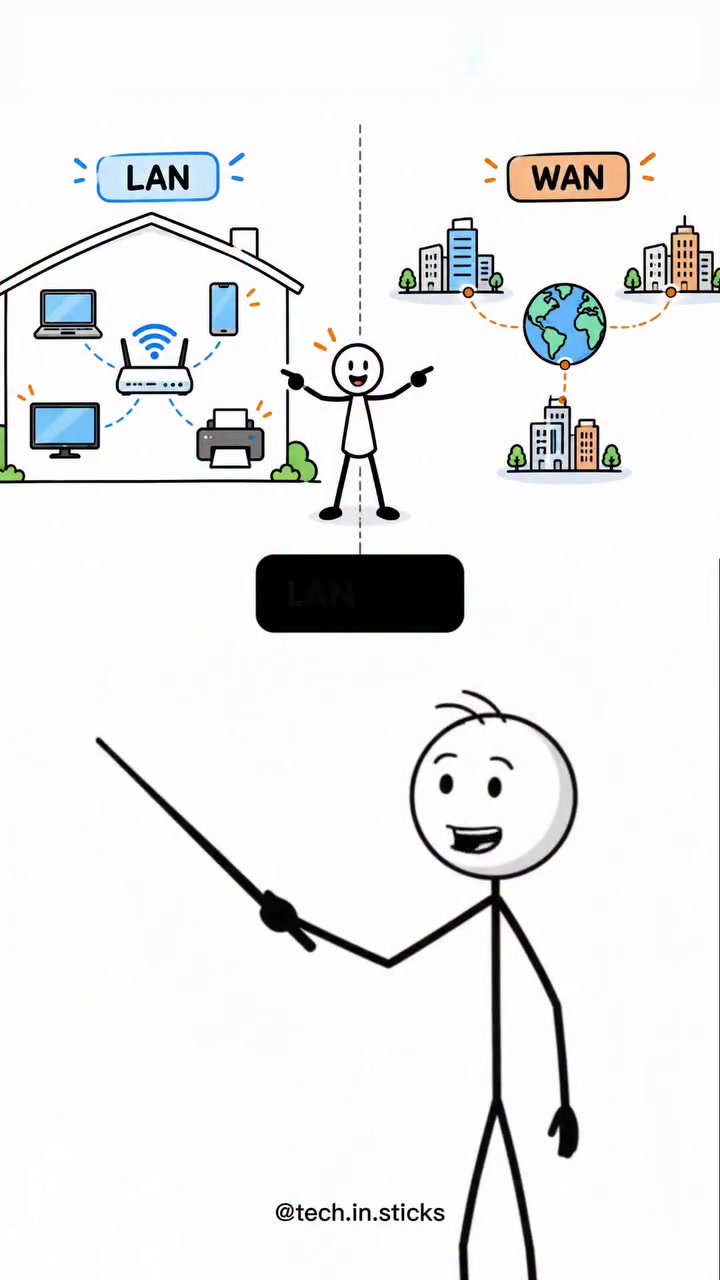
Not everyone needs to know the difference between a LAN and a WAN, but for anyone who does, tech.in.sticks puts it simply: the difference is all about distance. LANs connect devices within a single location, while WANs link networks across vast distances.
The Basics of Network Topology
A **LAN is a collection of devices connected to a single network within a limited geographic area. Translate LAN as Local Area Network. Examples are a home Wi-Fi network, the network of a small business, or the connected machines in a school lab. The defining aspect of a LAN is not how many devices it connects, but that all those devices share a single network. With LANs, the distance covered is not the key point. Rather, small, local area coverage is what makes LANs distinctive. A WAN differs from a LAN in the distance between the devices. Translate WAN as Wide Area Network. For example, a company with offices in Bangalore, Mumbai, and Delhi needs all these cities to communicate and share resources. Each city has its local network, but to connect all three cities, a WAN is needed. A WAN connects multiple LANs together, enabling communication and data sharing across vast distances. This stitching together of LANs is the core function of a WAN.
The Big Picture
In a world of endless connectivity, LANs and WANs are the basic blocks of network architecture — from the smallest home offices to the vastest multi-national corporations. Understanding the difference between the two is crucial for making informed decisions. In the early days of the internet, a LAN was the go-to for most users. The world's first website launched in 1991. It highlighted the potential LANs for office spaces and homes. The need to connect distant networks emerged as companies expanded, and institutions sought to share resources far and wide. Corporations and educational institutions have found their footing in networked systems. This need drove the development of WANs. These were essential for the broader world to utilize; first, companies, then individuals, began to demand more reliance on network connections. That has led to the world's far-reaching quest to connect everything — enabling offices separated by oceans, countries, and even continents to stay close.
**Comparing LAN and WAN
**Practical Examples
To make the distinction clearer, consider a simple home setup. Your phone, laptop, and smart TV are all part of the same LAN. That's your local network. There, all your household devices are connected, able to talk to each other and share files. Now, imagine connecting those same household devices to a distant university or hospital in another city. This requires a WAN. You want to connect a single network that ties two LANs together in different cities. The first instance is simple, as it directs the network within a small area. The other is complex, as it connects over vast geographical distances.
**The Role of Internet Service Providers
For connecting offices in Bangalore, Mumbai, and Delhi, the company relies on ISPs to facilitate the connections. These service providers supply the infrastructure needed, ensuring that data can travel securely over long distances, and they protect sensitive information by deploying secure connections. LANs within each office typically rely on a local router or switch, whereas WANs span across cities or countries, necessitating a complex infrastructure of fiber-optic cables, satellites, and other high-speed connections. ISPs like Reliance Jio or Airtel provide the backbone for these wide-area networks, offering reliable and fast connections.
**The Role of Routers and Switches
LAN routers and switches give a structured network. This enables devices within a LAN to communicate directly with one another, streamlining data sharing, and accessing the internet. ISPs provide modems and routers for home use; these offer a simple setup for the average user. ISP-provided routers and switches handle the complex tasks of managing traffic and ensuring smooth network operations, from homes to corporate spaces.
Diving into the Practical World
**LAN or WAN: What do you need?
In determining whether a LAN or WAN is optimal, take into account the type of connectivity required and the distance between devices. A LAN is best when a limited area needs a robust, interconnected network. This is why offices, schools, and small businesses rely on LANs. If communication occurs within a limited local area, such as a single building, a LAN suffices. For broader geographical reach, opting for a WAN is better. It is ideal for connecting multiple LANs so that far-apart locations can communicate and share resources. Multinational corporations, educational institutions, and healthcare providers that need seamless data sharing across vast distances need WANs.
**High-Speed, Secure Connections
LANs and WANs both must offer high-speed and secure connections. The difference lies in the scale of the network. For LANs, a standard broadband connection, EPBR, or Ethernet cable generally works fine. Both offer connectivity's high speeds, but their reliability and security measures are needed for LANs. A WAN demands more due to the vast distances. The layer of security ensures data is encrypted, boosting security and performance. VPNs and MPLS connections are common for WANs, offering secure, isolated paths over a shared infrastructure. The addition of firewalls and encryption enhances security, data integrity, and privacy across the vast distances.
The Compatibility Scale
LANs and WANs are complementary. In corporate spaces, LANs serve individual offices, while WANs connect these LANs across the distances. Within homes, LANs are versatile for interconnectivity, but individual devices need to connect via Wi-Fi or Ethernet. Devices like smartphones, tablets, and laptops form LANs, integrating Wi-Fi routers and accessing high-speed internet and cloud services. The internet of things (IoT) is a network in its own right. It offers a unique integrating factor, with devices demanding reliable and secure connections. IoT devices, however, would not function without LANs and WANs. The increased reliance on IoT devices and smartphones demands seamless connectivity for data sharing and internet access. Combining LANs and WANs ensures data integrity, accessibility, and security. LANs and WANs offer a clear way to conceptualize networked spaces. The distinctions between the two impact the reliability, security, and performance of networks.
Questions readers ask
What exactly does LAN stand for and how does it work?
LAN stands for Local Area Network. It connects devices within a limited geographic area, such as a home or office. All devices in a LAN share a single network, allowing them to communicate and share resources with each other. The key aspect of a LAN is its local coverage, not the number of devices connected.
How does a WAN differ from a LAN in terms of distance and functionality?
A WAN, or Wide Area Network, connects multiple LANs together across vast distances. Unlike LANs, which are confined to a single location, WANs enable communication and data sharing between networks that are far apart. For example, a company with offices in different cities would use a WAN to connect these locations.
Can I set up a LAN at home, and if so, how?
Yes, you can set up a LAN at home. Most home Wi-Fi networks are examples of LANs. To set one up, you would typically need a router, and you'd connect your devices to it. This allows all your devices to communicate with each other and share resources within your home network.
Why are WANs important for businesses with multiple locations?
WANs are crucial for businesses with multiple locations because they allow these offices to communicate and share resources as if they were in the same building. This is essential for collaboration, data sharing, and maintaining operational efficiency across distant sites.
What role do Internet Service Providers (ISPs) play in WANs?
ISPs are essential for facilitating WAN connections. They provide the necessary infrastructure, such as leased lines or other types of connections, to ensure that data can travel between distant LANs. Without ISPs, the vast networks that enable global communication would not be possible.
Can a single device be part of both a LAN and a WAN simultaneously?
Yes, a single device can be part of both a LAN and a WAN at the same time. For example, a computer in an office (part of a LAN) can also connect to a WAN to communicate with other offices in different locations. This dual connectivity allows the device to access both local and distant resources.
What are some practical examples of LANs and WANs in everyday life?
Everyday examples of LANs include home Wi-Fi networks, office networks, and school lab setups. Examples of WANs include corporate networks that connect multiple offices across cities or countries, and the global network that enables the World Wide Web. Understanding these distinctions helps in appreciating how data flows between local and distant networks.
Related deep dives
Similar reads based on topic and creator.




Recent articles
Fresh deep dives from the latest Reels we unpacked.




Comments
Be the first to comment.