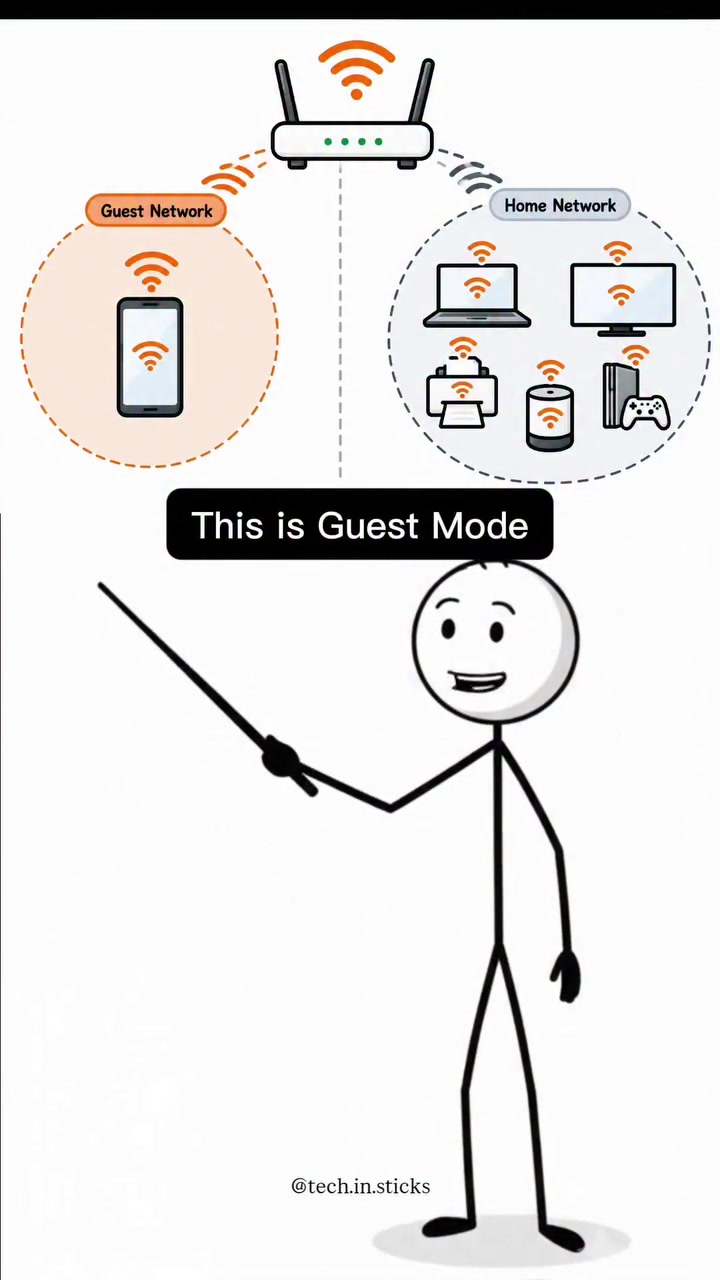
Guest Mode vs. User Mode — A Simple Guide to Router Networking
Hosts probably dread the moment your guests request the Wi-Fi password. They are worried about leaving guests and devices isolated from your main network and devices. The router’s guest network is a safety feature that allows visitors to access the internet but restricts it from using other devices. This keeps the main network secure and uninterrupted. Guest mode lets you share your Wi-Fi without sharing your entire home network. There are two modes on most routers: Guest Mode and User Mode. Each serves a different purpose, and understanding the difference is crucial for maintaining your network's security and functionality.
Network Isolation and Security in Modern Wi-Fi
The first thing that comes to mind when using a router is the guest network. Some may think of a router when they need to set up many smart home devices. Routers can isolate and protect the main network. The guest network relies on these very functionalities. Wi-Fi’s alarming rise in usage has led to an alarming rise in network security concerns. Guest networks have been a shield against this invasion of privacy.
Routers as the New Gateway: The Dual Network System
The Basics of Guest Mode
The guest network is a separate, isolated network. It is a standard feature on modern Wi-Fi routers. Visitors will connect to this guest network rather than the main network. This gives guest network devices access to the internet, but they cannot access the main network's devices (like printers, shared files, or other connected devices). The guest network has its own SSID (Service Set Identifier), password, and security settings, keeping it separate from the main network.
The Power of User Mode
This user mode enables all devices to communicate with each other. This is the standard network setup for your home or workplace. Devices on the user mode network can exchange data, share files, and access printers or other network-connected devices. This mode provides the highest level of network functionality and flexibility, allowing devices to work together seamlessly.
Keeping Network Access Separate
A guest network allows users to access the internet without giving them access to the main network. This typically means that when a user connects to the guest network, they are limited to internet access. The guest network is usually isolated from the main network, preventing visitors from accessing shared files, printers, or other devices. As a result, it can keep sensitive data safe. This is particularly useful for home networks, where visitors may need access to the internet but not to personal files or devices on the main network. It can also be useful in a business setting, where guests may need internet access but should not have access to sensitive company data or devices.
Safe and Sound with Guest Mode
- Separate SSID and Password: This ensures that visitors cannot access your main network, even if they guess your guest network password.
- Regularly Update Your Router's Firmware: This ensures that you have the latest security updates and features.
- Disable Guest Network When Not in Use: This prevents unwanted access to your network. Guest mode's simplicity and effectiveness highlight the need to raise awareness about its use. The guest network function, separates visitor devices from the main network, protecting the main network's data and devices.
Questions readers ask
What exactly is a guest network and how does it differ from the main network?
A guest network is a separate, isolated network created by your router that allows visitors to access the internet without giving them access to your main network's devices or shared files. Unlike the main network, the guest network has its own SSID and password, ensuring that guests cannot access your personal devices or data.
Can I set up a guest network on any router, or is it a feature of only certain models?
Most modern Wi-Fi routers come with a guest network feature. You can check your router's manual or settings to see if this feature is available. If your router is relatively new, it likely supports guest networks.
How does the user mode differ from guest mode in terms of functionality?
User mode is the standard network setup where all devices can communicate with each other, share files, and access network-connected devices like printers. In contrast, guest mode is an isolated network that only allows internet access and restricts access to the main network's devices.
What happens if I don't update my router's firmware regularly?
If you don't update your router's firmware, you might miss out on important security updates and new features. This can leave your network vulnerable to attacks and potential breaches, compromising the security of both your guest and main networks.
Can I have both a guest network and user mode active at the same time?
Yes, you can have both a guest network and user mode active simultaneously. This allows you to provide internet access to guests while keeping your main network secure and functional for your personal devices.
Is there a downside to using a guest network, such as slower internet speeds?
Using a guest network should not significantly impact the internet speed for devices on the main network. However, if too many devices are connected to the guest network, it could potentially slow down the overall internet speed, though this is typically minimal.
How do I know if my router supports guest mode?
To determine if your router supports guest mode, check the router's manual or access the router's settings through a web browser. Look for options related to guest networks or separate SSIDs. If you can't find this information, you can also search online for your specific router model to see if it supports guest networking.
Related deep dives
Similar reads based on topic and creator.




Recent articles
Fresh deep dives from the latest Reels we unpacked.




Comments
Be the first to comment.