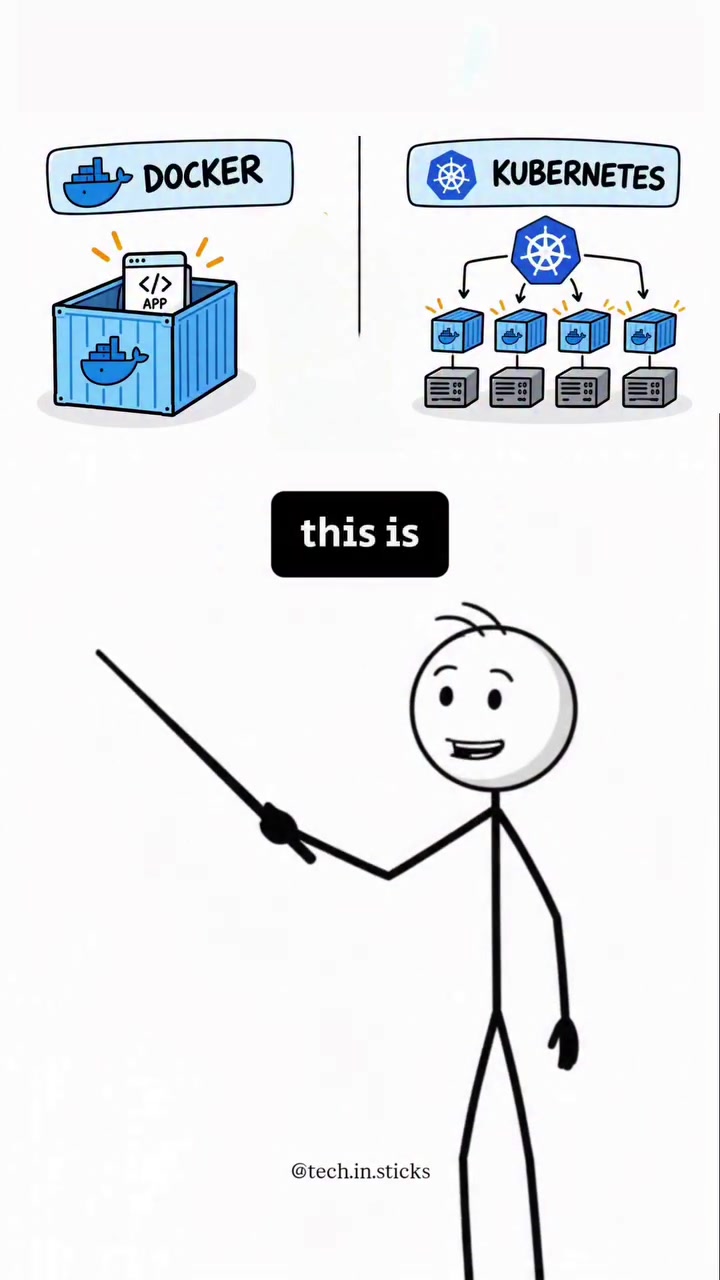
Docker and Kubernetes are two popular software tools serving distinct yet complementary roles in the realm of application deployment and management. They are both used to run applications, but they solve different problems. Docker packages an application and its dependencies into a container, ensuring consistent performance across different environments. Running hundreds of these containers manually can become unwieldy, though. That's where Kubernetes comes in.
Docker: The Containerizer
Docker is a platform designed to make it easier to create, deploy, and run applications by using containers. Containers are lightweight, standalone, and executable packages that include everything needed to run a piece of software, including the code, runtime, system tools, libraries, and settings. This guarantees that the application runs smoothly in various computing environments, from a developer's laptop to testing and staging, and on to production. Creating a Docker image — a blueprint for a container — starts with defining the components in a Dockerfile. This file outlines the base image, dependencies, and instructions for running the application. Docker Builds the image, converting the Dockerfile into a container through a series of steps. Docker's architecture uses a client-server model. The Docker client communicates with the Docker daemon, which does the heavy lifting of building, running, and distributing Docker containers. The client and daemon can run on the same system or connect remotely, offering flexibility for different deployment scenarios.
Why Kubernetes is Vital in Cloud-Native Technology
Containers offer consistency, but managing an application spread across hundreds or thousands of containers can be cumbersome. Kubernetes is an open-source system for automating deployment, scaling, and management of containerized applications. In an expanding cloud-native tech sector, Kubernetes orchestrates containers by grouping them into logical units and managing them across multiple hosts, machines, or clusters. In a cloud-native landscape where applications consist of numerous microservices, each with a separate container, Kubernetes effectively manages service discovery and load balancing. This keeps traffic managed and services accessible. If a container fails, Kubernetes automatically restarts it, maintaining high availability. Scaling up resources dynamically ensures the system can handle peak loads without manual intervention. Kubernetes further improves efficiency by distributing workloads across various containers, optimizing resource usage within the system.
Distinguishing Kubernetes Platforms
Kubernetes can be deployed on various platforms. Public cloud providers like Google Cloud, Amazon Web Services, and Microsoft Azure offer managed Kubernetes services. Each provider adds proprietary features on top of Kubernetes to integrate their services. Then, there are on-premises solutions for businesses seeking to maintain data centers. Kubernetes may be more suited for businesses with specialized needs.
Kubernetes: The Orcherstrator
In microarchitecture, container orchestration is crucial. Kubernetes excels by automatically handling aspects of app deployment, scaling, and management. Kubelet manages communication between the Kubernetes control plane and nodes, ensuring containers run as expected. The Node Problem Detector identifies issues on nodes and reports them to the Kubernetes API server. The Cluster Autoscaler adjusts the size of the cluster according to demand, adding or removing nodes to maintain resource efficiency
Kubernetes Distribute First then Scale
The containerized applications are deployed across multiple machines, ensuring they run reliably. Kubernetes helps start containers and restart failed ones, scaling resources as traffic increases. It effectively distributes workloads to optimize efficiency. When traffic surges, Kubernetes can scale up resources, adding more containers to handle the increased load.
What's the Difference Between Docker and Kubernetes?
Kubernetes is to the Docker ecosystem like a supervisor is to a worker. Docker builds the containers, while Kubernetes manages them. Docker streamlines the application development process and helps maintain consistency across different environments — from a developer's laptop to production servers. By encapsulating the application and its dependencies within a container, Docker ensures that the app behaves the same way everywhere, without the "it works on my machine" dilemma. Docker's ecosystem simplifies creating and managing containers, streamlining the development process. Kubernetes builds on this by offering advanced orchestration, capable of managing complex deployments across multiple hosts or machines. It ensures that applications run smoothly and efficiently, adjusting resources dynamically to meet demand. Kubernetes provides a robust framework for scaling, load balancing, and managing containerized applications, facilitating efficient resource management and high availability. Docker focuses on the development, while Kubernetes handles the scaling:
Native Resource Management
With Kubernetes, developers can also monitor resources through metrics. This helps balance the workloads and ensures efficient use of resources. Kubernetes also supports autoscaling, which can adjust the number of pods or nodes based on the application's requirements.
Hands On Docker and Kubernetes
To try Docker and Kubernetes, focus on these steps:
- Basic Docker Setup: Install Docker on your local machine. Use a Dockerfile to define your application's environment, then build and run a container.
- Installs: Follow Docker's installation guide for your operating system. An internet connection is required. Docker installs on Linux, Mac, and Windows.
- Basic Kubernetes Setup: Install Minikube, a tool that makes it easy to run Kubernetes locally. Deploy a simple application using kubectl, Kubernetes's command-line tool and explore its basic functionalities.
- Monitor: Install kubectl. Ensure Docker is installed and Minikube is running. Use kubectl to deploy and manage your applications.
- Basic Commands: Use basic kubectl commands to deploy, inspect, and manage your applications. Learn how to scale your application and update your deployment.
- Dockerfile and Kubernetes YAML: Write a Dockerfile to containerize your application. Define Kubernetes manifests in YAML to manage the deployment, service, and other resources.
- Write: Write a Dockerfile to containerize your application, defining the base image, dependencies, and instructions for running the application.
- Define: Define Kubernetes manifests in YAML to manage the deployment, service, and other resources.
- Intermediate and Advanced Topics: Explore more advanced Docker and Kubernetes features, such as networking, storage, security, and monitoring. Learn how to build, test, and deploy applications using CI/CD pipelines with Docker and Kubernetes.
- Topics: Explore more advanced Docker and Kubernetes features, such as networking, storage, security, and monitoring. Learn how to build, test, and deploy applications using CI/CD pipelines.
- Build: Use Docker to build, test, and deploy your applications.
- Deploy: Use Kubernetes to manage and scale your applications.
Docker and Kubernetes: Partners in Progress
Docker and Kubernetes are not competitors. They form a powerful duo, working together to streamline application deployment and management. Docker takes care of the packaging and running part, ensuring that the application runs consistently across diverse environments. Kubernetes, on the other hand, manages the complexity of orchestrating large numbers of containers, ensuring high availability and efficient resource utilization. Together, they address the challenges of modern application deployment, making it easier to develop, deploy, and manage applications at scale.
Questions readers ask
What exactly is a Docker container and how does it differ from a traditional virtual machine?
A Docker container is a lightweight, standalone, and executable package that includes everything needed to run a piece of software, such as the code, runtime, system tools, libraries, and settings. Unlike traditional virtual machines, which include a full operating system, containers share the host system’s OS kernel, making them more efficient and faster to start up.
How does Kubernetes manage and orchestrate Docker containers?
Kubernetes automates the deployment, scaling, and management of containerized applications. It groups containers into logical units and manages them across multiple hosts or clusters. This includes handling service discovery, load balancing, and automatically restarting failed containers to maintain high availability and efficiency.
Can I run Kubernetes on my local machine for testing purposes?
Yes, you can run Kubernetes on your local machine. Tools like Minikube and Kind (Kubernetes in Docker) allow you to set up a local Kubernetes cluster for testing and development purposes. This is useful for understanding how Kubernetes works and for developing applications before deploying them to a production environment.
What are some of the key differences between using Kubernetes on-premises versus using a managed Kubernetes service from a cloud provider?
Using Kubernetes on-premises gives businesses more control over their data and infrastructure but requires more management and maintenance. Managed Kubernetes services from cloud providers like Google Cloud, AWS, and Azure offer additional features and integrations, making them easier to use but potentially more expensive and less customizable.
How does Kubernetes handle scaling and load balancing for containerized applications?
Kubernetes dynamically scales resources to handle peak loads without manual intervention. It distributes workloads across various containers, optimizing resource usage. Additionally, Kubernetes manages service discovery and load balancing, ensuring that traffic is managed and services remain accessible even as containers are added or removed.
Can I use Docker without Kubernetes, and if so, when would that be appropriate?
Yes, you can use Docker without Kubernetes, especially for simpler applications or during the development and testing phases. Docker is sufficient for running a few containers manually, but as the number of containers grows, managing them manually becomes cumbersome, which is when Kubernetes becomes essential for orchestration and management.
How does the client-server model in Docker's architecture facilitate different deployment scenarios?
Docker's client-server model allows the Docker client to communicate with the Docker daemon, which handles the heavy lifting of building, running, and distributing Docker containers. This model offers flexibility because the client and daemon can run on the same system or connect remotely, accommodating various deployment scenarios, from local development to production environments.
Related deep dives
Similar reads based on topic and creator.



Recent articles
Fresh deep dives from the latest Reels we unpacked.




Comments
Be the first to comment.